You need a form. Maybe it’s a customer survey, a lead capture page, or a simple feedback form. You’ve narrowed it down to two options: Typeform and Google Forms. One is free and simple. The other is beautiful and expensive. The right choice depends on what you’re actually trying to accomplish.
Google Forms gives you a no-cost, no-fuss way to collect data. Typeform gives you a polished, one-question-at-a-time experience that feels more like a conversation. They’re solving the same problem with fundamentally different philosophies, and neither is the wrong choice, just the wrong choice for certain situations.
The editing experience
This is where the two tools diverge most.
Google Forms uses a traditional layout: all questions on a single page, a ”+” button to add new ones, drag-and-drop to reorder. If you’ve used Google Docs or Sheets, you already know how this works. You can build a functional survey in under five minutes.
The tradeoff is rigidity. You get Google’s design language whether you want it or not. Every Google Form looks like a Google Form.
Typeform builds forms as a sequence of individual screens, each with one question. The editor gives you control over colors, fonts, backgrounds, and layout for each screen. You’re designing an experience, not just listing questions.
The tradeoff is time. Typeform’s editor has a real learning curve. You need to think about flow between screens, visual consistency, and pacing — things you never consider in Google Forms.
Give it a try
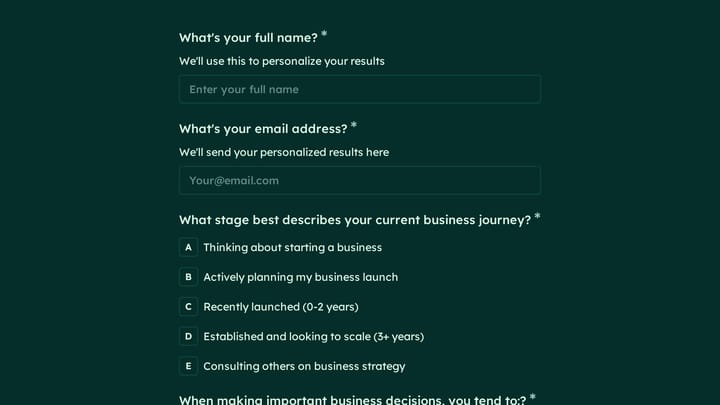
Play with this cocktail personality quiz before you build yours
This is a real, working template from our gallery. Fill it out like a respondent would, then make it your own.

Design and customization
If visual presentation matters to you, this section decides the comparison.
Google Forms lets you pick a pre-made theme, upload a header image, and choose an accent color. That’s roughly the extent of it. The output looks clean and professional in a generic way. For internal surveys or quick feedback collection, that’s fine. For a customer-facing form on your branded landing page, it sticks out.
Typeform takes design seriously. You can customize colors, fonts, backgrounds, images, and button styles. Paid plans add custom CSS, branded themes, and branding removal. The one-question-per-screen format creates visual breathing room that traditional forms can’t match.
The gap here is real. Google Forms gives you a form. Typeform gives you a form that can match your brand.
Pricing: the real difference
This is where the comparison gets uncomfortable for Typeform.
Google Forms is free. Completely free, with a Google account. Unlimited forms, unlimited responses, all question types, automatic Google Sheets integration, real-time collaboration. There’s no paid tier for Google Forms itself. Google Workspace plans ($7/user/month and up) add admin controls, but the form builder is identical.
Typeform uses a freemium model with tight limits on the free plan:
| Plan | Price | Forms | Responses/month |
|---|---|---|---|
| Free | $0 | 3 | 10 per form |
| Basic | $25/mo | Unlimited | 100 total |
| Plus | $50/mo | Unlimited | 1,000 total |
| Business | $83/mo | Unlimited | 10,000 total |
3 forms and 10 responses per form on the free plan. That’s a trial, not a free product. Most people who start with Typeform’s free plan hit the response cap within a week and face a decision: pay $25/month or start over somewhere else.
Honestly, this pricing model is frustrating because you can’t really predict your bill. If you run a campaign that performs better than expected, you blow through your response cap and either pay up or lose data. To remove Typeform branding, you need the Plus plan at $50/month. For custom CSS, you need Business at $83/month.
Feature comparison
Here’s how the two stack up across the features that matter most:
| Feature | Google Forms | Typeform (Free) | Typeform (Paid) |
|---|---|---|---|
| Forms | Unlimited | 3 | Unlimited |
| Responses | Unlimited | 10/form/month | 100–10,000/month |
| Question types | 11 | Basic set | 20+ |
| Conditional logic | Yes | No | Yes |
| Custom branding | No | No | Plus plan and up |
| Integrations | Google ecosystem | Limited | 500+ via Zapier |
| Offline access | Yes | No | No |
| Collaboration | Yes | Limited | Yes |
| Data export | Google Sheets (auto) | CSV | CSV, Sheets, CRM |
A few things stand out. Google Forms includes conditional logic for free, something Typeform locks behind its $25/month plan. Google Forms also works offline, which Typeform doesn’t offer at any price point. On the other hand, Typeform’s integration ecosystem is far broader if you need to connect forms to CRMs, email tools, or project management apps.
Ease of use
Google Forms wins here, and it’s not close. The interface is instantly familiar to anyone who’s used a Google product. Creating a survey takes minutes. Sharing is one click. There’s effectively no learning curve.
Typeform requires investment. Understanding logic jumps, managing the screen-by-screen builder, and getting the design right takes practice. The payoff is a more engaging end product, but you’re spending 3-5x longer to build each form compared to Google Forms.
For teams where multiple people need to create forms, especially non-technical team members, Google Forms’ simplicity is a genuine advantage.
Data and integrations
Google Forms automatically saves every response to a Google Sheets spreadsheet. You can analyze data with formulas, pivot tables, and charts without leaving the Google ecosystem. For organizations already running on Google Workspace, this is perfect.
The limitation: third-party integrations are sparse. You can use Google Apps Script for custom automation, but it requires coding. Connecting to non-Google tools means using Zapier or a similar intermediary.
Typeform has built-in analytics with completion rate tracking and drop-off analysis, useful data that Google Forms doesn’t surface natively. Export options include CSV, Excel, and direct connections to tools like Airtable, HubSpot, and Mailchimp. Most of these integrations require a paid plan, though.
When Google Forms is the right choice
Pick Google Forms if you:
- Need a free solution with no response limits
- Want something that works in five minutes
- Already use Google Workspace
- Build internal surveys, quizzes, or feedback forms
- Need offline functionality
- Don’t need custom branding
Google Forms works best for educators, internal team surveys, event RSVPs, and situations where speed and cost matter more than appearance. It’s also the safer choice when you’re collecting high volumes of responses and don’t want to worry about hitting a cap mid-campaign.
When Typeform is the right choice
Pick Typeform if you:
- Build customer-facing forms where presentation matters
- Need the one-question-at-a-time experience
- Want 500+ app integrations out of the box
- Can budget $25-83/month for form building
- Create marketing surveys or lead generation forms
Typeform works best for marketing teams, agencies, and customer research where the form experience is part of the brand. If your form is the first interaction a potential customer has with your company, Typeform’s design polish can genuinely improve first impressions.
Where both fall short
Neither tool fully solves the “I want beautiful forms without spending a fortune” problem.
Google Forms gives you unlimited everything but almost no design control. Your forms will always look like Google Forms, and there’s no way to match specific brand guidelines, choose custom fonts, or create a visually distinctive experience.
Typeform gives you the design tools but gates them behind expensive plans. The free plan is too limited to evaluate properly, and even the $25/month Basic plan doesn’t let you remove Typeform’s branding. You’re paying for someone else’s logo on your form.
The design-vs-budget tradeoff shouldn’t be this stark. If you want a form that looks good, works on all devices, and doesn’t cap your responses, neither Typeform nor Google Forms fully delivers.
Fomr takes a different approach: unlimited forms, responses, fields, and team members on the free plan, with a visual editor that gives you control over fonts (1,700+), colors, backgrounds, and layout. The Pro plan is $34/month or $24/month billed yearly for custom domains, branding removal, and SEO controls. We don’t do one-question-per-screen by default, but multi-page forms let you control pacing however you want.
Honest caveat: Fomr doesn’t yet have conditional logic (coming soon) or native integrations (coming soon). Those are planned features. If you need logic jumps or CRM connections today, Typeform’s paid plans still have the edge there.
The verdict
| Priority | Best choice |
|---|---|
| Free + simple | Google Forms |
| Premium design + integrations | Typeform (paid) |
| Design control + free plan | Fomr |
| Offline access | Google Forms |
| One-question-at-a-time UX | Typeform |
| No response limits + custom branding | Fomr Pro ($34/mo monthly or $24/mo yearly) |
Choose Google Forms for internal use, education, and anywhere simplicity and cost matter most. Choose Typeform if you need its integration ecosystem and can justify the monthly spend. Consider Fomr if you want design flexibility without per-response pricing.
The fastest way to compare for yourself: open Fomr’s guest editor and build a form in a few minutes — no account needed. Then decide which tool fits your workflow.