Choosing between Typeform and Jotform feels like comparing a sleek sports car to a reliable SUV. Both get you where you need to go, but the experience couldn’t be more different. Typeform wins hearts with its conversational, one-question-at-a-time approach, while Jotform appeals to users who want every feature under the sun packed into a traditional form layout.
We’ve spent months testing both platforms to help you cut through the marketing noise. Here’s what actually matters when deciding between these two form builders.
Design and user experience: style vs substance
Typeform’s design philosophy centers on conversation. Every form feels like a chat with a friend — questions appear one at a time, with smooth animations and plenty of white space. It’s Instagram to Jotform’s Facebook: polished, minimal, and designed to impress.
The downside? You’re locked into Typeform’s vision. Customization options are limited compared to traditional form builders. You can tweak colors and add your logo, but you can’t fundamentally change the layout or question flow.
Jotform takes the opposite approach. Their drag-and-drop editor gives you complete control over form layout. Want to put three questions side-by-side? Done. Need a complex multi-column layout with conditional sections? Jotform handles it easily.
But this flexibility comes at a cost. Jotform forms often look dated out of the box. Without design skills, you’ll struggle to create something that doesn’t scream “generic online form.”
The verdict: Pick Typeform if you want forms that look professional with zero design work. Choose Jotform if you need specific layouts or have design skills to make it shine.
Give it a try
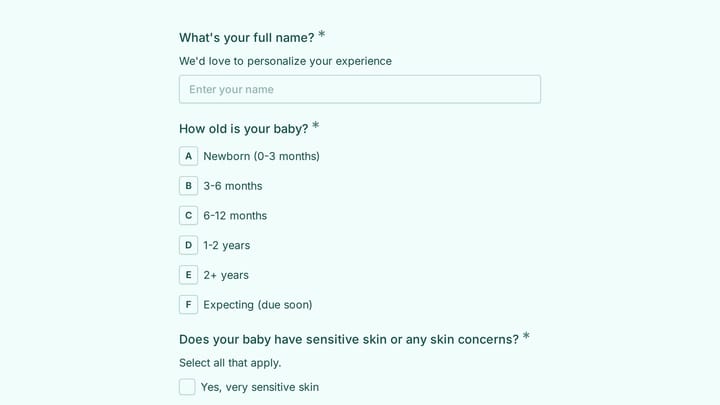
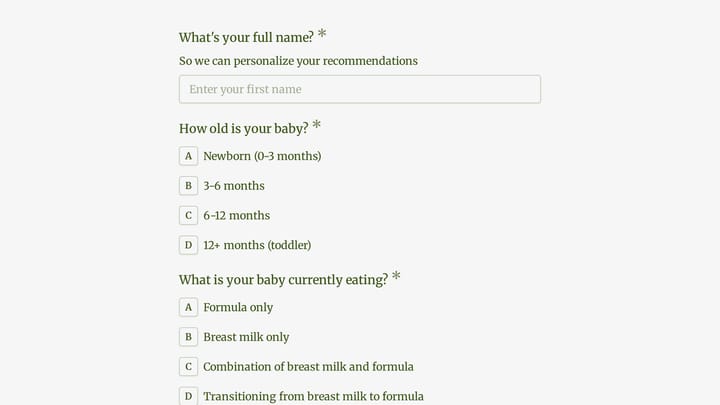
Here's a working baby carrier recommendation quiz to try
This is a real, working template from our gallery. Fill it out like a respondent would, then make it your own.

Editor experience: simplicity vs power
Building forms in Typeform feels effortless. The editor guides you through each step with clear prompts and helpful suggestions. Adding questions is intuitive — just click and type. The preview updates instantly, so you always know how your form will look to respondents.
However, Typeform’s simplicity becomes a limitation for complex forms. Creating multi-page surveys with branching logic requires careful planning, and the linear editing flow can feel restrictive when you need to make major structural changes.
Jotform’s editor resembles a website builder more than a form tool. You drag elements from a sidebar onto a canvas, then configure each field’s properties in a panel. It’s powerful but overwhelming for newcomers. The learning curve is steep, especially if you’re coming from simpler tools like Google Forms.
Where Jotform shines is handling complex requirements. Need to integrate payment processing, file uploads, and conditional logic in the same form? Jotform makes it straightforward, while Typeform would require workarounds or premium features.
Typeform vs Jotform pricing: premium vs value
Here’s where the differences become stark:
| Feature | Typeform Free | Typeform Basic ($29/mo) | Jotform Free | Jotform Bronze ($39/mo) |
|---|---|---|---|---|
| Monthly responses | 100 | 1,000 | 100 | 1,000 |
| Forms | 3 | Unlimited | 5 | 25 |
| Questions per form | 10 | Unlimited | Unlimited | Unlimited |
| File uploads | No | 1GB storage | 100MB total | 10GB storage |
| Remove branding | No | Yes | No | Yes |
| Custom domains | No | No (Plus plan) | No | Yes |
Typeform’s pricing reflects its premium positioning. Even the basic plan costs $29/month, and you’ll need the $59/month Plus plan for features like custom domains and advanced question types. The free plan is severely limited — just 3 forms with 10 questions each.
Jotform offers better value for most users. The free plan includes 5 forms with unlimited questions, and the $39/month Bronze plan includes features that Typeform reserves for higher tiers. If you’re building forms for a business, Jotform delivers more bang for your buck.
Features and integrations: depth vs breadth
Typeform focuses on core form functionality done exceptionally well. Their question types are thoughtfully designed, from picture choice questions that make surveys engaging to opinion scales that capture nuanced feedback. The platform integrates with popular tools like Zapier, Mailchimp, and Slack, but the selection is curated rather than comprehensive.
Jotform takes a kitchen-sink approach. They offer 400+ form templates, 100+ integrations, and widgets for everything from appointment scheduling to e-signatures. Need to collect payments? Jotform supports 30+ payment processors. Want to sync data with your CRM? They probably have a direct integration.
This breadth comes with complexity. Jotform’s interface can feel cluttered, and finding the right feature among hundreds of options takes patience. Typeform’s focused approach means fewer choices but clearer paths to common goals.
Free plan comparison: what you actually get
Both platforms offer free plans, but they serve different user types.
Typeform’s free plan is essentially a demo. With just 3 forms, 10 questions per form, and 100 monthly responses, it’s barely usable for real projects. It’s designed to showcase the platform’s design quality, then push you toward paid plans.
Jotform’s free plan provides genuine value. Five forms with unlimited questions and 100 monthly responses covers many small business needs. You get access to basic integrations, file uploads (with storage limits), and most question types. It’s a legitimate option for occasional form builders.
Mobile experience and accessibility
Typeform’s mobile experience is outstanding. The one-question-at-a-time format works perfectly on small screens, and the interface adapts beautifully across devices. Response rates on mobile are typically higher with Typeform because the experience feels native to mobile browsing.
Jotform forms can feel cramped on mobile, especially complex layouts with multiple columns. However, Jotform offers a separate mobile app for form building, which some users prefer for quick edits on the go. The platform also provides better accessibility options for users with disabilities.
When to choose Typeform vs Jotform
Choose Typeform if you:
- Want forms that look professional without design work
- Prioritize high response rates and user experience
- Build simple to medium-complexity forms (surveys, lead generation, feedback)
- Have budget for premium features
- Value brand perception and want forms that impress
Choose Jotform if you:
- Need complex forms with advanced functionality
- Want maximum customization control
- Have limited budget but need professional features
- Build forms frequently and need efficiency tools
- Require specific integrations or payment processing
The third option: Fomr’s design-first approach
While researching this comparison, we kept thinking about what’s missing from both platforms. Typeform’s design is beautiful but restrictive. Jotform’s flexibility comes with complexity. What if you could have beautiful forms with complete design control?
That’s exactly what we built with Fomr. Our drag-and-drop editor gives you Jotform’s layout flexibility with design tools that make every form look professionally crafted. You get 1,700+ fonts, custom colors, backgrounds, and complete branding control — all on a free plan with unlimited forms and responses.
We’re honest about what we don’t have yet (conditional logic and payments are coming soon), but if you want forms that look amazing without the premium price tag, Fomr might be exactly what you’re looking for.
Making your decision
The Typeform vs Jotform choice ultimately comes down to priorities. Typeform excels at creating engaging, conversion-focused forms that work beautifully out of the box. Jotform provides enterprise-level functionality at reasonable prices, with the flexibility to handle any form requirement.
For most small businesses and marketers, Jotform’s value proposition is hard to beat. The free plan covers basic needs, and paid plans include features that Typeform charges premium prices for.
But if form design and user experience are critical to your success — think lead generation, customer surveys, or any form where completion rates directly impact revenue — Typeform’s premium approach might justify the higher cost.
Ready to see how modern form building should work? Try Fomr’s guest editor and build a form without even creating an account. You might discover that the best choice isn’t choosing between the old options at all.