Paperform is a genuinely good form builder. The document-style editor is clever — you write content and drop form fields inline, so the result reads more like a branded page than a traditional form. The design quality is high, the payment integrations work well, and the conditional logic is capable enough for most use cases.
But here’s the thing: Paperform has no free plan. The cheapest tier starts at $24/month, and even that caps you at 1,000 submissions. If you’re a freelancer collecting client intake responses, a nonprofit running event signups, or a small team that just needs a contact form on your website, that’s a tough pill to swallow. You’re paying before you’ve even confirmed the tool fits your workflow.
That pricing model pushes a lot of people to look for a Paperform alternative — something with similar design quality or better features, ideally without the upfront cost. We tested six tools that fit the bill. Here’s what we found.
Why people leave Paperform
Before jumping into the list, it’s worth understanding the common frustrations. Not because Paperform is bad, but because knowing what bothers you helps you pick the right replacement.
No free plan at all. Most form builders offer at least a limited free tier. Paperform gives you a 14-day trial and then you’re paying. For teams evaluating multiple tools, that’s a short window to make a decision.
Submission caps on lower tiers. The Essentials plan ($24/month) limits you to 1,000 submissions per month. The Pro plan ($49/month) bumps that to 10,000. If you’re running high-traffic forms, costs add up fast.
The document editor isn’t for everyone. Paperform’s content-first approach works beautifully for landing-page-style forms — booking pages, order forms, event registrations. But if you want a straightforward multi-field form with a traditional layout, the document metaphor can feel like extra work. You’re writing a page when you just want to drag and drop some fields.
Limited template library. Compared to tools like Jotform (10,000+ templates) or even Typeform, Paperform’s template selection is smaller. You’ll likely build from scratch more often.
1. Fomr — best for design control with a truly free plan
We built Fomr, so take this with the appropriate skepticism. But we built it because we were tired of form builders that either looked great and cost a fortune, or were free and looked terrible. Paperform sits squarely in the first camp.
Fomr is a visual drag-and-drop form builder where design is the starting point, not an afterthought. You get 1,700+ fonts, full color control, custom backgrounds, logo uploads, and multi-page layouts with flexible field arrangements. The editor shows you exactly what respondents will see as you build — no switching between edit and preview modes.
The free plan has no response limits. None. Unlimited forms, unlimited responses, unlimited fields, unlimited team members. We don’t gate core functionality behind a paywall. The Pro plan ($17/month) adds custom domains, white-label branding, and SEO controls.
You can share forms via direct link, embed them on your website using our JavaScript widget, trigger them as popups, or generate QR codes. There’s also a guest editor that lets you build a complete form without creating an account — useful if you want to test the editor before committing to anything.
Where Fomr falls short: We don’t have conditional logic, file uploads, payment collection, or integrations with tools like Zapier and Google Sheets yet. All of these are on our roadmap and coming soon, but if you need them today — especially payments, which is one of Paperform’s strengths — Fomr isn’t the right pick right now. We’d rather be upfront about that.
Pricing:
- Free: Unlimited forms, responses, fields, and team members
- Pro: $17/month (custom domains, remove branding, SEO controls)
Best for: Teams that want Paperform-level design quality without paying $24/month just to get started. If your forms are customer-facing and brand consistency matters, Fomr gives you more visual control than most tools at any price point. If you need payments or conditional logic today, check back soon or look at the options below.
2. Typeform — best for conversational surveys
Typeform is probably the most recognizable name in the form builder space. Their one-question-at-a-time format feels polished and engaging, with smooth animations and clean typography that makes surveys feel less like chores.
The conditional logic is strong. You can build branching paths that adapt based on previous answers, and the analytics dashboard shows exactly where people drop off. For lead capture forms and customer research, the conversational format genuinely improves completion rates.
Where Typeform falls short as a Paperform alternative: The free plan gives you just 100 responses per month — barely enough for a contact form on a moderately trafficked site. Paid plans start at $25/month (Basic) for 100 responses, scaling to $50/month for 1,000. That’s actually more expensive than Paperform per response on the lower tiers.
Design customization is also more limited than it first appears. You’re working within Typeform’s visual framework. You can adjust colors and add your logo, but you can’t break out of the Typeform aesthetic the way you can with a more flexible editor. And the one-at-a-time format doesn’t suit every use case — registration forms, applications, and order forms work better when users can see multiple fields at once.
Pricing:
- Free: 100 responses/month
- Basic: $25/month (100 responses)
- Plus: $50/month (1,000 responses)
- Business: $83/month (10,000 responses)
Best for: Marketing teams running surveys, quizzes, or lead qualification forms where the conversational experience matters more than volume. Not a great fit if you’re looking for something cheaper than Paperform.
3. Tally — best free alternative with a clean editor
Tally takes a similar content-first approach to Paperform — you type in a Notion-style block editor, and your text becomes form fields. If you liked Paperform’s document metaphor but not the price tag, Tally is the closest free equivalent.
The free plan is genuinely generous: unlimited forms and unlimited responses with no caps. The editor is fast and intuitive, forms look clean by default, and you can customize colors and fonts without much effort. Tally also includes conditional logic on the free plan, which is a real advantage over several competitors.
Where Tally falls short: The design options don’t go as deep as Paperform or Fomr. You can change colors and pick from a decent font selection, but you won’t get the level of visual control that a design-focused tool offers. Background images, complex layouts, and granular typography controls aren’t really Tally’s thing. The Pro plan ($29/month) adds custom domains and file uploads, but at that price you’re in the same range as Paperform itself.
Pricing:
- Free: Unlimited forms and responses
- Pro: $29/month (custom domains, file uploads, integrations)
Best for: People who liked Paperform’s editing style and want something similar for free. Tally is a strong Paperform alternative if you value simplicity and don’t need deep design customization.
4. Jotform — best for feature depth
Jotform has been around since 2006, and it shows — in both good and bad ways. The feature list is enormous: conditional logic, payment processing (Stripe, PayPal, Square), e-signatures, HIPAA compliance, PDF generation, approval workflows, and a template library with over 10,000 options. If Paperform felt limited in features, Jotform won’t have that problem.
The drag-and-drop editor is functional, and you can build complex multi-page forms with field validation, calculations, and dynamic content. For organizations that need forms tied to business processes, Jotform covers a lot of ground.
Where Jotform falls short: The interface feels dated. Navigation is confusing, the editor is clunky compared to modern tools, and the default form designs look like they’re from 2015 unless you invest time in custom CSS. The free plan limits you to 5 forms and 100 monthly submissions — tight enough that you’ll hit the ceiling quickly. Paid plans start at $34/month, which isn’t cheap either.
We covered Jotform in more detail in our comparison of the top form builders.
Pricing:
- Free: 5 forms, 100 submissions/month
- Starter: $34/month (25 forms, 1,000 submissions)
- Bronze: $39/month (100 forms, 2,500 submissions)
Best for: Organizations that need enterprise-grade features — payments, compliance, workflows — and can tolerate a less polished editing experience. Not ideal if design quality is what drew you to Paperform in the first place.
5. Google Forms — best for zero-cost simplicity
Google Forms is the obvious fallback. It’s completely free, has no response limits, and integrates directly with Google Sheets. If you’re already in Google Workspace, you can have a form live in under five minutes.
For internal surveys, quick polls, team feedback, or classroom quizzes, it does the job reliably. Collaboration works like any other Google Doc. There are no surprises.
Where Google Forms falls short: Design. There’s almost none. You pick a color theme, maybe add a header image, and that’s the extent of your customization. No custom fonts, no layout control, no background images, no branding beyond the basics. Every Google Form looks like a Google Form, which is fine internally but embarrassing on a client-facing website.
If you’re coming from Paperform specifically because you cared about how your forms looked, Google Forms will feel like a massive downgrade. It solves the pricing problem by being free, but it creates a design problem that Paperform never had.
For a deeper look at free options, check our guide to the best free online form builders.
Pricing:
- Free (with a Google account)
Best for: Internal forms, quick data collection, and situations where appearance genuinely doesn’t matter. Not a real Paperform replacement for customer-facing use cases.
6. Fillout — best for Notion-powered teams
Fillout is a newer form builder (launched in 2022) that’s carved out a niche with strong database integrations — particularly Notion, Airtable, and Google Sheets. If your workflow revolves around pushing form responses directly into a database, Fillout handles that well.
The editor is clean and modern, with conditional logic, scheduling features, and payment collection built in. The free plan gives you 1,000 responses per month, which is more generous than Typeform or Jotform. Design customization is decent — you can adjust colors and fonts — though it doesn’t reach the level of Paperform or Fomr.
Where Fillout falls short: The design options feel constrained once you push past the basics. Forms look like Fillout forms, and there’s limited room to make them feel like your forms. The tool is also relatively young, so the feature set is still maturing. Some users report occasional rough edges in the editor.
We wrote a full breakdown of Fillout alternatives if you want more detail on how it compares.
Pricing:
- Free: 1,000 responses/month
- Starter: $15/month (unlimited responses)
- Pro: $35/month (custom domains, advanced features)
Best for: Teams that use Notion or Airtable as their primary database and want form responses to flow directly into those tools. Less compelling if database integration isn’t a priority.
Quick comparison table
| Feature | Paperform | Fomr | Typeform | Tally | Jotform | Google Forms | Fillout |
|---|---|---|---|---|---|---|---|
| Free plan | No | Yes | Yes (100/mo) | Yes | Yes (100/mo) | Yes | Yes (1,000/mo) |
| Cheapest paid | $24/mo | $17/mo | $25/mo | $29/mo | $34/mo | Free | $15/mo |
| Design depth | High | Very high | Medium | Medium | Low | Very low | Medium |
| Conditional logic | Yes | Coming soon | Yes | Yes | Yes | No | Yes |
| Payments | Yes | Coming soon | Yes | No | Yes | No | Yes |
| Custom fonts | Yes | 1,700+ | Limited | Limited | Basic | No | Limited |
| Unlimited responses (free) | N/A | Yes | No | Yes | No | Yes | No |
How to pick the right Paperform alternative
The best replacement depends on what you actually valued about Paperform — and what frustrated you.
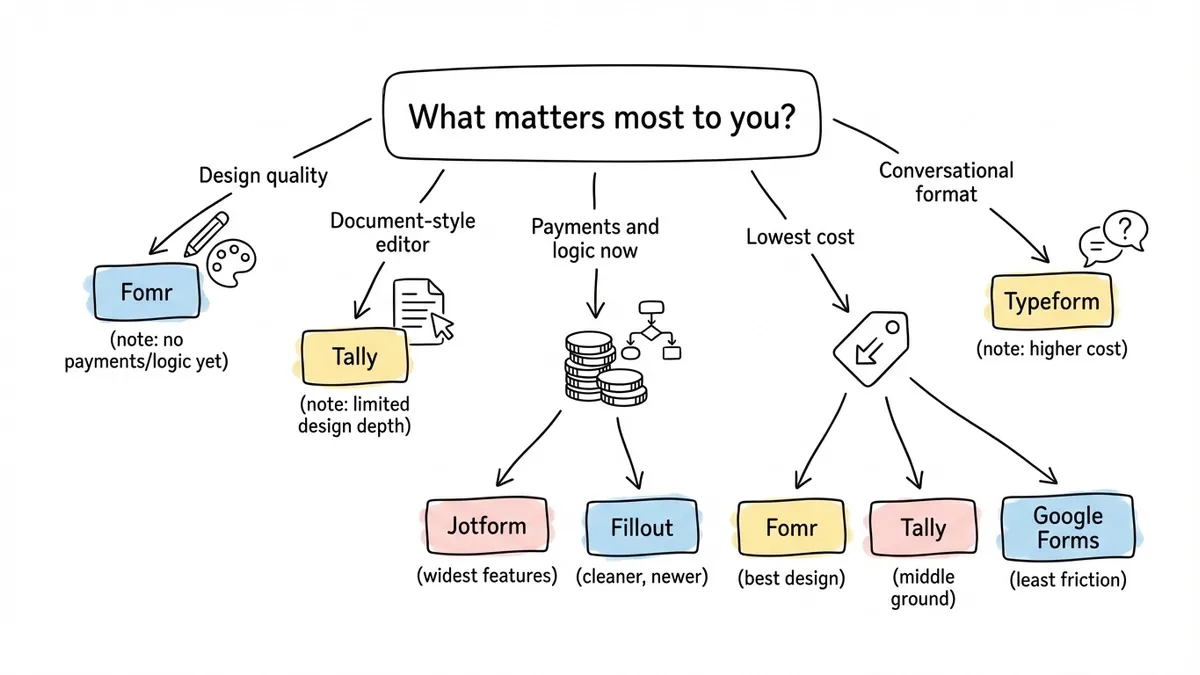
If design quality is your priority: Fomr gives you the deepest visual customization on a free plan. You get more fonts, more layout control, and more branding options than Paperform offers at $24/month. The tradeoff: conditional logic and payments are coming soon, so Paperform still has the edge if you need them today.
If you liked the document-style editor: Tally is the closest match. The block-based editing feels similar to Paperform’s content-first approach, and the free plan is unlimited. Design depth is more limited, though.
If you need payments and logic right now: Jotform or Fillout are your best bets. Jotform has the widest feature set. Fillout is cleaner and more modern but less mature.
If budget is the main concern: Fomr, Tally, and Google Forms all offer unlimited responses for free. Fomr gives you the most design control. Google Forms gives you the least friction. Tally sits in between.
If you want conversational forms: Typeform is still the best at the one-question-at-a-time format, but be prepared to pay for it.
The bottom line
Paperform is a good tool with a pricing model that doesn’t work for everyone. If you’re paying $24/month and getting value from the document editor and payment features, there’s no urgent reason to switch. But if the cost feels steep for what you’re using, or you want a free plan to start with, the alternatives above each solve a different version of that problem.
If you want to see what a design-first form builder feels like without paying anything, try Fomr’s guest editor. No account required, no credit card, no time limit. Build a form and decide for yourself.