HR is the most form-heavy department in any company. It’s not even close. From the moment someone applies for a job to the day they leave, every milestone generates a form. Onboarding packets, time-off requests, benefits enrollment, performance reviews, incident reports, exit interviews, policy acknowledgments, equipment checklists. A mid-size company with 200 employees can easily cycle through thousands of form submissions per year just on the HR side.
And yet, a lot of HR teams are still managing this with a patchwork of Word documents, PDF attachments, email chains, and maybe a Google Form or two. The result is predictable: lost submissions, inconsistent data, manual re-entry into HRIS systems, and HR staff spending hours on administrative work that should take minutes.
A good form builder for HR can fix most of this. But not every form builder is built with HR workflows in mind. Here’s what to look for, what to avoid, and how to actually standardize your HR processes with digital forms.
Every form an HR team needs (and there are more than you think)
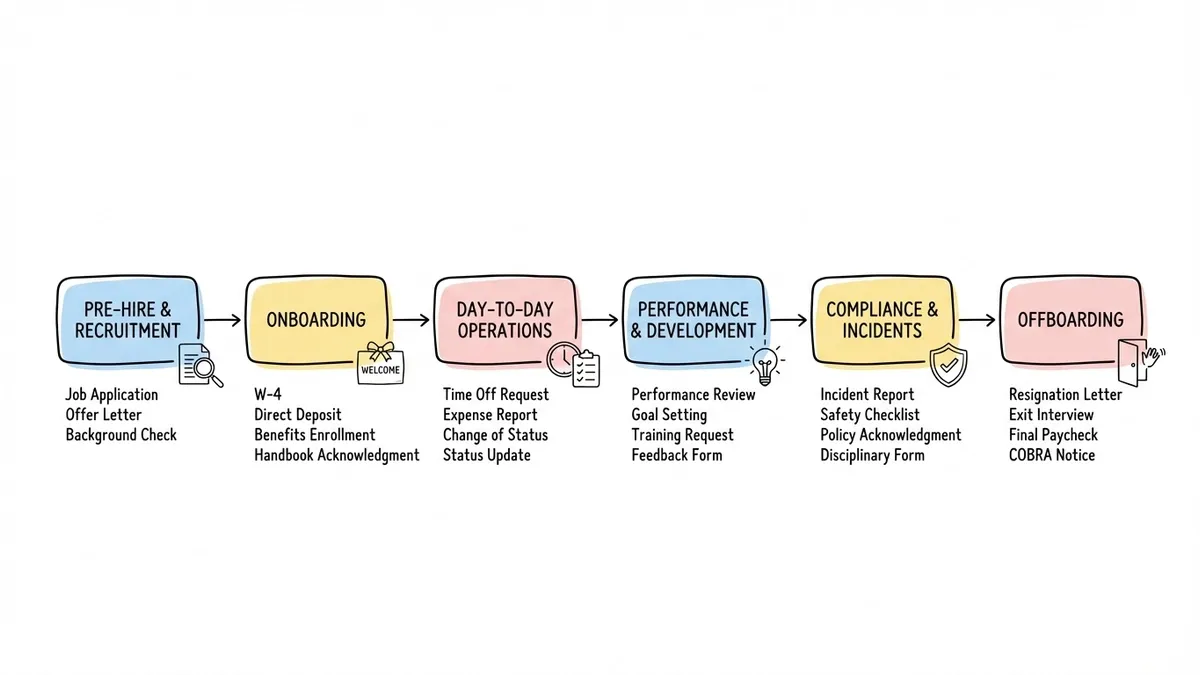
Most people outside HR underestimate the sheer volume of forms the department handles. Let’s map them out by employee lifecycle stage, because that’s how HR actually thinks about this work.
Pre-hire and recruitment
Job application forms, candidate screening questionnaires, interview evaluation forms, reference check forms, offer letter acknowledgments. These are the forms candidates and hiring managers interact with before someone is even on payroll.
The job application form is the most public-facing of the bunch. It represents your company to people who haven’t worked there yet. A clunky, ugly application form sends a message about your organization, and it’s not a good one. We wrote a full guide on building job application forms that covers field planning and candidate experience.
Onboarding
This is where the form volume spikes. New hire information forms, emergency contact forms, tax withholding (W-4), direct deposit authorization, benefits enrollment, IT equipment requests, parking permits, handbook acknowledgments, confidentiality agreements. A typical onboarding process involves 8 to 15 separate forms, sometimes more.
The problem isn’t just the number of forms. It’s the timing. HR needs to collect all of this information within the first few days of employment, often before the new hire’s first day. Sending a stack of PDFs via email and asking someone to print, sign, scan, and return them is a terrible first impression. Our employee onboarding form guide walks through how to structure this better.
Day-to-day operations
Time-off requests, expense reports, schedule change requests, remote work agreements, training requests, internal transfer applications. These are the recurring forms that employees interact with throughout their tenure. They’re individually simple, but they add up fast.
Time-off requests alone can generate hundreds of submissions per month in a company of any real size. If each one requires an email thread or a walk to someone’s desk, you’re burning hours of productivity across the organization. A digital time-off request form that routes to the right manager cuts that friction dramatically.
Performance and development
Performance review forms, self-assessment questionnaires, 360-degree feedback forms, goal-setting templates, training evaluation forms, promotion nomination forms. These tend to be longer and more complex than operational forms, with a mix of rating scales, open-ended questions, and structured sections.
Performance reviews are particularly tricky because they often involve multiple respondents filling out the same form about the same person. You need a form builder that handles this cleanly without creating confusion about who’s reviewing whom.
Compliance and incidents
Incident report forms, workplace injury reports, harassment complaint forms, safety inspection checklists, policy violation documentation, accommodation request forms. These forms carry legal weight. They need to be timestamped, stored securely, and accessible for audits.
Our guide on creating incident report forms covers the specific fields and structure these forms require. Getting the format right matters here more than almost anywhere else in HR.
Offboarding
Exit interview forms, equipment return checklists, final paycheck authorization, benefits continuation (COBRA) election forms, knowledge transfer documents, non-compete acknowledgments. The offboarding process is often rushed and disorganized, which means important steps get skipped.
A well-structured exit interview form is one of the most valuable data collection tools HR has. The feedback from departing employees reveals problems that current employees won’t talk about openly. But only if you actually collect it consistently.
Give it a try
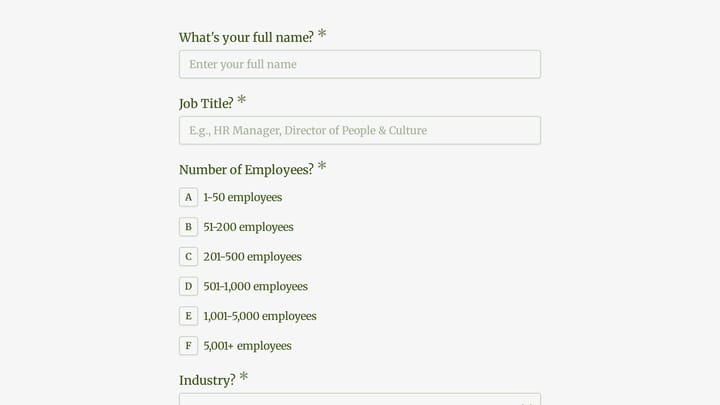
Try a real engineering team onboarding form below
This is a real, working template from our gallery. Fill it out like a respondent would, then make it your own.

What HR teams need from a form builder
Not every form builder works well for HR. Consumer survey tools and marketing lead-gen forms solve different problems. Here’s what actually matters when you’re building human resources forms online.
Multi-page layouts
HR forms are long. An onboarding packet with personal information, emergency contacts, tax details, and benefits selections can easily hit 30 or 40 fields. Putting all of that on a single page is a guaranteed way to overwhelm new hires and tank completion rates.
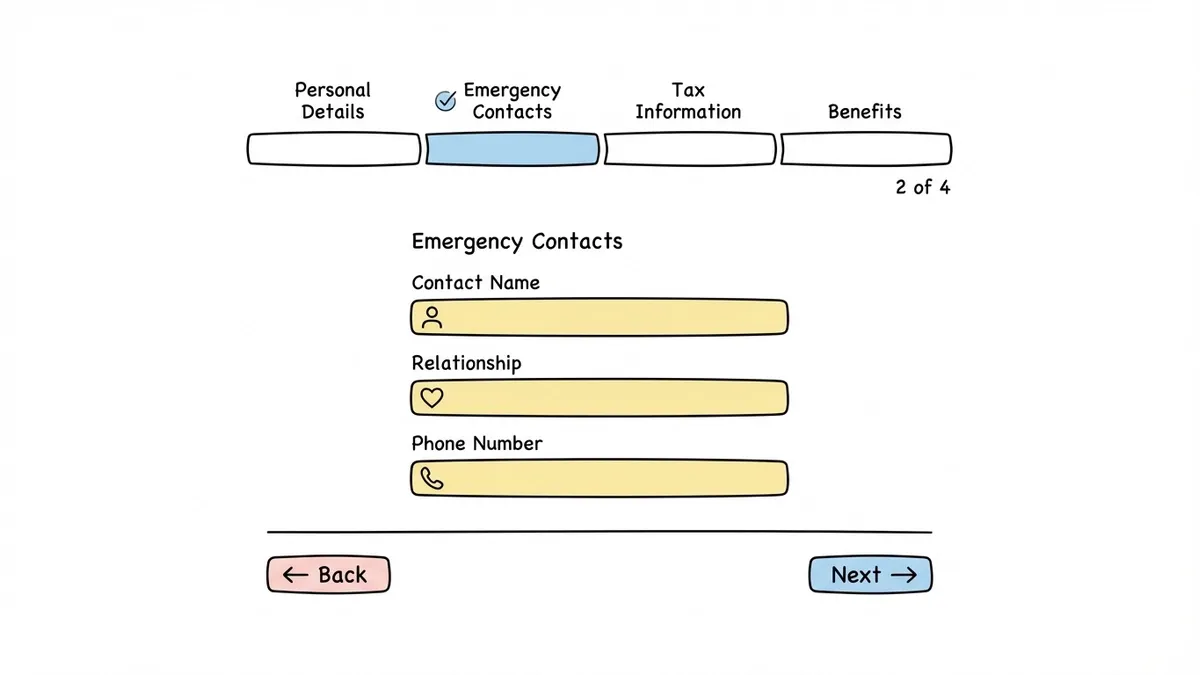
Multi-page forms let you break things into logical sections. Page one: personal details. Page two: emergency contacts. Page three: tax information. Page four: benefits. Each page feels manageable, and the progress indicator tells the person filling it out how much is left.
Design control and branding
HR forms are internal-facing, but that doesn’t mean they should look like they were built in 2008. Your onboarding forms are a new hire’s first digital interaction with your company. Your job application form is a candidate’s first impression. These forms should look like they belong to your organization.
That means custom colors that match your brand, your company logo, fonts that don’t look like a default spreadsheet, and layouts that feel intentional rather than thrown together. Some form builders give you a color picker and call it “customization.” Others give you real control over the visual experience.
Ease of use for non-technical staff
HR professionals are not developers. They’re not designers. They need to build and update forms without writing code, without reading documentation, and without submitting a ticket to IT every time a field needs to change.
A drag-and-drop editor is the baseline. But the editor also needs to be intuitive enough that someone can figure it out in ten minutes, not ten hours. If building a simple time-off request form requires a tutorial video, the tool is too complicated for HR use.
Diverse field types
HR forms need more than text boxes and dropdowns. You’ll want date pickers for start dates and leave periods. Rating scales for performance reviews. Multiple choice for benefits selection. Long text fields for incident descriptions and exit interview responses. Ranking questions for training preference surveys. Number fields for employee IDs and phone numbers.
A form builder with a limited set of field types will force you to work around its constraints. You’ll end up using text fields where a date picker should be, or asking people to type “yes” or “no” instead of clicking a toggle. These workarounds create messy data that’s harder to analyze.
Team collaboration
HR is rarely a one-person department. Multiple people need to create, edit, and manage forms. The form builder should support team access without requiring everyone to share a single login. Role-based permissions are even better, so you can let a recruiter edit the job application form without giving them access to the incident report submissions.
Security and privacy: the non-negotiable part
HR forms collect some of the most sensitive data in any organization. Social security numbers, bank account details, medical information, salary data, disciplinary records, harassment complaints. A data breach involving HR forms isn’t just embarrassing. It’s a legal liability.
Encryption
At minimum, your form builder should use HTTPS encryption for data in transit (when someone submits a form) and encryption at rest (when submissions are stored on the server). This is table stakes in 2026, but it’s worth verifying. Some free tools cut corners here.
Access controls
Who can see form submissions? Can you restrict access by form, by department, by role? If your benefits enrollment form submissions are visible to anyone with a login, that’s a problem. Look for granular permission settings that let you control access at the form level.
Data residency and compliance
Depending on your industry and location, you may need to know where your form data is physically stored. Companies operating in the EU need to consider GDPR requirements. Healthcare organizations have HIPAA obligations for forms that collect protected health information. Government contractors may have specific data handling requirements.
Most HR forms don’t trigger the same compliance requirements as, say, patient intake forms in healthcare. But it’s worth understanding what your specific obligations are before choosing a tool. A form builder that’s SOC 2 compliant and uses encrypted storage covers the needs of most private-sector HR departments.
Data retention
How long are submissions stored? Can you export and delete data when an employee leaves? GDPR gives employees the right to request deletion of their personal data. Even outside the EU, good data hygiene means not keeping sensitive employee information longer than necessary. Your form builder should make it straightforward to export data and clear old submissions.
How to standardize HR processes with forms
Having the right form builder is only half the equation. The other half is using it to create consistent, repeatable processes. Here’s where most HR teams leave value on the table.
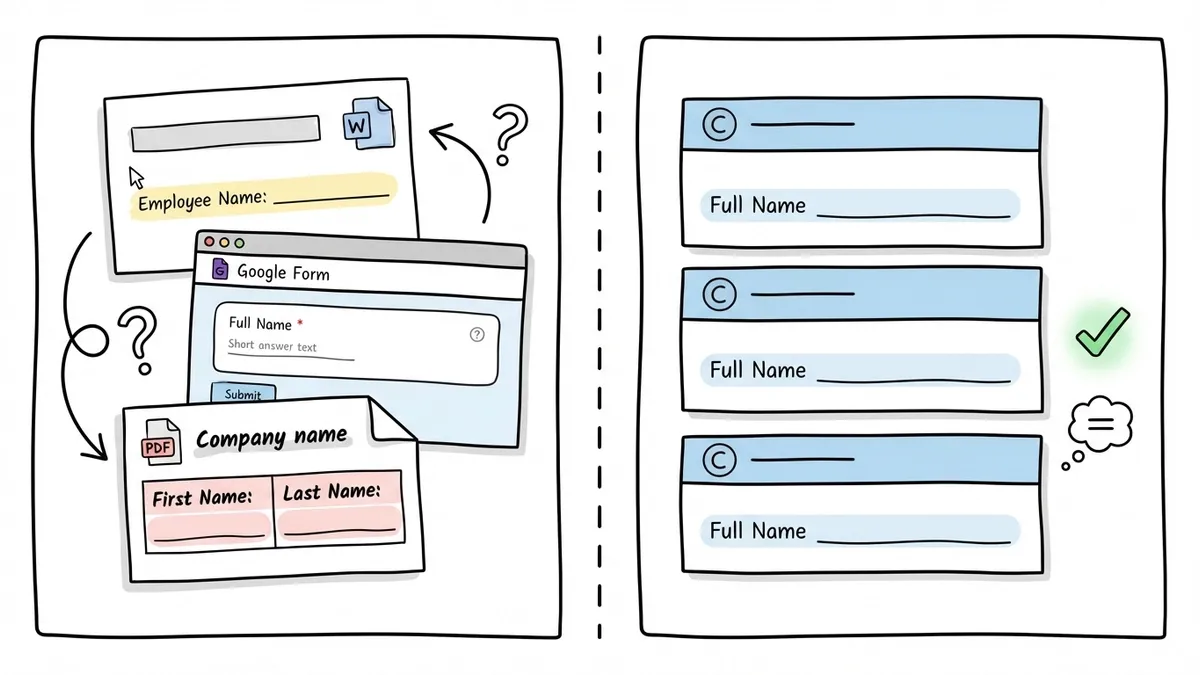
Create a form inventory
Start by listing every form your HR department uses. Include the paper ones, the Word documents, the PDFs, the Google Forms, and the random email templates that function as informal forms. You’ll probably find duplicates, outdated versions, and forms that nobody remembers creating but are still in circulation.
Categorize each form by lifecycle stage (pre-hire, onboarding, operations, performance, compliance, offboarding) and by frequency (one-time, recurring, event-triggered). This gives you a clear picture of what needs to be built and what to prioritize.
Standardize field names and formats
This sounds boring, but it saves enormous headaches downstream. If one form asks for “Employee Name” and another asks for “Full Name” and a third asks for “First Name” and “Last Name” separately, your data is inconsistent before it even reaches your HRIS.
Decide on standard field names, date formats, and data structures. Use them across every form. When you eventually connect forms to other systems (through integrations or manual export), consistent data makes everything easier.
Build templates, not one-offs
Once you’ve standardized your field conventions, build template forms for each category. A performance review template. An incident report template. A time-off request template. When a manager needs a new form, they duplicate the template instead of starting from scratch. This keeps every form consistent in structure, branding, and data format.
Think about the employee experience
HR forms are one of the most frequent touchpoints employees have with the HR department. If every interaction involves a clunky, confusing form, that shapes how employees perceive HR. It’s a small thing, but it compounds.
A well-designed form that takes two minutes to complete, works on a phone, and confirms the submission clearly is a better experience than a PDF that requires Adobe Acrobat, a printer, and a trip to the HR office. The bar is low. Clear it.
Plan for integrations (even if you’re not ready yet)
Most HR teams eventually want form submissions to flow into their HRIS, payroll system, or project management tools. Even if you’re not setting up integrations today, choose a form builder that supports data export in standard formats (CSV at minimum) and has integration capabilities on the roadmap.
Manual data entry from form submissions into other systems is one of the biggest time sinks in HR administration. Any step you take toward reducing it pays off quickly.
Picking the right tool
The HR form builder market ranges from free general-purpose tools to expensive enterprise platforms. Here’s a practical framework for choosing.
If you’re a small team (under 50 employees), you probably don’t need an enterprise HR platform with built-in forms. A good general-purpose form builder with strong design controls, multi-page support, and team collaboration will cover your needs at a fraction of the cost. Fomr fits this category well. The free plan includes unlimited forms, unlimited responses, and unlimited team members, which means your entire HR department can use it without worrying about per-seat pricing. The drag-and-drop editor is simple enough that anyone in HR can build forms without help from IT.
If you’re a mid-size company (50-500 employees), you’ll want the same features plus tighter integration with your HRIS and more sophisticated access controls. Evaluate whether your HRIS has built-in form capabilities that are good enough, or whether a dedicated form builder gives you better forms that you connect via export or integration.
If you’re enterprise (500+ employees), you’re likely already locked into an HR platform like Workday, BambooHR, or SAP SuccessFactors that includes form functionality. The question is whether those built-in forms are good enough or whether supplementing with a dedicated form builder for specific use cases (like candidate-facing application forms or company-wide eNPS surveys) would improve the experience.
Regardless of company size, avoid these common mistakes:
- Paying for per-response pricing when you know HR forms generate high volume
- Choosing a tool based on features you’ll “eventually” need instead of what you need now
- Defaulting to whatever tool IT recommends without checking if it actually works for HR’s specific needs
- Ignoring the mobile experience (employees will fill out time-off requests and expense reports on their phones)
Start with one form
You don’t need to digitize your entire HR operation in a week. Pick the form that causes the most pain right now. Maybe it’s the onboarding packet that new hires complain about. Maybe it’s the time-off request process that generates a dozen emails per request. Maybe it’s the exit interview that only 30% of departing employees bother to complete because the PDF is so tedious.
Build that one form. Make it look good. Make it work on mobile. See how the process improves. Then build the next one.
If you want to test things without committing to a platform, Fomr’s guest editor lets you build a form without creating an account. Drag in some fields, set your company colors, and see what a modern HR form looks like. It takes about five minutes, and you’ll know pretty quickly whether it fits your workflow.