Real estate runs on paperwork. Rental applications, showing requests, buyer questionnaires, maintenance tickets, open house sign-in sheets, tenant screening forms, vendor intake packets. Every transaction and every property generates a stack of documents that someone has to create, distribute, collect, and organize.
Most agents and property managers still handle this with a mix of PDFs, paper clipboards, and email attachments. It works, technically, the same way a filing cabinet works when you need to find one document among three thousand. The information gets collected, but it’s scattered across inboxes, desk drawers, and phone screenshots of handwritten notes.
A form builder for real estate can consolidate all of that into one place. But the real estate industry has specific needs that generic form tools don’t always address well. You need forms that look professional enough to hand to a client spending half a million dollars on a house. You need them to work on a phone at an open house with spotty Wi-Fi. And you need the whole thing to take five minutes to set up, because you have twelve other things to do before your next showing.
Here’s how to think about it.
The forms real estate professionals actually need
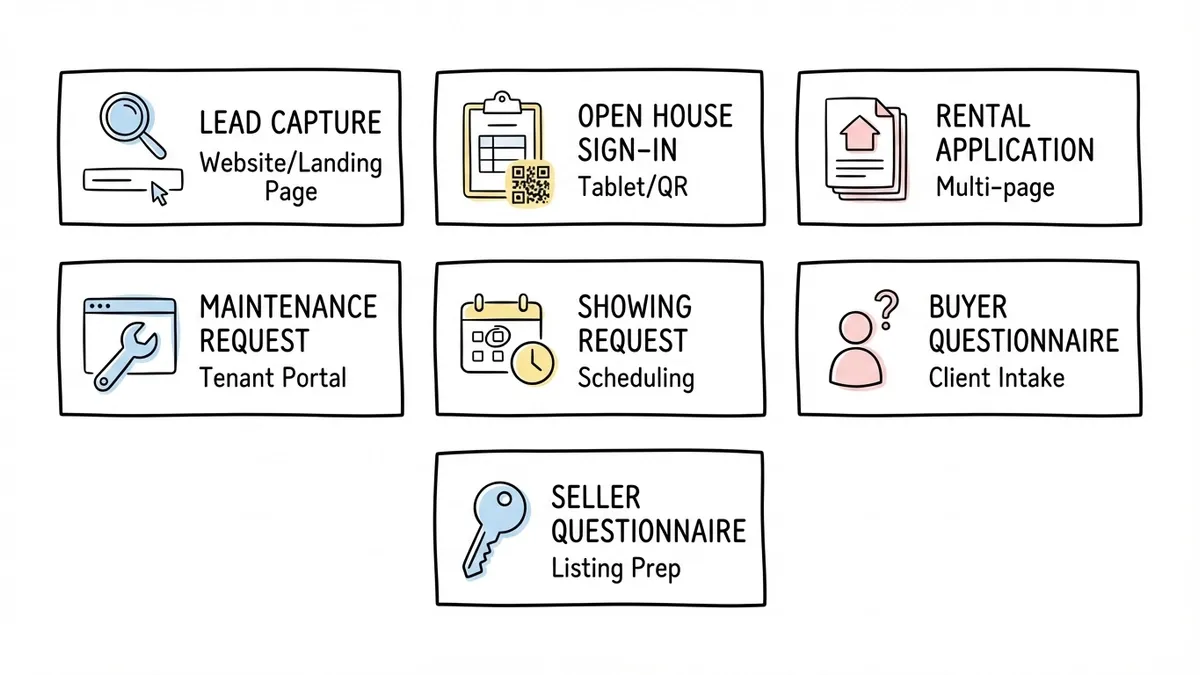
Before you evaluate tools, it helps to map out what you’re actually building. Real estate forms fall into a few distinct categories, and each one has different requirements.
Lead capture and inquiry forms
This is the highest-value form in your stack. A lead capture form on your website or landing page is often the first interaction a potential buyer or seller has with you. It needs to be short (name, email, phone, property interest, timeline), it needs to load fast, and it needs to look like it belongs on your site rather than something bolted on from a different decade.
The mistake most agents make is asking too many questions upfront. A buyer who’s casually browsing listings at 10 PM doesn’t want to fill out fifteen fields. They want to ask a quick question or request more info. Keep your initial capture form to four or five fields, then follow up with a more detailed questionnaire once you’ve made contact. We wrote a full breakdown of lead generation forms that convert if you want to dig into the strategy behind this.
Open house sign-in forms
The paper sign-in sheet at an open house is one of the most wasteful tools in real estate. Half the entries are illegible. People write fake phone numbers because they don’t want to be called. And the sheet itself gets coffee-stained, lost, or left in the agent’s car for a week before anyone follows up.
A digital sign-in form on a tablet or accessed via QR code solves most of these problems. You get clean data, validated email addresses, and instant access to the list from anywhere. More on the QR code approach in a later section.
Your open house sign-in form should collect: full name, email, phone number, whether they’re working with an agent, how they heard about the listing, and their buying timeline. That’s it. People are walking through a house, not sitting at a desk. Keep it under 60 seconds to complete.
Rental application forms
Rental applications are the most complex forms in real estate. They need employment history, income verification, previous addresses, landlord references, pet information, and consent for background and credit checks. That’s a lot of fields, and the order you present them matters.
The best approach is a multi-page form that groups related information together: personal details on page one, residential history on page two, employment and income on page three, references and authorizations on page four. This feels less overwhelming than a single long scroll, and it gives applicants a sense of progress as they move through the sections.
We have a detailed guide on building rental application forms that covers field selection, legal considerations, and layout strategies. If you manage rental properties, that’s worth reading alongside this post.
Maintenance request forms
Tenants need a simple way to report issues. A maintenance request form should capture the property address, unit number, a description of the problem, urgency level, preferred contact method, and ideally a photo. The photo part is tricky with some form builders since not all of them support file uploads natively; with Fomr, a file upload field lets tenants attach photos directly to the request. Pair it with a dropdown for issue category (plumbing, electrical, HVAC, appliance, structural, pest, other) so your maintenance team can triage and prioritize.
Our guide on creating maintenance request forms walks through the full setup process.
Showing request and scheduling forms
Buyers or their agents need to request showings, and you need a form that captures the property address, requested date and time, buyer’s agent info (if applicable), and any special requirements. Date and time picker fields are important here. A free-text field for scheduling leads to back-and-forth emails that waste everyone’s time.
Buyer and seller questionnaires
Once you’re working with a client, you need detailed information about what they’re looking for (buyers) or what they’re offering (sellers). A buyer questionnaire covers budget range, preferred neighborhoods, must-have features, deal-breakers, pre-approval status, and timeline. A seller questionnaire covers property details, recent improvements, known issues, desired timeline, and pricing expectations.
These forms tend to be longer, and that’s fine because the client is already committed to working with you. A conversational, one-question-at-a-time format works well here since it feels more like an interview than a bureaucratic form.
Give it a try
This live estate agent estimate form is ready to fill out
This is a real, working template from our gallery. Fill it out like a respondent would, then make it your own.

What to look for in a real estate form builder
Not every form builder is a good fit for real estate. Here’s what actually matters, ranked roughly by importance.
Mobile-first design
Your clients will fill out most of your forms on their phones. At open houses, on the couch browsing listings, in the car between appointments. If your forms don’t look good and work smoothly on a phone screen, you’ll lose responses. This isn’t a nice-to-have. It’s the baseline.
Test every form on your own phone before publishing it. If you have to pinch and zoom, or if buttons are too small to tap accurately, the form isn’t ready.
Branding and visual polish
Real estate is a reputation business. Your forms are an extension of your brand, and they should look like it. A generic white form with default styling sends a different message than a form that matches your website colors, uses your logo, and feels like a cohesive part of your marketing.
Look for a form builder that gives you control over fonts, colors, backgrounds, and logo placement. Fomr, for example, offers access to 1,700+ Google Fonts, custom color schemes, and background images, so your forms can match your brokerage branding exactly. That kind of visual consistency matters when you’re competing for listings against other agents.
Multi-page forms
Rental applications and detailed questionnaires need multiple pages. A form builder that only supports single-page layouts will force you to cram everything into one long scroll, which tanks completion rates. Look for tools that let you split forms across pages with progress indicators.
Embedding and sharing options
You’ll need to put forms in different places: embedded on your website, shared as a direct link in emails, displayed as a popup on a landing page, or printed as a QR code on a flyer. The more distribution options your form builder supports, the less friction you’ll have getting forms in front of the right people.
Pricing that doesn’t punish growth
Some form builders charge per response or cap submissions on free plans. That’s a problem in real estate, where a single open house can generate 30-50 sign-ins and a busy property manager might process hundreds of maintenance requests per month. Look for pricing that doesn’t penalize you for actually using the product.
Fomr’s free plan includes unlimited forms, responses, fields, and team members. That’s unusual in this space, and it means you won’t hit a paywall the week before a big open house.
Conditional logic (a note on timing)
Conditional logic, where the form shows or hides fields based on previous answers, is genuinely useful for real estate forms. A rental application could skip the pet section if the applicant selects “no pets,” or a buyer questionnaire could show different follow-up questions based on budget range. Not every form builder offers this, and some that do charge extra for it. It’s worth checking before you commit to a tool.
Fomr has conditional logic on its roadmap but hasn’t shipped it yet. If this is a must-have for your workflow right now, that’s worth knowing upfront. For most real estate forms, though, a well-structured multi-page layout handles the same problem without conditional branching.
Using QR codes at open houses and on signage
QR codes had a rough reputation for years, but the pandemic normalized them. Most people now know how to point their phone camera at a QR code without thinking twice. For real estate, this is a big deal.
Open house sign-ins
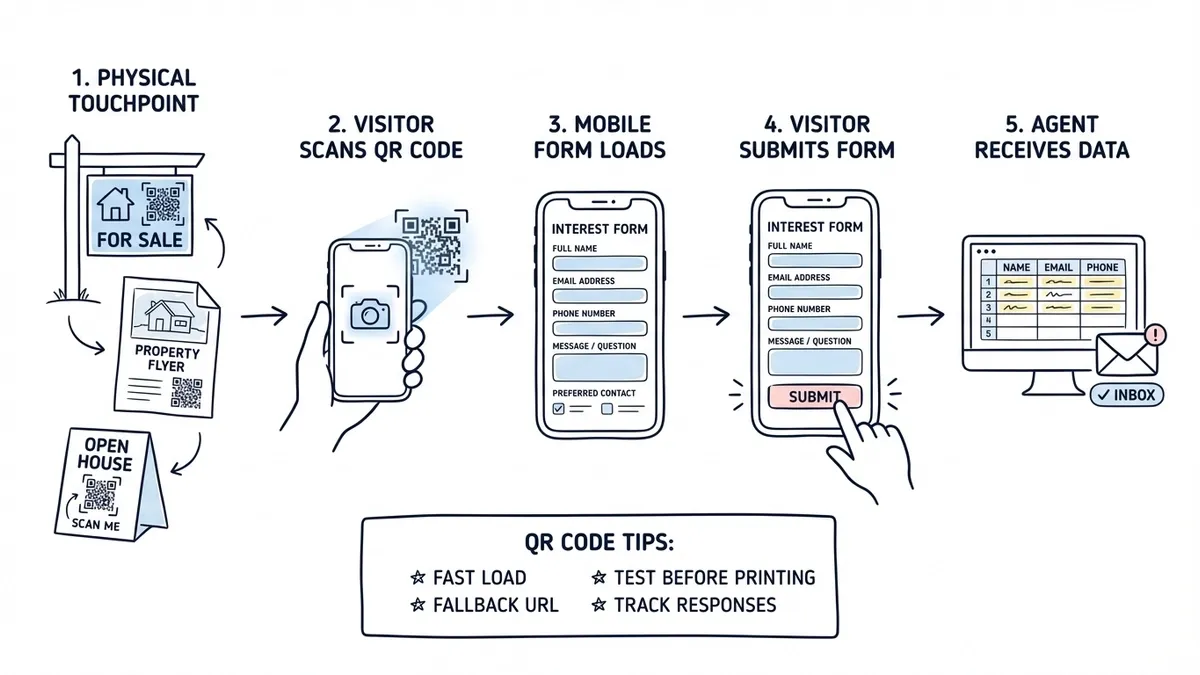
Print a QR code on a small sign or table tent at the entrance. Visitors scan it, fill out a quick sign-in form on their phone, and you get clean, typed data instead of scribbled handwriting. No tablet to buy, charge, and babysit. No clipboard to pass around (which some people still find unhygienic post-COVID).
The form should be short enough to complete while standing. Five or six fields, max. Name, email, phone, working with an agent (yes/no), and how they heard about the listing. If you want to ask about their timeline or budget, make those fields optional.
Property flyers and yard signs
Include a QR code on your property flyers that links to a showing request form or a detailed property information page with an inquiry form at the bottom. This turns a passive marketing piece into an active lead capture tool. Someone walking their dog past a “For Sale” sign can scan the code and request a showing before they get home.
Business cards and mailers
A QR code on your business card that links to a contact form is more useful than a phone number that people won’t call. It lowers the barrier to reaching out, especially for younger buyers who prefer texting and forms over phone calls.
Tips for QR code forms
- Make sure the form loads fast on mobile. A QR code that leads to a slow-loading page defeats the purpose.
- Use a short, memorable URL as a fallback for people who can’t or won’t scan QR codes.
- Test the QR code yourself before printing 500 flyers. Scan it from different distances and angles.
- Track which QR codes generate the most responses so you know which marketing materials are working.
Building branded forms that match your brokerage
Your brokerage probably has brand guidelines: specific colors, fonts, a logo, maybe a tagline. Your forms should follow those guidelines the same way your business cards and website do.
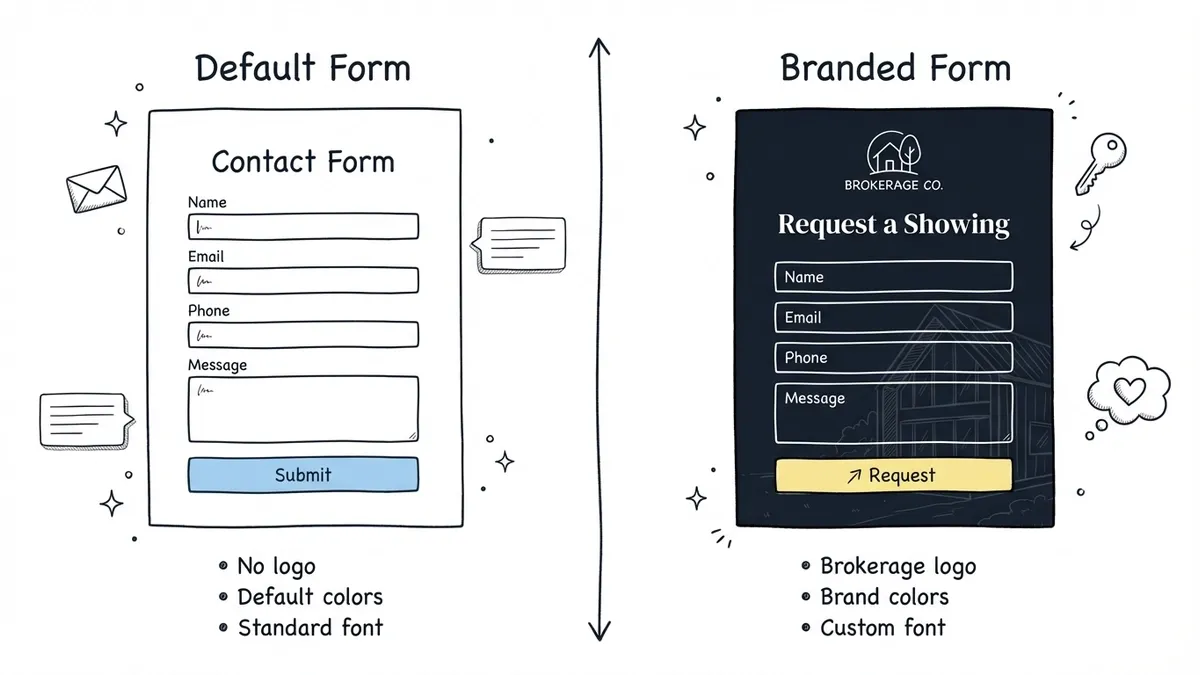
This sounds obvious, but most agents skip it because their form builder makes customization difficult or locks design features behind a paid plan. The result is a jarring experience where a client clicks a beautifully designed listing page and lands on a plain white form that looks like it was built in 2008.
Here’s what branded real estate forms should include:
- Your brokerage logo at the top
- Brand colors for buttons, backgrounds, and accents
- A font that matches (or complements) your website typography
- A background image or color that fits the property or your brand aesthetic
- A custom thank-you page that confirms submission and sets expectations for next steps
If you’re on a team, consistency matters even more. Every agent’s forms should look like they come from the same brokerage, not from five different tools with five different styles.
For agents who want to go further, custom domains let you serve forms from your own URL (like forms.yourbrokerage.com) instead of a generic form builder domain. This is a small detail that clients rarely notice consciously, but it reinforces professionalism.
Putting it together: a practical setup
Here’s what a realistic form stack looks like for a busy real estate agent or small property management company:
- A lead capture form embedded on your website and linked from your email signature
- An open house sign-in form with a QR code printed on table tents
- A showing request form linked from property flyers and listing pages
- A buyer questionnaire sent to new clients after the initial consultation
- A rental application form (if you manage rentals) with multi-page layout
- A maintenance request form with a permanent link shared with all tenants
- A seller questionnaire sent during the listing appointment process
That’s seven forms. With most form builders, you’d set these up once and update them occasionally. The whole setup might take an afternoon.
The key is picking a tool that handles all seven without forcing you to compromise on design for some and functionality for others. You want one place to build, share, and manage everything, not a patchwork of three different tools because one doesn’t support multi-page forms and another doesn’t let you customize fonts.
Start building
If you’ve been getting by with PDFs and paper forms, switching to a proper form builder will save you hours every week and make a better impression on clients. The setup time is minimal compared to the ongoing time you’re spending on manual data entry and illegible handwriting.
Fomr’s guest editor lets you build a form without creating an account, so you can test the drag-and-drop builder, try different layouts, and see how branding works before committing to anything. Start with your highest-value form (probably lead capture or open house sign-in) and expand from there.