WordPress powers over 43% of all websites on the internet. That’s roughly 800 million sites. And nearly every one of them needs a form at some point, whether it’s a contact page, a lead capture widget, or an event registration flow.
So you search for the best form builder for WordPress, and you get a wall of “Top 10” listicles that all recommend the same five plugins. What those articles rarely mention is that WordPress plugins aren’t your only option. Standalone form builders that embed on any site, WordPress included, have gotten good enough that the plugin-vs-standalone decision deserves a real conversation.
I’ve used both approaches across dozens of WordPress sites. Here’s what I’ve learned about when each one makes sense, and where each falls apart.
The two approaches to WordPress forms
There are fundamentally two ways to add forms to a WordPress site:

WordPress form plugins install directly into your WordPress admin. They store data in your WordPress database, render forms using your theme’s styles, and manage everything from the WordPress dashboard. WPForms, Gravity Forms, Contact Form 7, and Formidable Forms are the big names here.
Standalone form builders are separate web apps where you build your form, then embed it on your WordPress site using a JavaScript snippet or iframe. Fomr, Typeform, and Jotform fall into this category. The form lives on the builder’s infrastructure, not your WordPress server.
Both approaches work. The right choice depends on what you care about most.
Give it a try
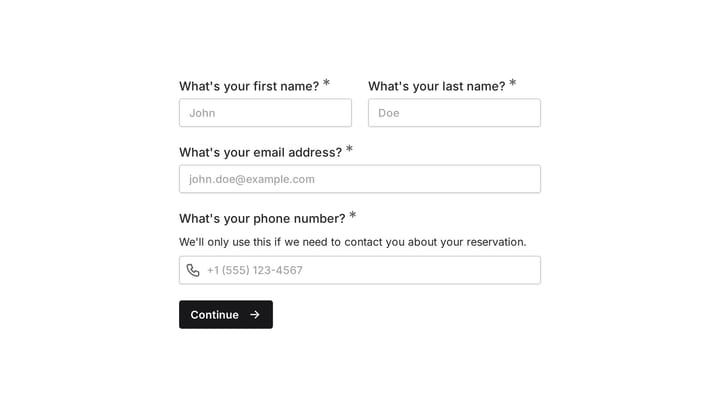
Have a go at this auto repair shop contact form
This is a real, working template from our gallery. Fill it out like a respondent would, then make it your own.

WordPress form plugins: the familiar option
If you’ve been in the WordPress ecosystem for a while, plugins feel natural. You install them like any other plugin, configure them in the dashboard, and drop a shortcode into a page. No external accounts, no embed codes.
WPForms
WPForms is the most popular WordPress form plugin, and it earned that position by being genuinely easy to use. The drag-and-drop builder works well, the templates cover common use cases, and the free version (WPForms Lite) handles basic contact forms without issues.
The paid version starts at $49.50/year for a single site. That gets you conditional logic, file uploads, and multi-page forms. The higher tiers ($99.50-$299.50/year) add payment integrations, user registration, and surveys. It’s reasonable pricing if you only run one or two WordPress sites.
Where WPForms gets frustrating is design control. You can change colors and fonts, but you’re working within the constraints of your WordPress theme. If your theme has opinionated form styles, WPForms inherits them, and overriding those styles means writing custom CSS.
Gravity Forms
Gravity Forms is the power user’s choice. It has more field types, more add-ons, and more flexibility than WPForms. If you need complex calculations, multi-step workflows, or advanced conditional logic, Gravity Forms can probably handle it.
The catch is complexity. The interface isn’t as intuitive as WPForms, and the add-on model means you’ll spend time figuring out which of the 30+ add-ons you actually need. Pricing starts at $59/year for a single site, but the Elite license ($259/year) is where most of the useful add-ons live.
I’d recommend Gravity Forms for developers and agencies building complex WordPress sites. For a small business owner who just needs a contact form and a booking request, it’s more tool than you need.
Contact Form 7
Contact Form 7 is free, lightweight, and has been around since 2007. It has over 5 million active installations. If all you need is a basic contact form and you don’t mind editing HTML-like markup to configure it, CF7 does the job with minimal overhead.
The downside is obvious: there’s no visual editor. You configure forms by editing a template that looks like this:
[text* your-name] [email* your-email] [textarea your-message]That’s fine for developers. It’s not fine for someone who wants to drag fields around and see a live preview. CF7 also lacks built-in features like conditional logic, multi-page forms, and file uploads without third-party extensions.
Formidable Forms
Formidable Forms sits between WPForms and Gravity Forms in terms of complexity. Its standout feature is the ability to create front-end views of submitted data, which is useful if you’re building directories, listings, or dashboards powered by form submissions.
Pricing starts at $39.50/year for basic features, scaling up to $299.50/year for the full suite. It’s a solid middle-ground option, though it doesn’t get as much community attention as WPForms or Gravity Forms, which means fewer tutorials and third-party resources when you get stuck.
The plugin problem nobody talks about
WordPress form plugins work well until they don’t. There are a few structural issues with the plugin approach that most comparison articles gloss over.
Security vulnerabilities
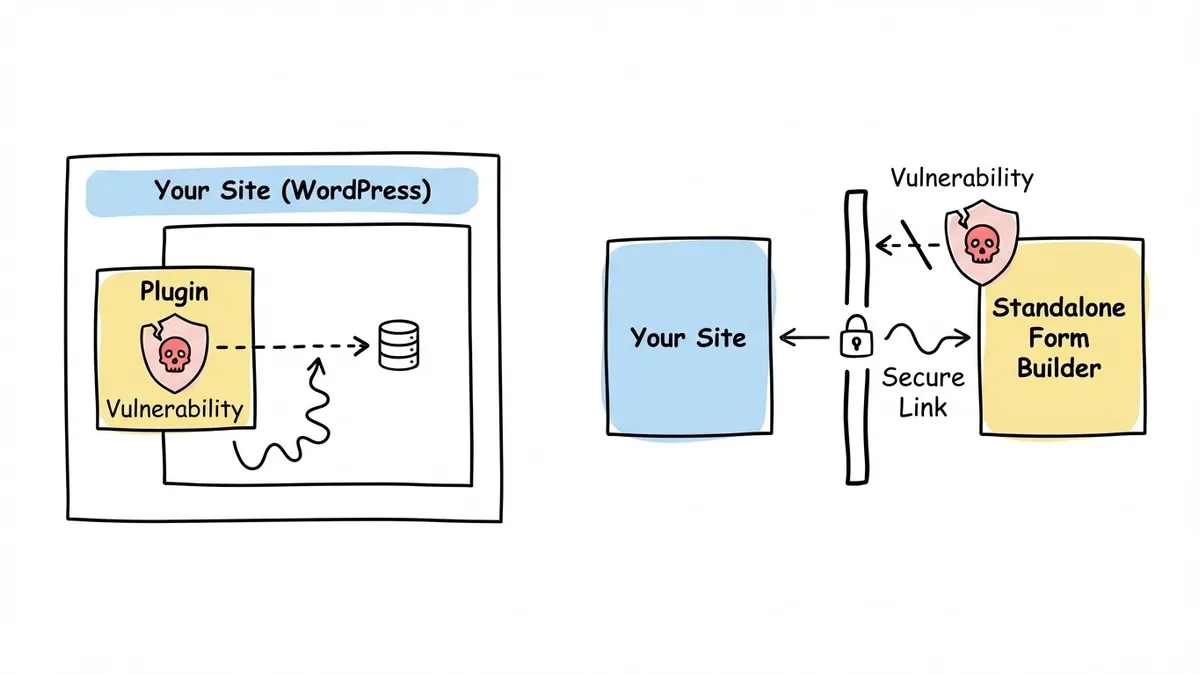
Every WordPress plugin you install is code running on your server with access to your database. WordPress plugins are one of the most common attack vectors for WordPress sites. Wordfence reported that plugin vulnerabilities accounted for the vast majority of new WordPress security threats in 2023, with form plugins being no exception.
WPForms, Gravity Forms, and others have all had security patches over the years. That’s not a knock on those specific tools; it’s the nature of the plugin model. More plugins means more code running on your server, more potential entry points, and more things to keep updated.
If you forget to update a form plugin (or any plugin), you’re leaving a known vulnerability open. Standalone form builders don’t have this problem because they don’t run code on your server.
Performance impact
Plugins add JavaScript, CSS, and database queries to your WordPress site. A single form plugin might not cause noticeable slowdowns, but WordPress sites tend to accumulate plugins over time. By the time you have a form plugin, an SEO plugin, a caching plugin, a security plugin, and a page builder, your load times start creeping up.
Form plugins that load their assets on every page (not just pages with forms) are particularly wasteful. Some do this, some don’t. Check whether your form plugin enqueues scripts globally or only where needed.
Platform lock-in
This is the one that bites people later. If you build 30 forms in WPForms and then decide to move your site to Webflow, Squarespace, or a custom stack, those forms don’t come with you. Your form data might export as CSV, but the forms themselves, the logic, the design, the configuration, all of that stays in WordPress.
Standalone form builders avoid this entirely. Your forms live in the builder’s cloud. Swap your website platform, and you just update the embed code.
Standalone form builders: the platform-independent option
Standalone form builders don’t care what CMS you use. You build the form in their editor, grab an embed code, and paste it into your WordPress site. The form renders inside your page but runs on the builder’s servers.
How embedding works on WordPress
Adding a standalone form to WordPress takes about two minutes. You paste a script tag into your theme’s header (or use a plugin like “Insert Headers and Footers” to do it without touching code), then add a small HTML snippet wherever you want the form to appear.
With Fomr, the embed code looks like this:
<!-- In your theme's <head> or via a header plugin --><script async src="https://fomr.io/widget/embed.js"></script>
<!-- In a Custom HTML block on any page or post --><div data-fomr-id="YOUR_FORM_ID"></div>
That’s it. The form loads asynchronously, so it won’t block your page from rendering. It adapts to the container width automatically. And because it’s a JavaScript widget rather than an iframe, it looks and feels like part of your site. We have a full guide on embedding forms if you want the detailed walkthrough.
Other standalone builders like Typeform and Jotform use iframe-based embeds, which work but can feel slightly disconnected from your page’s design.
Fomr
Fomr is a standalone form builder built around design flexibility. The visual editor gives you control over fonts (1,700+ options), colors, backgrounds, spacing, and layout in a way that most WordPress plugins can’t match. You see changes in real time as you make them.
The free plan includes unlimited forms, unlimited responses, unlimited fields, and unlimited team members. That’s not a typo, and there’s no catch where you hit a wall at 100 submissions. For most WordPress site owners, the free plan covers everything.
The Pro plan ($17/month) adds custom domains, removes Fomr branding, and gives you SEO controls for hosted form pages. If you’re embedding forms on your WordPress site, the free plan is probably enough.
Conditional logic, payment collection, and native integrations with tools like Zapier are coming soon (Google Sheets sync already ships). If you need those features right now, that’s a real limitation.
Where Fomr stands out for WordPress users specifically is portability. If you ever migrate away from WordPress, your forms stay exactly the same. Change the embed code on your new site, and you’re done.
Typeform
Typeform’s conversational, one-question-at-a-time format looks polished and works well for surveys and quizzes. The design quality is high.
The problem for WordPress users is pricing. Typeform’s free plan caps you at 10 responses per month. Ten. For a contact form on a WordPress site that gets any real traffic, you’ll blow past that in a day. Paid plans start at $25/month, which adds up fast if you’re running a small business site.
Typeform also uses iframes for embedding, which means the form sits in a box on your page rather than blending into it natively.
Jotform
Jotform has been around for years and offers a huge template library. The free plan gives you 100 monthly submissions across 5 forms, which is more generous than Typeform but still limiting if you have multiple forms.
The editor is functional but feels dated compared to newer tools. Design customization exists but requires more manual effort to get forms looking polished. Paid plans start at $39/month for Bronze, or $408 a year billed annually.
Plugin vs standalone: a direct comparison
Here’s how the two approaches stack up on the things that matter most for WordPress sites:
| Factor | WordPress plugins | Standalone builders |
|---|---|---|
| Setup effort | Install and activate | Paste embed code |
| Design control | Limited by theme | Full control in builder |
| Performance impact | Adds load to your server | Runs on external servers |
| Security risk | Plugin vulnerabilities | No code on your server |
| Platform portability | Locked to WordPress | Works on any site |
| Offline access | No | Some (Fomr works offline) |
| Data storage | Your WordPress database | Builder’s cloud |
| Pricing (entry) | Free - $59/year | Free - $25/month |
Neither approach is universally better. The right choice depends on your priorities.
Choose a WordPress plugin if:
- You want everything managed from the WordPress dashboard
- You need deep WordPress-specific integrations (user registration, WooCommerce, membership plugins)
- You’re comfortable keeping plugins updated and managing security
- You prefer annual pricing over monthly subscriptions
Choose a standalone form builder if:
- Design quality matters and your WordPress theme’s form styles are limiting
- You run multiple websites (not just WordPress) and want one form builder for all of them
- You want to minimize the number of plugins on your WordPress site
- You might migrate away from WordPress someday
- Security is a top concern and you’d rather not add another plugin to your attack surface
How to embed any form builder on WordPress
Regardless of which standalone builder you pick, the process for adding a form to your WordPress site follows the same pattern:
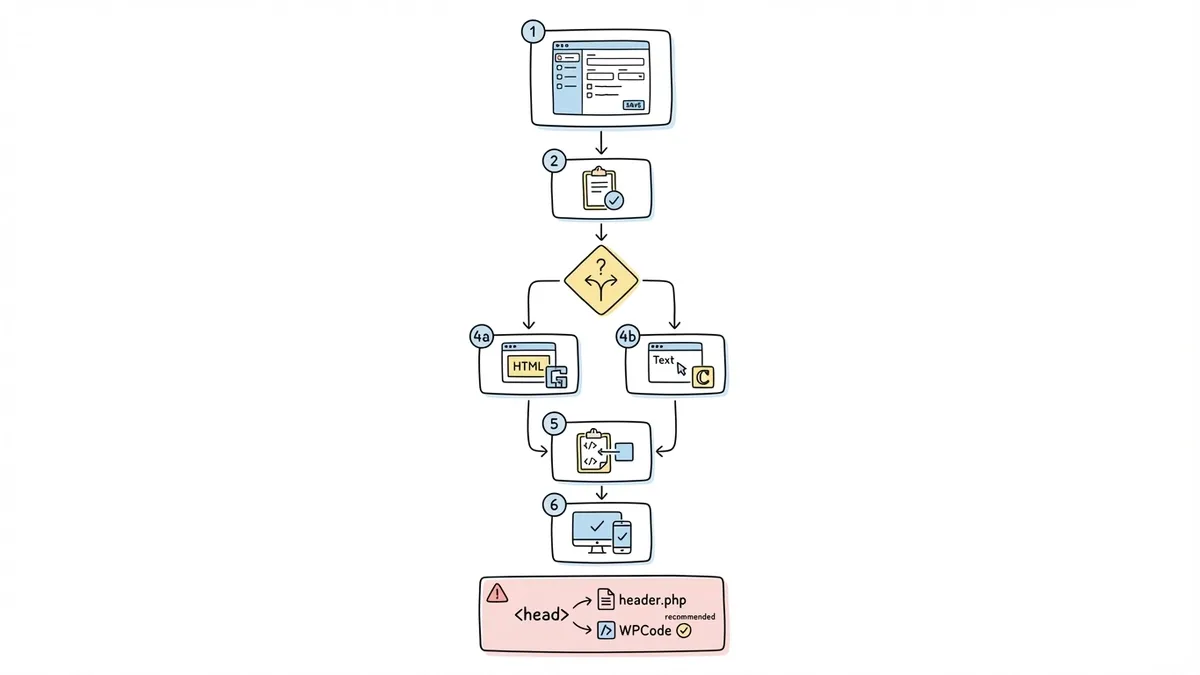
- Build your form in the standalone builder’s editor
- Copy the embed code from the builder’s share/embed settings
- In WordPress, edit the page where you want the form
- Add a Custom HTML block (in the Gutenberg editor) or switch to the Text tab (in the Classic editor)
- Paste the embed code
- Publish and test on both desktop and mobile
For the script tag that some builders require in the <head>, you can either edit your theme’s header.php file or use a free plugin like “WPCode” to inject it without touching theme files. The second option is safer because theme updates won’t overwrite your changes.
If you want a popup form instead of an inline embed, most standalone builders support that too. Fomr lets you trigger popup forms from any button using data attributes. Check our guide to creating contact forms for design tips that apply regardless of which builder you use.
What about WordPress.com (hosted)?
One important distinction: WordPress.org (self-hosted) and WordPress.com (hosted) handle forms differently.
On WordPress.org, you can install any plugin and paste any embed code. Full flexibility.
On WordPress.com, your options depend on your plan. The free and Personal plans restrict custom plugins and limit the HTML you can add. The Business plan ($33/month) and above allow plugins and custom code. If you’re on a lower-tier WordPress.com plan, standalone form builders with simple embed codes are often your only option for forms beyond the built-in WordPress.com form block.
This is another point in favor of standalone builders. They work on WordPress.com regardless of your plan, as long as you can add a Custom HTML block.
Making the decision
The best form builder for your WordPress site isn’t necessarily the one with the most features or the highest rating on the WordPress plugin directory. It’s the one that fits how you actually work.
If you’re building a complex WordPress-centric operation with WooCommerce, membership areas, and user registration, a plugin like Gravity Forms or WPForms makes sense. The tight WordPress integration is genuinely useful there.
If you care about form design, want to keep your WordPress install lean, or run sites on multiple platforms, a standalone builder gives you more flexibility with less maintenance overhead. Fomr’s free plan lets you build unlimited forms with full design control and embed them on your WordPress site in minutes. You can try the editor without even creating an account to see if it fits your workflow.
For a broader look at how different form builders compare beyond WordPress, check out our full form builder comparison.