Somebody fills out your event registration form, hits submit, and then… you email them a PayPal link. They pay three days later, maybe. Or they forget. Or they dispute the amount because the form didn’t show a total. You spend your Tuesday chasing invoices instead of running your business.
A form builder with payment processing solves this by letting people fill out information and pay in the same flow, on the same page, without switching tabs or waiting for a follow-up email. Getting it right involves real decisions about security, user experience, and which payment processor to connect.
Types of forms that collect payments
Not every form needs a payment field. But when it does, the form and the payment are usually inseparable. Here are the most common cases.
Order forms. The classic use case. A customer picks products, selects quantities, and pays. This could be a bakery taking custom cake orders, a print shop accepting design submissions, or a small retailer selling a handful of products without a full e-commerce store. We wrote a full guide on building order forms that covers the form design side in detail.
Event registration with fees. Conferences, workshops, fundraiser dinners, 5K runs. Attendees fill out their details and pay the registration fee in one step. Splitting this into “register here, then pay there” creates drop-off. People register with the intention of paying later and never do. If you’re building one of these, our event registration form guide walks through the structure.
Donation forms. Nonprofits need to collect donor information alongside the gift amount. The form typically includes name, email, donation amount (fixed tiers or custom), and an optional dedication or message. Recurring donation options add another layer of complexity.
Service booking deposits. Photographers, consultants, contractors, and salons often require a deposit to hold a booking. The form collects the appointment details and takes a partial payment upfront.
Application fees. Some organizations charge fees for processing applications, whether it’s a rental application, a vendor booth at a market, or a conference speaking submission. The payment validates that the applicant is serious.
The common thread: in all of these, separating the form from the payment creates friction, increases abandonment, and generates manual work for you. An online payment form builder eliminates that gap.
Give it a try
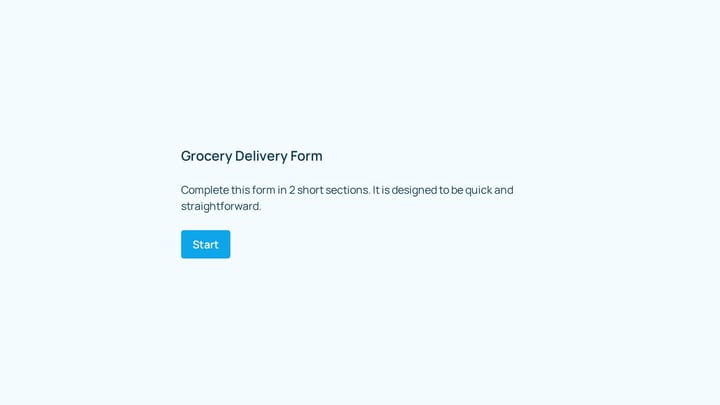
This dessert order form is live — click through it
This is a real, working template from our gallery. Fill it out like a respondent would, then make it your own.

What to look for in a form builder with payment processing
Payment forms have requirements that regular forms don’t. Here’s what actually matters when you’re evaluating tools.
Payment processor support
The form builder needs to connect to at least one major payment processor. The big three are Stripe, PayPal, and Square, and they each have different strengths.
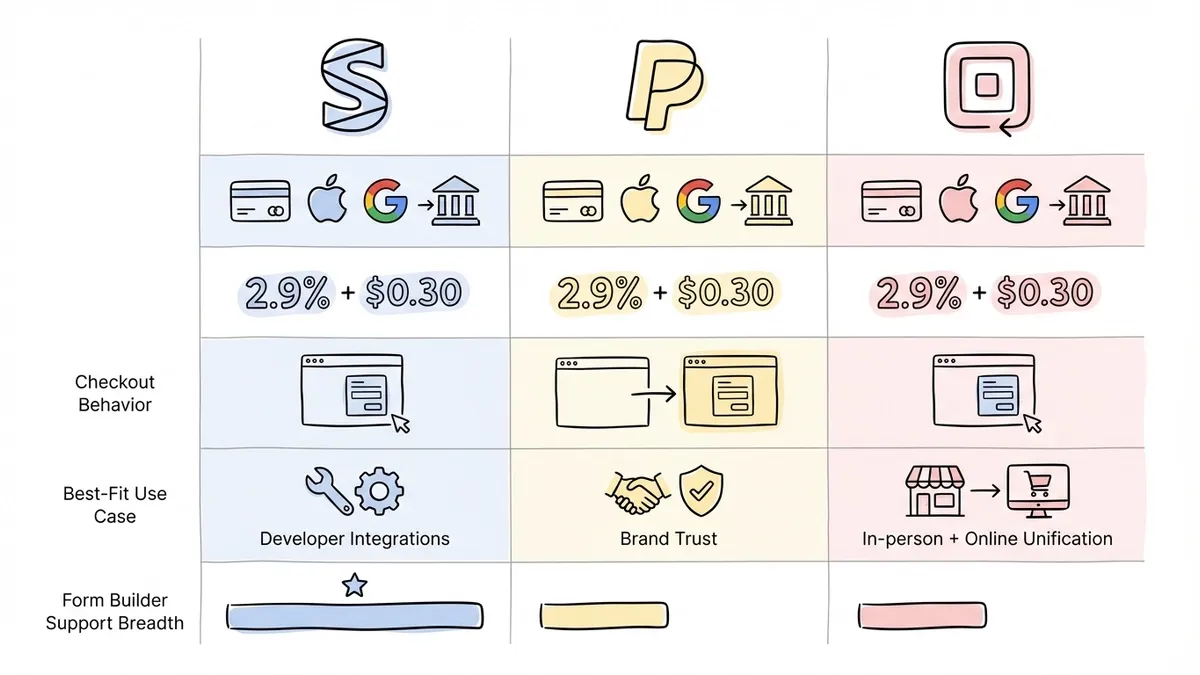
Stripe is the most widely integrated option. It supports credit cards, debit cards, Apple Pay, Google Pay, and bank transfers in most countries. Processing fees are typically 2.9% + $0.30 per transaction in the US. Most form builders integrate with Stripe first because its API is well-documented and reliable.
PayPal has the advantage of brand recognition. Some customers, especially older demographics and international buyers, trust PayPal more than entering card details directly. The downside is that PayPal’s checkout flow can redirect users away from your form, which breaks the seamless experience.
Square is popular with businesses that also have physical locations, since it unifies online and in-person payments. If you already use Square for your point-of-sale system, having your form payments flow into the same dashboard is convenient.
The best payment form builders support at least Stripe and PayPal. Some also support newer options like Braintree or regional processors. If you only get one, Stripe covers the widest range of use cases.
Pricing calculations
A payment form that can’t calculate totals is barely useful. You need the form to handle quantity-based pricing (3 tickets at $25 each = $75), variable pricing (different ticket tiers or product options), tax calculations, discount codes, and shipping fees.
Some form builders handle this with built-in calculation fields. Others rely on the payment processor to compute the total. The first approach gives you more control. The second is simpler but less flexible.
Recurring payments
If you’re collecting subscriptions, memberships, or installment payments, the form builder needs to support recurring billing through the Stripe integration. Not all form builders offer this, and the ones that do sometimes charge extra for it.
Receipt and confirmation handling
After someone pays, they expect a confirmation. At minimum, the form builder should show a thank-you page with a summary of what was paid. Better tools also send email receipts automatically.
PCI compliance: the security part you can’t skip
Here’s where payment forms get serious. When you collect credit card information, you’re subject to PCI DSS (Payment Card Industry Data Security Standard). This isn’t optional. It’s a set of security requirements enforced by the card networks (Visa, Mastercard, etc.), and violating them can result in fines, increased processing fees, or losing the ability to accept cards entirely.
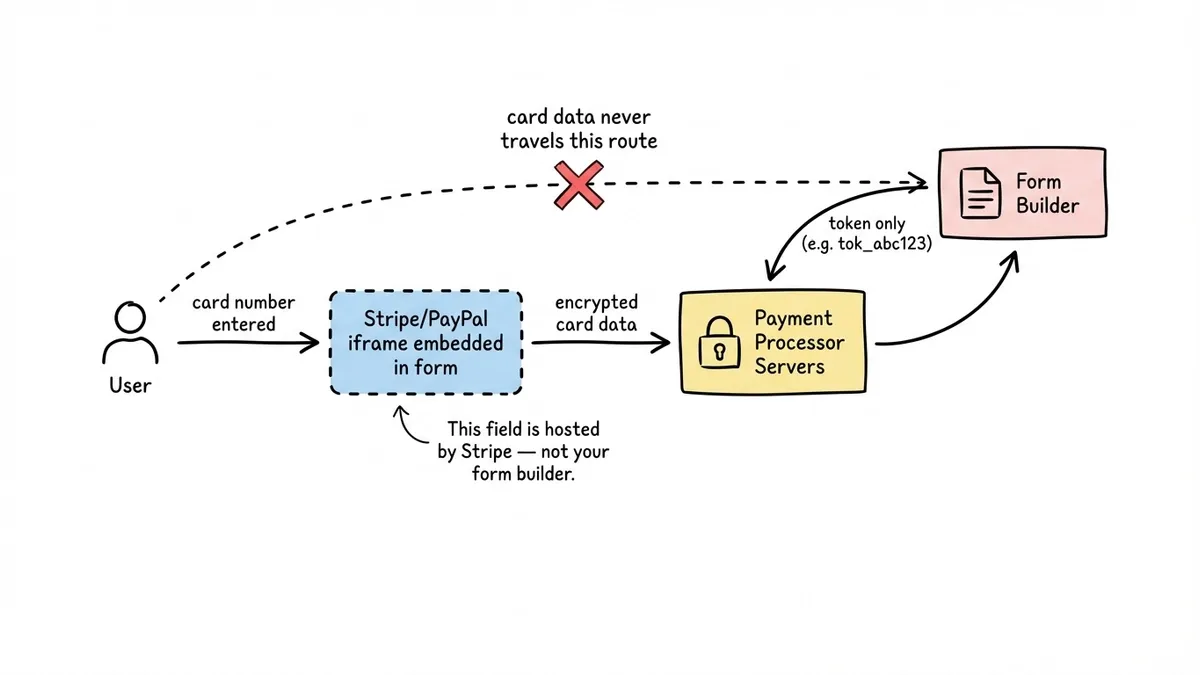
The good news: you almost certainly don’t need to handle PCI compliance yourself. Modern payment form builders embed the payment processor’s own input fields into your form. When someone types their card number, that data goes directly to Stripe or PayPal’s servers. It never touches your form builder’s servers, and it never touches yours.
This approach is called tokenization. The processor collects the sensitive card data, returns a token (a random string representing the payment method), and the form builder uses that token to charge the card. Your form only ever sees the token, not the actual card number.
What this means in practice:
- The card number field in your form is actually an iframe or embedded element hosted by Stripe/PayPal, not a regular form field
- The form builder itself is classified as SAQ A under PCI DSS, which is the lightest compliance level
- You don’t need to worry about encrypting card data at rest, because you never store it
Red flag to watch for: if a form builder asks you to create a regular text field for credit card numbers, run. That means card data would pass through their servers unencrypted, which violates PCI requirements and puts your customers at risk.
SSL/TLS encryption (the padlock in the browser) is also non-negotiable. Any form collecting payments must be served over HTTPS. Most form builders handle this automatically, but verify it if you’re embedding the form on your own website.
UX best practices for payment forms
Payment forms have higher stakes than a typical contact form. People are handing over money. Any confusion, friction, or doubt increases the chance they’ll abandon the form. Here are the details that matter.
Show the total before the payment step
This sounds obvious, but a surprising number of payment forms don’t do it well. If someone selects three items, applies a discount code, and adds shipping, they need to see the final total clearly before they enter payment details. Surprising someone with an unexpected amount at the last step is the fastest way to lose a sale.
Display an itemized summary: what they’re buying, quantities, unit prices, discounts, taxes, and the total. Update it in real time as they make selections.
Keep the form short
Every field you add to a payment form costs you conversions. This is true for all forms, but the effect is amplified when money is involved. People are already hesitant to pay online. Making them fill out 15 fields before they can enter their card number gives them 15 opportunities to reconsider.
Collect only what you need to fulfill the order and process the payment. Name, email, and payment details are the baseline. Shipping address if you’re sending something physical. Everything else should earn its place or get cut.
Use multi-step layouts for longer payment forms
If your payment form genuinely needs more fields (event registration with meal preferences, t-shirt sizes, and emergency contacts, for example), break it into pages. Put the informational fields first and the payment step last.
This works for two reasons. People who’ve already invested time filling out earlier pages are more likely to complete the payment step. And it keeps each page visually clean instead of presenting a wall of fields.
Display trust signals
People look for reasons to trust your form before entering card details. Small visual cues help: the padlock icon and HTTPS in the URL bar, “Powered by Stripe” or the payment processor’s logo near the card fields, and your business name and logo on the form itself.
These aren’t magic. But their absence is noticeable. A bare form with no branding and no indication of who’s processing the payment feels sketchy, even if it’s technically secure.
Handle errors gracefully
Card declines happen. Expired cards, insufficient funds, incorrect CVVs. When a payment fails, the error message should be specific: “Your card was declined. Please check your card number and expiration date, or try a different card” is far more useful than a generic “Payment failed.”
Don’t clear the entire form when a payment error occurs. Losing ten fields of data because a card number had a typo is infuriating. Keep the form state intact and let the user fix just the payment field.
Form builders that handle payments well
Several established form builders offer solid payment integrations. Here’s a quick look at the most common options.
Jotform integrates with Stripe, PayPal, Square, and about 30 other payment gateways. It supports one-time payments, subscriptions, and donations. The free plan allows payment collection but limits you to 5 forms and 100 monthly submissions. Paid plans start at $39/month for Bronze, or $408 a year billed annually.
Typeform integrates with Stripe. The payment experience fits naturally into its one-question-at-a-time format, which can feel smooth for simple purchases. Payment features require the Business plan at $59/month.
Tally offers Stripe integration on its free plan, which is unusual. You can collect one-time payments without upgrading. The trade-off is less design flexibility compared to dedicated payment form tools.
Cognito Forms supports Stripe, PayPal, and Square, with calculation fields and quantity-based pricing. Recurring payments are available on paid plans. The free plan allows payment collection with a per-transaction fee on top of the processor’s fees.
Google Forms does not support payment collection natively. You’d need a third-party add-on, and the experience is clunky. If payments are a requirement, Google Forms isn’t the right tool.
The right choice depends on your volume, budget, and how much design control you need. For occasional payment forms with low volume, a free tier with Stripe support (like Tally or Cognito Forms) might be enough. For higher volume or more complex pricing, Jotform’s breadth of payment integrations is hard to beat.
Where Fomr stands on payment collection (honest answer)
Payment collection is on Fomr’s roadmap and coming soon, but it isn’t available in the product today. We’d rather be upfront about that than bury it in fine print.
If collecting payments through your form is a hard requirement right now, you’ll need one of the tools listed above.
What Fomr does well today is everything around the payment step. Our drag-and-drop editor gives you full design control with 1,700+ fonts, custom colors, backgrounds, and logos. You get multi-page forms, 30+ field types, embed widgets, popup forms, QR code sharing, and custom domains on Pro. The free plan includes unlimited forms, responses, and team members, which is genuinely unusual for a form builder.
If your form doesn’t involve payments, or if you can handle the payment step separately for now (linking to a Stripe payment page after submission, for example), Fomr is worth a look.
Practical tips for payment forms
A few things worth keeping in mind, regardless of which tool you use:
Test the full payment flow yourself. Every payment form builder offers a test mode or sandbox. Use it. Go through the entire process as a customer on both desktop and mobile: fill out the form, enter test card details, submit, and check that the confirmation and receipt work.
Start with Stripe if you’re unsure. It has the widest form builder support, the most straightforward pricing, and good documentation. You can always add PayPal later if your customers ask for it.
Don’t hide the price. If your form collects a payment, the amount should be visible from the start, not revealed only at the payment step. People abandon forms when they feel surprised or misled about cost.
Watch your abandonment rate. Payment forms typically have higher abandonment than non-payment forms. If yours is above 70-80%, something in the flow is causing friction. Common culprits: too many fields, unclear pricing, no trust signals, or a payment step that feels disconnected from the rest of the form.
Consider offering multiple payment methods. Some people won’t enter a credit card but will pay through PayPal. Others prefer Apple Pay because it’s faster. The Baymard Institute’s checkout research consistently shows that limited payment options are a top reason for abandonment.
Build the form first, add payments when you’re ready
A payment form is still a form. The payment step matters, but so does everything before it: the field choices, the layout, the design, the mobile experience. A beautifully integrated Stripe checkout at the end of a confusing, ugly form won’t save your conversion rate.
Get the form right first. If you need payments today, the tools above will get you there. If you want to start building forms that look great and work well, try Fomr for free. No account required.