A single HIPAA violation can cost between $100 and $50,000 per incident, with annual penalties capping at $1.5 million per violation category. In 2023, the HHS Office for Civil Rights settled or imposed penalties totaling over $4 million, and that doesn’t count the state-level enforcement actions that have become increasingly common. The financial exposure is real, but the reputational damage is worse. Patients don’t come back to a practice that leaked their medical records through a web form.
If your forms collect protected health information, HIPAA compliance isn’t optional. It’s a federal requirement with teeth. And the form builder you use to collect that data is a critical link in your compliance chain.
This guide covers what HIPAA actually requires from your forms, which form builders meet those requirements, the mistakes that lead to violations, and how to make a practical decision about which tool to use. We’ll also be upfront about where Fomr fits in this picture (spoiler: we’re not HIPAA compliant yet).
Disclaimer: This article is educational, not legal advice. HIPAA compliance depends on your specific situation, the data you collect, and how your systems are configured. Work with a qualified healthcare compliance attorney or consultant before making decisions about PHI handling.
What HIPAA requires from your forms
HIPAA isn’t a single rule. It’s a set of regulations, primarily the Privacy Rule and the Security Rule, that govern how covered entities and their business associates handle protected health information. When you collect PHI through an online form, several specific requirements kick in.
What counts as PHI
Protected health information is any individually identifiable health information that relates to a person’s past, present, or future physical or mental health condition, the provision of healthcare, or payment for healthcare. The key word is “individually identifiable.” A dataset showing that 200 patients in a zip code have diabetes isn’t PHI. A form submission that says “John Smith, DOB 03/15/1982, diagnosed with Type 2 diabetes” absolutely is.
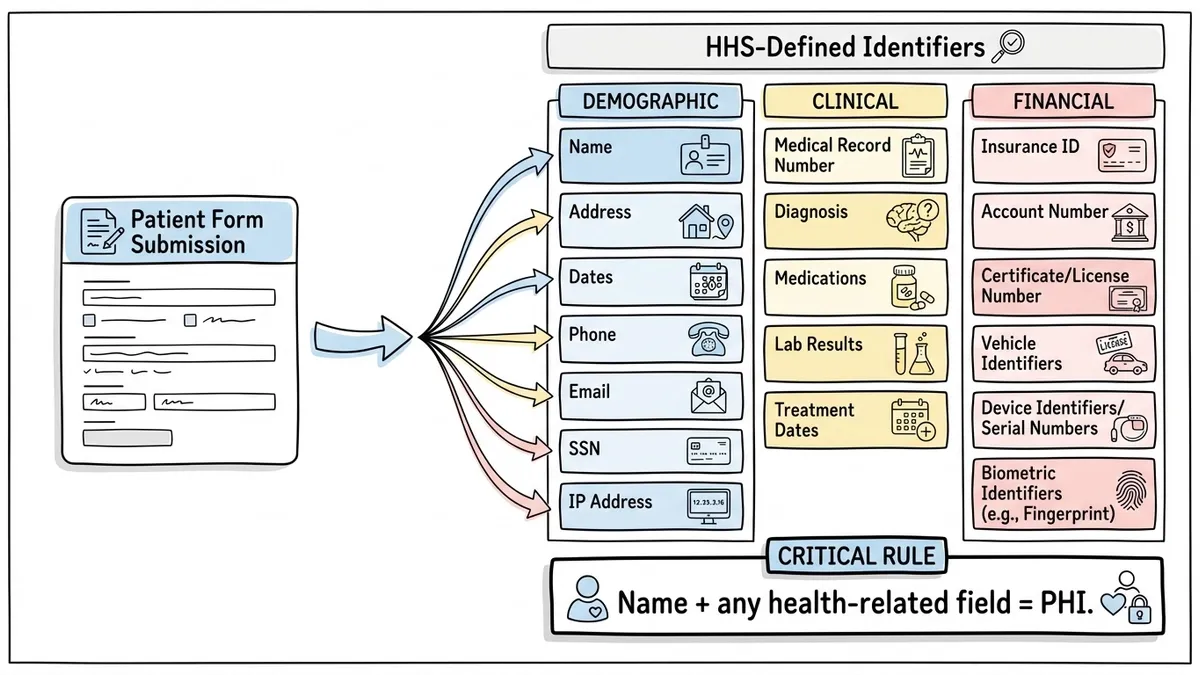
The HHS guidance on PHI lists 18 identifiers that, when combined with health information, create PHI. These include names, dates (birth, admission, discharge), phone numbers, email addresses, Social Security numbers, medical record numbers, and even IP addresses in some interpretations.
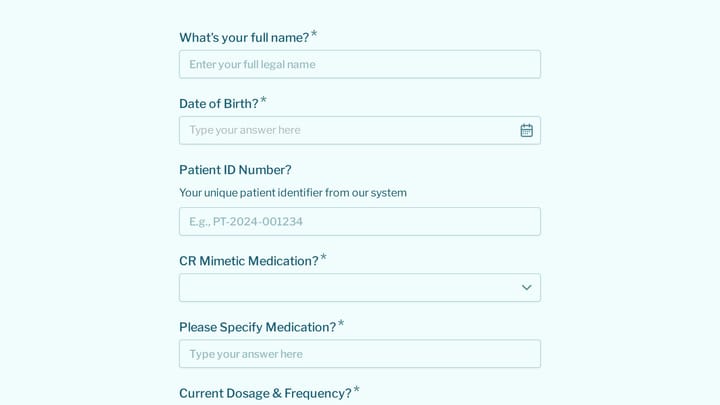
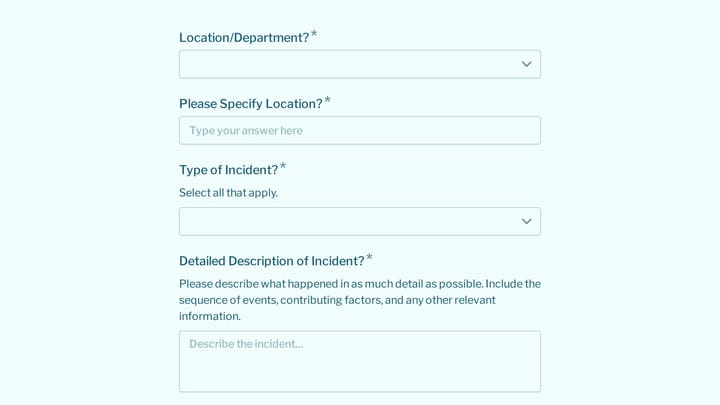
For practical purposes: if your form collects a person’s name alongside anything health-related (symptoms, medications, diagnoses, insurance details, appointment reasons that reference conditions), you’re collecting PHI.
The Business Associate Agreement
This is where most form builder evaluations should start. Under HIPAA, any vendor that creates, receives, maintains, or transmits PHI on behalf of a covered entity is a business associate. Your form builder stores patient data on its servers. That makes it a business associate.
A Business Associate Agreement (BAA) is a legal contract between you and the vendor that specifies how they’ll protect PHI, what they’re allowed to do with it, and what happens if there’s a breach. Without a signed BAA, using a form builder to collect PHI is a HIPAA violation, full stop. It doesn’t matter how secure the tool is technically. No BAA means no compliance.
Some form builders will sign a BAA on their enterprise or healthcare-specific plans. Others won’t sign one at all, which tells you everything you need to know about whether they’re appropriate for PHI collection.
Encryption requirements
The HIPAA Security Rule requires covered entities and business associates to implement technical safeguards to protect electronic PHI (ePHI). Encryption is the most important of these.
You need encryption in two places:
- In transit: Data moving from the patient’s browser to the server must be encrypted via TLS/HTTPS. This is table stakes in 2026, but it’s worth verifying, especially if you’re using custom domains or embedding forms on older websites.
- At rest: Data stored in the form builder’s database should be encrypted using a strong standard like AES-256. If someone gains unauthorized access to the database, encrypted data is unreadable without the keys.
HIPAA technically classifies encryption as an “addressable” safeguard rather than “required,” which means you can use an alternative measure if you document why encryption isn’t reasonable. In practice, there’s no good reason to skip encryption for form data in 2026. Any auditor will expect it.
Access controls and audit trails
HIPAA requires that access to ePHI be limited to authorized individuals. Your form builder needs role-based access controls so you can restrict who sees patient submissions. The receptionist who manages appointment scheduling probably shouldn’t have access to detailed medical history form responses.
Audit trails are equally important. HIPAA requires that you track who accessed PHI, when, and what they did with it. If a staff member exports all patient intake responses at 2 AM on a Saturday, you need a log of that. Good audit trails also protect you during investigations. If OCR comes knocking, you can demonstrate exactly who had access to what.
Our guide to choosing a secure form builder covers encryption, access controls, and audit logging in more detail. Those security fundamentals apply to HIPAA compliance and beyond.
Breach notification
If PHI is compromised, HIPAA requires notification to affected individuals within 60 days, and to HHS if the breach affects 500 or more people. Your form builder vendor, as a business associate, is required to notify you of any breach on their end so you can fulfill your notification obligations.
This is another reason the BAA matters. It should spell out the vendor’s breach notification timeline and responsibilities. A vendor that won’t sign a BAA also won’t have contractual obligations to tell you when something goes wrong.
Give it a try
Fill out this live patient health history questionnaire
This is a real, working template from our gallery. Fill it out like a respondent would, then make it your own.

Which form builders are HIPAA compliant
Not many. HIPAA compliance requires significant infrastructure investment, legal commitments, and ongoing security audits. Here’s a realistic look at the options.
Jotform
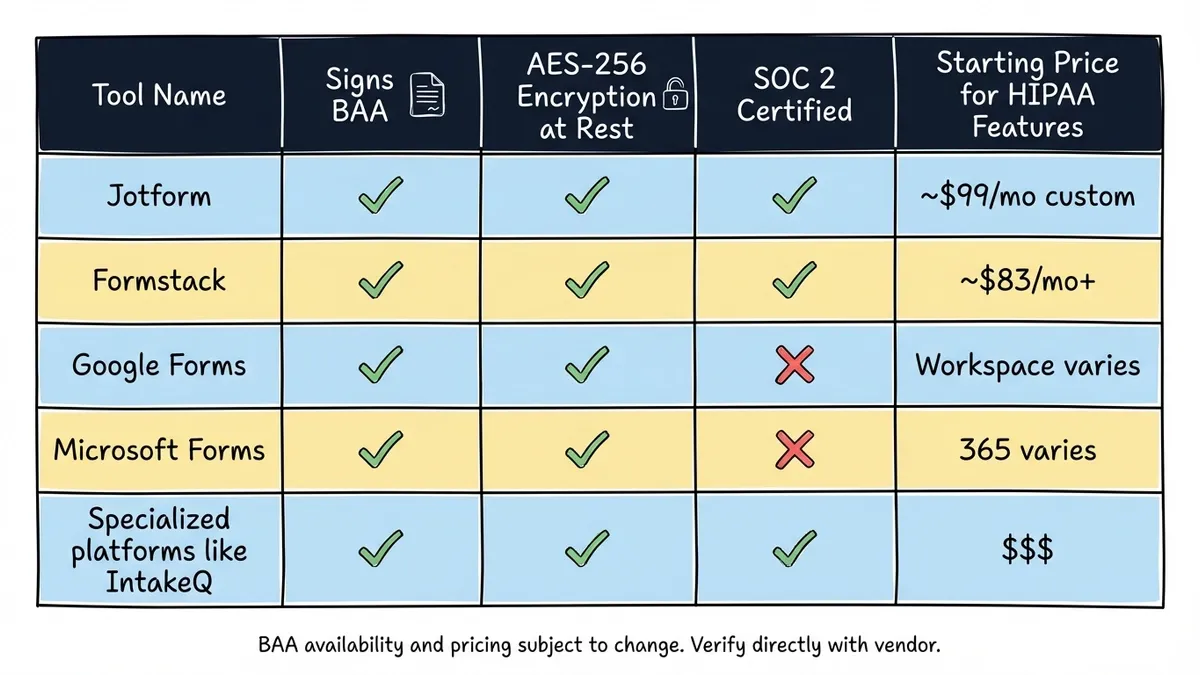
Jotform offers HIPAA compliance on its Enterprise plan, which starts at custom pricing (typically $99/month and up). They’ll sign a BAA, provide encryption at rest and in transit, and offer audit logging. Jotform has been in the HIPAA form space for years and has a dedicated healthcare product. The downside is cost. Their free and standard plans are not HIPAA compliant, and the jump to Enterprise pricing is steep for small practices.
Formstack
Formstack offers HIPAA compliant forms on their healthcare-specific plans. They sign BAAs, provide AES-256 encryption, and have SOC 2 Type II certification. Formstack also integrates with several EHR systems, which matters if you need form data to flow into clinical workflows. Pricing starts around $83/month for their base plan, with HIPAA features on higher tiers.
Google Forms
Google Forms is not HIPAA compliant by default. Google Workspace (the paid business version) can be configured for HIPAA compliance, and Google will sign a BAA for Workspace customers. But the configuration isn’t automatic. You need to set up the Workspace account correctly, restrict sharing settings, and ensure forms aren’t accessible to unauthorized users. It’s doable, but it requires careful setup and ongoing management. If you’re already paying for Google Workspace, this can be a cost-effective option. If you’re not, the overhead of configuring it correctly may not be worth it.
Microsoft Forms
Similar story to Google. Microsoft 365 business plans can be covered under a BAA, and Microsoft Forms inherits those protections when configured within a compliant Microsoft 365 environment. The same caveats apply: you need to configure it correctly, and the default settings aren’t HIPAA compliant out of the box.
Specialized healthcare form platforms
Tools like IntakeQ, Phreesia, and Klara are built specifically for healthcare. They come with BAAs, HIPAA compliance baked in, EHR integrations, and features like e-signatures for consent forms. They’re more expensive than general-purpose form builders, but they’re purpose-built for the use case. If your primary need is patient intake and clinical forms, these are worth evaluating.
What to look for when evaluating a HIPAA compliant form builder
Price and features matter, but compliance is the filter that comes first. Here’s a practical checklist.
Will they sign a BAA? Ask this before anything else. If the answer is no, or “only on our enterprise plan,” you know your minimum price point. A vendor that hedges on the BAA question is a vendor you shouldn’t trust with PHI.
What encryption do they use? You want AES-256 at rest and TLS 1.2+ in transit. Ask specifically. “We use industry-standard encryption” is a non-answer.
Where is data stored? Some healthcare regulations have data residency requirements. Even if yours don’t, knowing where your patients’ data physically lives is basic due diligence.
Do they have SOC 2 certification? SOC 2 Type II is the gold standard for SaaS security audits. It’s not a HIPAA requirement, but it demonstrates that the vendor takes security seriously enough to submit to independent auditing. A form builder with SOC 2 and a signed BAA is a much safer bet than one with just a BAA.
What happens to data when you cancel? HIPAA requires that business associates return or destroy PHI when the relationship ends. Your BAA should address this, but it’s worth asking about the practical process. Can you export all data before cancellation? How quickly is data purged from their systems?
Do they support access controls and audit logs? You need to restrict who on your team can view submissions, and you need a record of who accessed what. If the form builder gives every team member full access with no logging, that’s a compliance gap.
Common HIPAA violations with online forms
Understanding where others have failed helps you avoid the same mistakes. These are the violations that come up repeatedly in OCR enforcement actions and settlement agreements.
Using a non-compliant tool for PHI
This is the most common one. A practice sets up a patient intake form on a free form builder that has no BAA, no encryption at rest, and no access controls. The form works fine. Patients fill it out. Data flows in. Everything seems great until an audit or a breach reveals that PHI has been sitting in a non-compliant system for months or years.
The fix is straightforward: before you put any form live that collects PHI, confirm that the tool has a signed BAA and meets the technical safeguards. If it doesn’t, use a different tool for that specific form.
Collecting more PHI than necessary
HIPAA’s “minimum necessary” standard says you should only collect the PHI you actually need for the purpose at hand. An appointment request form doesn’t need a full medical history. A satisfaction survey doesn’t need a patient’s Social Security number.
Over-collection increases your risk surface. Every additional PHI field is another piece of data you need to protect, track, and eventually dispose of. Keep forms focused on what’s actually needed for the task.
Sending PHI via unencrypted email notifications
Your form builder might be HIPAA compliant, but if it sends you an email notification containing the patient’s full submission in plain text, you’ve created a compliance gap. Email is not encrypted by default. PHI in email notifications is a common violation that’s easy to overlook.
Configure notifications to alert you that a new submission arrived without including the actual PHI. Something like “New patient intake form submitted” with a link to view the response in the secure platform is the right approach.
No access controls on responses
If every staff member in your practice can log into the form builder and see every patient’s submissions, you’re violating the minimum necessary standard. The billing coordinator doesn’t need to see therapy intake questionnaires. The marketing intern definitely doesn’t need access to medical history forms.
Set up role-based access from day one. It’s much harder to restrict access retroactively once people are used to seeing everything.
Not every healthcare form needs HIPAA compliance
This is a point that gets lost in the conversation. HIPAA applies to PHI. Not every form a healthcare organization uses collects PHI.
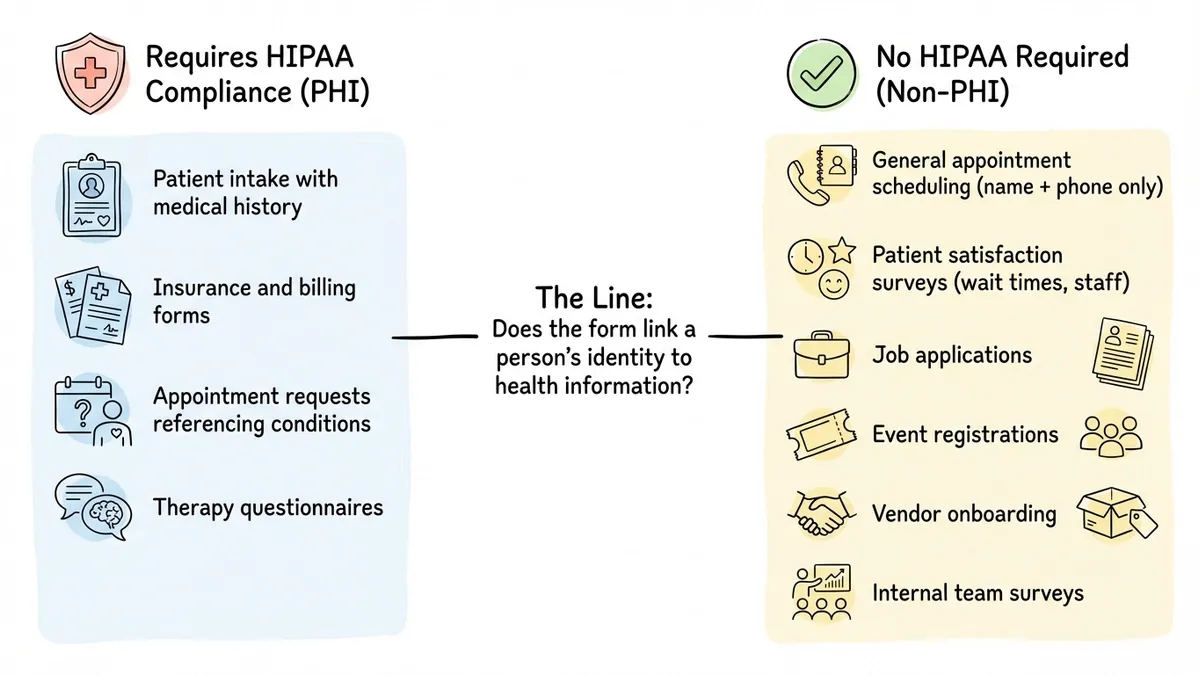
A patient satisfaction survey that asks about wait times and staff friendliness, without referencing the patient’s condition or treatment, typically falls outside PHI requirements. A general contact form on your practice’s website (“I’d like to schedule an appointment, here’s my name and phone number”) is arguably not PHI if it doesn’t include health information.
Job application forms, vendor registration forms, event signups, internal feedback surveys. Healthcare organizations use plenty of forms that have nothing to do with patient health data.
For these non-PHI forms, you have much more flexibility in which tools you use. You still want good security practices (encryption, access controls, a reputable vendor), but you don’t need a BAA or HIPAA-specific infrastructure.
Our guide to form builders for healthcare breaks down which types of healthcare forms typically require HIPAA compliance and which don’t. It’s worth reading if you’re trying to figure out where the line falls for your organization.
Where Fomr fits (an honest assessment)
We’ll be direct: Fomr is not HIPAA compliant. We don’t sign BAAs, and we haven’t built the specific infrastructure (field-level encryption, HIPAA-grade audit trails, breach notification workflows) required to handle PHI. If your form collects protected health information, Fomr is not the right tool for that form today.
That said, healthcare organizations have plenty of forms that don’t involve PHI. Appointment requests that stick to scheduling logistics, patient satisfaction surveys focused on experience rather than clinical details, event registrations, job applications, internal team forms, vendor onboarding. For these use cases, Fomr works well.
Fomr stores form data in the European Union in SOC 2-compliant data centers, encrypts it in transit over HTTPS/TLS and at rest, and gives you team-based access controls. Our security page documents these practices in full. You get unlimited forms, responses, and team members on the free plan, which is useful for organizations that need a lot of non-clinical forms without per-form or per-response costs. The drag-and-drop editor makes it easy to build professional-looking forms quickly, and you can customize designs with your practice’s branding.
If you want to see what building a patient-facing form looks like (for non-PHI use cases), our patient intake form guide walks through the structure and field planning. Just remember: if the form collects PHI, use a HIPAA compliant tool for that specific form.
HIPAA compliance is something we’re evaluating for the future, but we’d rather be honest about where we are today than make claims we can’t back up.
Making the right choice
Picking a HIPAA compliant form builder comes down to a few practical steps:
-
Audit your forms. List every form your organization uses and classify each one: does it collect PHI, or doesn’t it? This determines which forms need a HIPAA compliant tool and which don’t.
-
Start with the BAA. For PHI forms, your first question to any vendor should be whether they’ll sign a Business Associate Agreement. No BAA, no deal.
-
Verify the technical safeguards. Encryption at rest and in transit, access controls, audit logging. Don’t take marketing claims at face value. Ask for specifics and documentation.
-
Use the right tool for each job. You don’t need to run every form through your most expensive, most locked-down platform. Use a HIPAA compliant tool for PHI forms and a flexible, well-designed tool like Fomr for everything else.
-
Get professional guidance. A healthcare compliance consultant can review your specific setup and identify gaps that a blog post can’t. The cost of a compliance review is trivial compared to the cost of a violation.
HIPAA compliance isn’t something you set up once and forget. It’s an ongoing responsibility that requires regular review as your forms, tools, and workflows change. But getting the foundation right, starting with the right form builder for each use case, puts you in a much stronger position.