Nobody thinks about form security until something goes wrong. A healthcare clinic collects patient symptoms through an unencrypted form. A nonprofit stores donor credit card numbers in a spreadsheet linked to a Google Form. A SaaS company’s lead generation form gets hit with 40,000 spam submissions in a weekend, and buried in the noise are SQL injection attempts targeting their backend.
These aren’t hypothetical scenarios. The 2024 Verizon Data Breach Investigations Report found that web applications were the attack vector in 26% of breaches, and forms are one of the most exposed parts of any web application. They’re the front door. They accept user input, transmit it across the internet, and store it in a database. Every step in that chain is a potential failure point.
If you’re collecting personal data, financial information, health records, or anything else people wouldn’t want posted on a billboard, you need a secure form builder. Not one that just claims to be secure in its marketing copy, but one where you can verify the specific protections in place.
This guide walks through what actually matters when evaluating form security, the vulnerabilities most people overlook, and how to make a practical decision without needing a security engineering degree.
What “secure” actually means for a form builder
Security isn’t a single feature. It’s a stack of protections that work together, and a weakness at any layer can undermine the rest. Here’s what to look for.
TLS encryption in transit
This is the baseline. Every form submission should travel over HTTPS, which means the data is encrypted using TLS (Transport Layer Security) while it moves from the respondent’s browser to the server. If a form builder serves forms over plain HTTP, walk away. It’s 2026. There’s no excuse.
TLS protects against man-in-the-middle attacks, where someone intercepts the data while it’s being transmitted. Think of it as a sealed envelope versus a postcard. Without TLS, anyone sitting on the same network (a coffee shop Wi-Fi, a compromised router) can read the form data in plain text.
Check for this: look at the URL where your form is hosted. It should start with https://. The form builder’s embed code should also load over HTTPS. If you’re using a custom domain, make sure the builder provisions an SSL certificate for it automatically.
Encryption at rest
TLS covers data in transit. Encryption at rest covers data sitting in the database. If someone gains unauthorized access to the server or database, encrypted data is unreadable without the decryption keys.
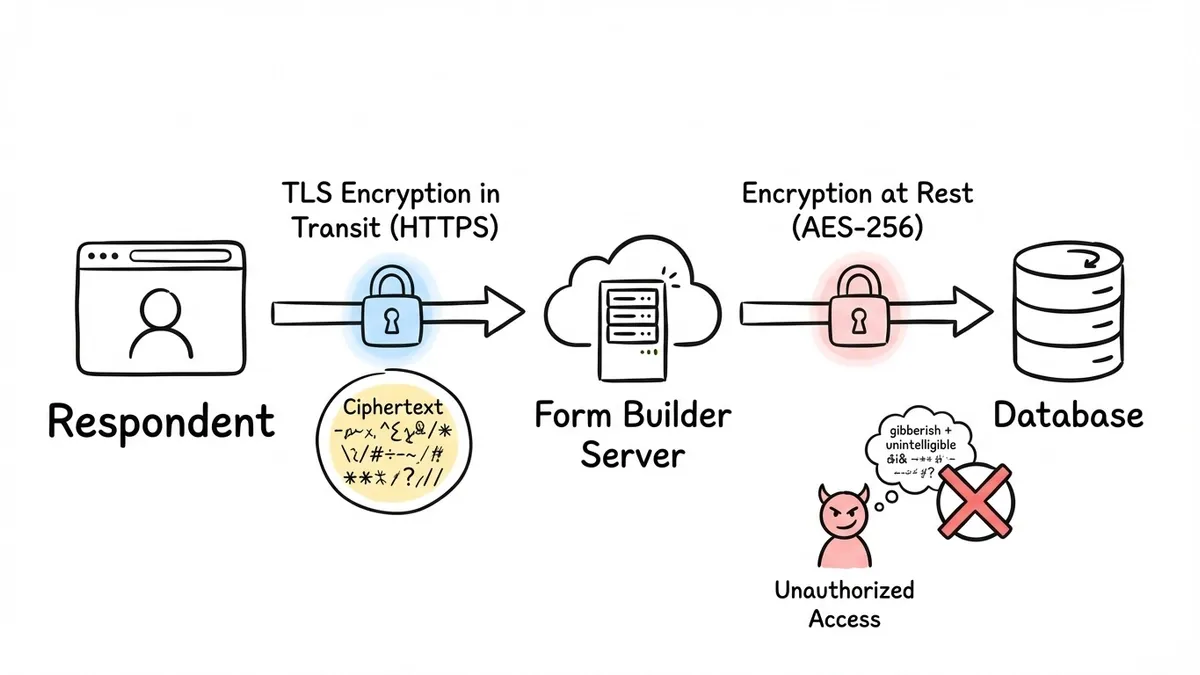
Not every form builder encrypts stored responses. Some store them in plain text in a database, relying entirely on access controls to keep them safe. That works until it doesn’t. A misconfigured database, a leaked credential, or a compromised backup can expose everything.
Ask your form builder: are responses encrypted at rest? What encryption standard do they use? AES-256 is the current industry standard. Anything less should raise questions.
Access controls and permissions
Who can see the form responses? In a lot of form builders, everyone on the team account can see everything. That’s a problem if you have 15 people on your account but only 3 should be reading customer support submissions that contain personal details.
Good access controls let you restrict who can view, edit, or export responses. Role-based access (admin, editor, viewer) is the minimum. Some regulated industries need field-level permissions, where certain team members can see the form structure but not the response data.
This matters more than people realize. The Verizon DBIR consistently finds that insider threats and privilege misuse account for a meaningful percentage of breaches. Overly broad access is a risk even when everyone on your team has good intentions.
Data residency and storage location
Where is the data physically stored? If you’re collecting data from EU residents, GDPR has specific requirements about data transfers outside the European Economic Area. If you’re in healthcare, your data might need to stay within specific geographic boundaries depending on local regulations.
Most form builders store data in the United States by default. Some offer EU data residency as an option, usually on higher-tier plans. If data residency matters for your use case, ask about it before you commit. We covered the broader GDPR picture in our guide to building GDPR compliant forms, which goes deeper on consent, data minimization, and privacy notices.
Audit logs
If something goes wrong, you need to know what happened. Audit logs track who accessed what data, when, and what they did with it. Did someone export all responses at 3 AM? Did a team member’s account get accessed from an unusual location?
Audit logs are a compliance requirement for SOC 2, HIPAA, and most other security frameworks. They’re also just good practice. You can’t investigate a security incident if you have no record of what happened.
Give it a try
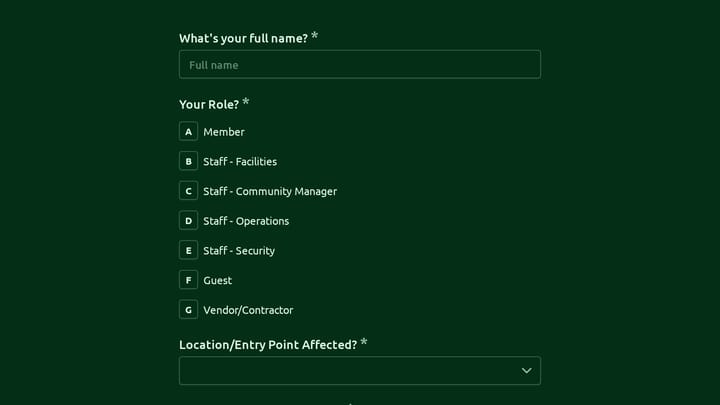
Try this access control forms yourself
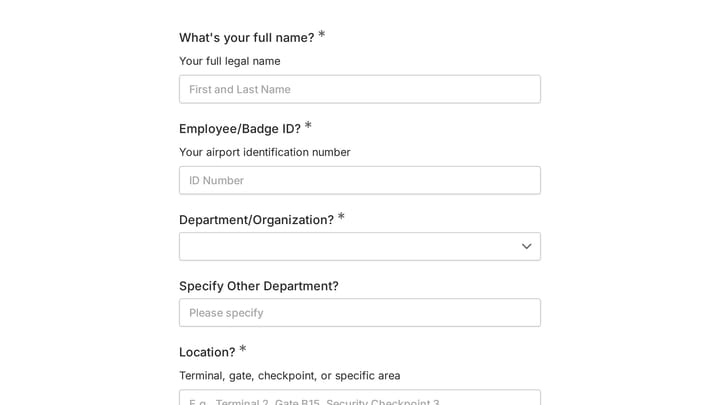
This is a real, working template from our gallery. Fill it out like a respondent would, then make it your own.

Security certifications and what they mean
Certifications are a shortcut for evaluating a vendor’s security posture. They’re not perfect, but they’re better than taking a marketing page at face value.
SOC 2
SOC 2 (System and Organization Controls 2) is an auditing framework developed by the AICPA. It evaluates a company’s controls across five “trust service criteria”: security, availability, processing integrity, confidentiality, and privacy.
A SOC 2 Type II report means an independent auditor examined the company’s controls over a period of time (usually 6-12 months) and verified they were operating effectively. Type I is a point-in-time snapshot. Type II is more meaningful because it shows the controls actually work over time, not just on the day the auditor showed up.
SOC 2 is the most common certification you’ll see from SaaS form builders. It’s not a magic stamp that guarantees nothing will ever go wrong, but it does mean a third party has verified that the basics (and then some) are in place. Worth knowing how to read the claim, though. “We are SOC 2 compliant” and “we run on SOC 2-compliant infrastructure” are different statements: the first is the company’s own audit, the second is their hosting provider’s. Check which one a vendor is making, and ask for the report if the distinction matters to you.
ISO 27001
ISO 27001 is an international standard for information security management systems (ISMS). It’s broader than SOC 2 and covers the entire organization’s approach to managing information security risks. Getting ISO 27001 certified is expensive and time-consuming, which is why you see it more often at larger companies.
If a form builder has ISO 27001 certification, it signals a mature security program. But plenty of smaller, well-run companies have strong security without ISO 27001 simply because the certification process is designed for larger organizations.
HIPAA compliance
HIPAA isn’t a certification you can get. There’s no official “HIPAA certified” stamp. When a form builder says it’s “HIPAA compliant,” it means the company claims to meet the requirements of the HIPAA Security Rule and is willing to sign a Business Associate Agreement (BAA).
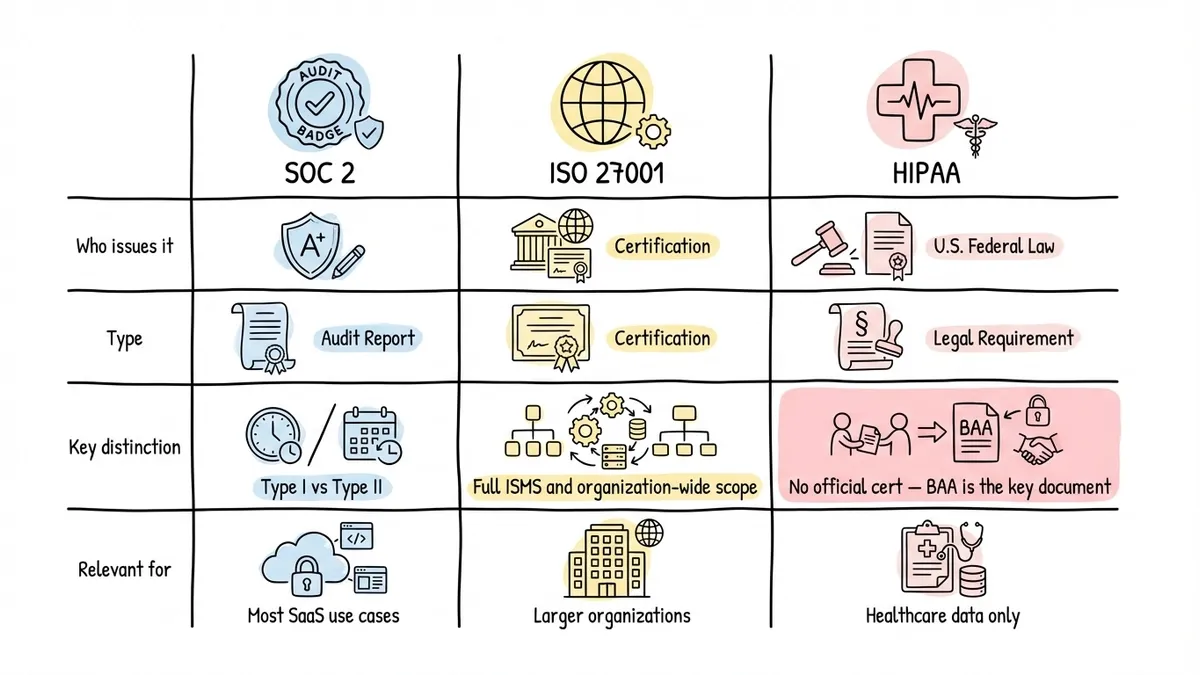
The BAA is the key document. If a form builder won’t sign a BAA, it doesn’t matter what their website says about HIPAA. Without a BAA, you’re legally exposed if there’s a breach involving protected health information. Our guide to form builders for healthcare covers this in more detail, including which types of healthcare forms actually require HIPAA compliance and which don’t.
Common form security vulnerabilities
Even with a solid form builder, there are attack vectors that catch people off guard. Knowing about them helps you ask better questions and configure your forms more carefully.
Cross-site request forgery (CSRF)
CSRF attacks trick a user’s browser into submitting a form on their behalf without their knowledge. Imagine you’re logged into your bank, and you visit a malicious website that silently submits a transfer request using your authenticated session.
For form builders, CSRF protection means including a unique token with each form that the server validates on submission. If the token doesn’t match, the submission gets rejected. This should be handled automatically by the form builder. You shouldn’t have to think about it, but it’s worth asking whether it’s in place.
Injection attacks
SQL injection and cross-site scripting (XSS) are the classics. An attacker submits malicious code through a form field, and if the backend doesn’t sanitize the input properly, that code gets executed.
SQL injection can expose or destroy your entire database. XSS can steal session cookies, redirect users, or deface pages. Both are preventable with proper input validation and output encoding, but they still show up in the OWASP Top 10 year after year because developers keep making the same mistakes.
A good form builder handles input sanitization on your behalf. You shouldn’t need to worry about a respondent typing '; DROP TABLE responses; -- into a text field. But if you’re building forms with custom code or using a builder that lets you inject raw HTML, be careful.
Spam and bot submissions
Spam isn’t just annoying. It’s a security concern. High-volume bot submissions can be used for credential stuffing (testing stolen username/password combinations), DDoS attacks against your backend, or simply flooding your inbox so you miss legitimate submissions.
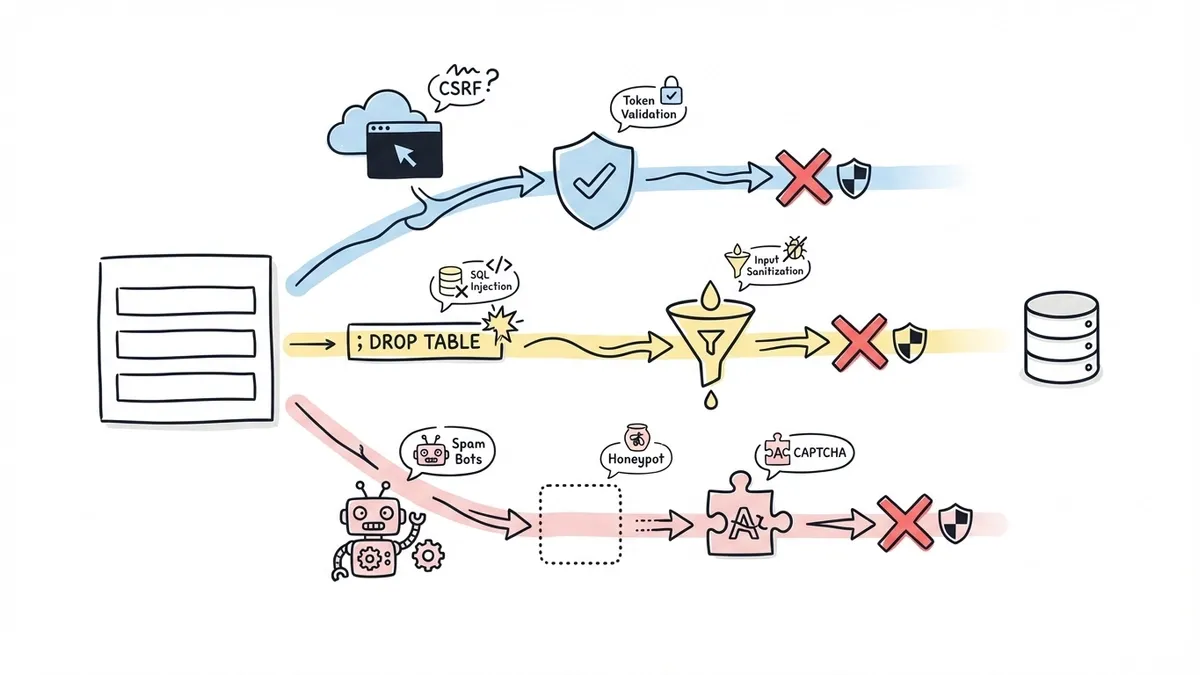
CAPTCHA is the most common defense, but it’s not the only one. Honeypot fields (hidden fields that humans don’t see but bots fill out), rate limiting, and behavioral analysis all help. Some form builders offer built-in spam protection. Others leave it entirely to you.
The tradeoff with CAPTCHA is that it hurts completion rates. Nobody enjoys clicking on traffic lights. Invisible reCAPTCHA and hCaptcha’s passive mode are better, but they still add friction for some users. Honeypot fields are invisible to respondents and catch most unsophisticated bots, making them a good first line of defense.
Data leakage through integrations
Your form builder might be secure, but what about the tools it sends data to? If form responses get piped into a Google Sheet that’s shared with “anyone with the link,” your encryption at rest doesn’t matter much.
Every integration is a potential leak. Email notifications that include full response data in plain text. Webhook payloads sent to HTTP (not HTTPS) endpoints. Third-party analytics scripts loaded on the form page that can read field values. Review your entire data flow, not just the form builder itself.
How to evaluate a form builder’s security
Here’s a practical checklist you can use when comparing options. Not every item will matter for every use case, but working through the list will surface the gaps that matter for yours.
The questions to ask
- Is all data transmitted over HTTPS/TLS? This should be a yes with no caveats.
- Are responses encrypted at rest? Ask for the specific encryption standard.
- Where is data stored? Country and cloud provider matter for compliance.
- What access controls are available? Role-based access, team permissions, response-level restrictions.
- Do they have SOC 2 Type II? Ask for the report or at least confirmation of the audit period.
- Will they sign a BAA? Only relevant if you’re handling health information, but critical if you are.
- How do they handle input sanitization? Protection against injection and XSS should be automatic.
- What spam protection is built in? CAPTCHA, honeypot fields, rate limiting.
- Can you delete individual responses? Important for GDPR right-to-erasure requests.
- Do they publish a security page or trust center? Transparency is a good sign.
Red flags to watch for
Vague security claims with no specifics. “Bank-level encryption” is a marketing phrase, not a technical specification. If a form builder can’t tell you whether they use AES-256 or where their servers are located, that’s a problem.
No mention of security certifications or audits. A small company might not have SOC 2 yet, and that’s understandable. But they should at least be able to describe their security practices in concrete terms.
Inability to delete data. If you can’t delete individual form responses, you can’t comply with GDPR deletion requests or clean up after a data collection mistake. This is surprisingly common in free-tier form builders.
Forms served over HTTP. Again, it’s 2026. If the form URL doesn’t start with https://, don’t use it.
Matching security to your use case
Not every form needs the same level of protection. A quick poll asking people their favorite pizza topping doesn’t need the same security posture as a patient intake form collecting medical history and insurance details.
Think about what you’re collecting and calibrate accordingly.
Low sensitivity: Event RSVPs, feedback surveys, newsletter signups. TLS encryption and basic spam protection are sufficient. Most reputable form builders cover this by default.
Medium sensitivity: Contact forms with personal details, job applications, customer support requests. You want TLS, encryption at rest, access controls, and a form builder with at least SOC 2 compliance.
High sensitivity: Health information, financial data, legal documents, anything involving minors. You need all of the above plus a BAA (for health data), strict access controls, audit logs, and careful attention to data residency. Our guide on creating online consent forms covers the specific considerations for forms that collect sensitive authorizations.
The mistake people make is applying the same casual approach to every form. A marketing team that’s used to building quick survey forms might not think twice about collecting sensitive HR data with the same tool and the same settings. The form builder might be capable of handling it securely, but only if it’s configured correctly.
Where Fomr stands on security
We should be straightforward about where Fomr fits in this picture. All forms on Fomr are served over HTTPS with TLS encryption, and form data is stored encrypted at rest in the European Union, in SOC 2-compliant data centers. Our infrastructure is GDPR-aligned. You can delete individual responses, and team access is managed at the workspace level.
Our security page documents these practices in full, including data residency, retention, and the third-party providers involved.
For many use cases, that’s exactly what you need. If you’re building contact forms, feedback surveys, registration forms, or lead capture forms, Fomr gives you a secure foundation with a free tier that doesn’t artificially limit your forms or responses.
We don’t currently offer a signed BAA, which means Fomr isn’t the right choice for forms that collect protected health information under HIPAA. We’re honest about that because we’d rather you make the right decision for your compliance requirements than find out the hard way. If you need HIPAA compliance, look for a form builder that explicitly offers BAAs and has the infrastructure to back it up.
For everything else, you can try Fomr’s editor without creating an account and see how it works. Security shouldn’t require a premium plan to get the basics right, and it doesn’t with us.
The short version
Choosing a secure form builder comes down to verifying specifics, not trusting marketing language. Check for TLS, encryption at rest, access controls, and relevant certifications. Understand the common vulnerabilities (CSRF, injection, spam) and make sure your builder handles them. Match your security requirements to the sensitivity of the data you’re collecting.
Forms are one of the most direct ways you collect data from real people. Treating their security as an afterthought is a risk you don’t need to take.