Jotform pricing looks simple on the plan cards: a free Starter plan and three paid tiers from $34 to $99 a month on annual billing. The part that decides your bill sits lower on the page. Jotform counts submissions, form views and storage across your whole account, so every client form you run draws from the same pool.
For one business with a contact form, that’s fine. For an agency running lead forms for ten clients, it means a single client’s campaign can push everyone’s forms over quota. Below is every plan with its real limits, which of them reset each month, and a month-by-month model of a 10-client agency so you can see which tier it ends up paying for.
All Jotform figures in this post were checked on November 3, 2026, on Jotform’s pricing page. Jotform runs frequent promotions, so the price you see at checkout may be lower for the first term.
Jotform pricing at a glance
Jotform has five plans. Four have public prices.
| Plan | Monthly billing | Annual billing | Active forms | Submissions / month | Form views / month | Stored submissions | Upload space |
|---|---|---|---|---|---|---|---|
| Starter (free) | $0 | $0 | 5 | 100 | 10,000 | 500 | 100 MB |
| Bronze | $39/mo | $408/yr ($34/mo) | 25 | 1,000 | 100,000 | 10,000 | 1 GB |
| Silver | $49/mo | $468/yr ($39/mo) | 50 | 2,500 | 1,000,000 | 25,000 | 10 GB |
| Gold | $129/mo | $1,188/yr ($99/mo) | 100 | 10,000 | 10,000,000 | 100,000 | 100 GB |
| Enterprise | Custom | Custom | Unlimited | Unlimited | Unlimited | Unlimited | Unlimited |
A few more caps scale with the tiers. Payment submissions and signed documents are 10, 100, 250 and 1,000 a month from Starter to Gold. Fields per form go from 100 on Starter to 1,000 on Gold.
So, how much does Jotform cost? For most small businesses it’s $34 to $39 a month on an annual plan. For anyone running forms at volume, it’s $99 a month or more, and that’s the number to plan around.
Is Jotform free? What the Starter plan really allows
Yes, Jotform is free on the Starter plan, and the free plan is more capable than most. You get payment integrations, widgets, conditional logic and templates without paying.
The Jotform free plan limits are what bite:
- 5 active forms on the whole account
- 100 submissions a month, counted across all five forms
- 500 stored submissions in total, after which the oldest responses are deleted to make room
- Jotform branding on your forms and signed documents
- No HIPAA features
One hundred submissions a month is about three a day. A single client’s newsletter signup can burn through that in a week, so for agency work the free plan is a trial, not a home.
Monthly limits vs lifetime limits
This is the part of Jotform pricing that catches people out, because the limits behave differently.
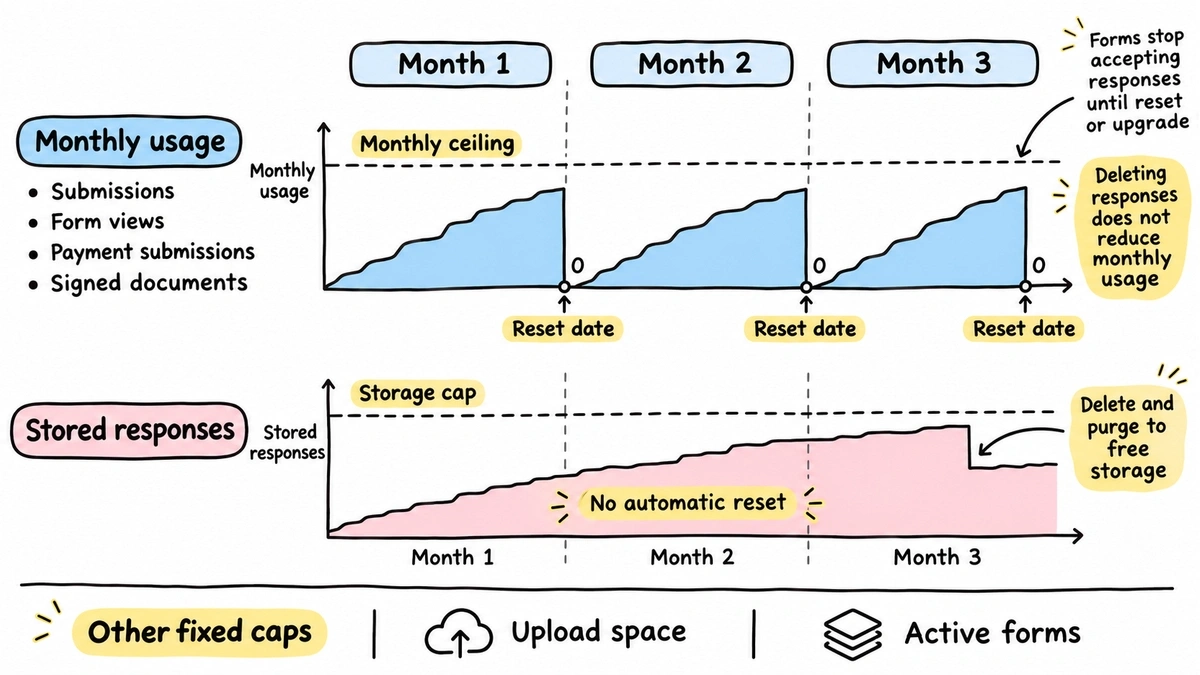
These reset every month, on the same day each month (your reset date is under Account Settings, Usage):
- Submissions
- Form views
- Payment submissions
- Signed documents
These don’t reset at all:
- Total submission storage. It’s the maximum number of responses your account can hold. Jotform’s pricing FAQ says that once you pass it, the system deletes the oldest response to make room for each new one. You can download and purge old entries to stay under it.
- Upload space. A fixed amount of disk space for file uploads. You free it by deleting and purging submissions that have files attached.
- Active forms. A ceiling on how many forms can be live at once.
When a monthly limit runs out, forms stop accepting responses. Jotform’s help guide on the over-quota error says visitors see a page reading “This Form Has Exceeded Its Allocated Quota” until the reset date or an upgrade. You get an email warning, but your respondents get the error.
Deleting responses doesn’t give you room back on the monthly counter. Only the reset or an upgrade does.
Which tier unlocks what
Two features decide the tier for a lot of buyers.
Branding removal starts at Bronze. Every paid plan can remove Jotform branding and swap in your own.
HIPAA features (encryption, auditing, PHI segmentation) start at Gold. If you collect health information, Silver isn’t an option, and the minimum is $99 a month on annual billing. If you’re unsure whether you need it, the HHS summary of the HIPAA Privacy Rule explains who counts as a covered entity.
A few things only exist on Enterprise. The pricing FAQ calls Enterprise “the only multiuser Jotform plan”, and lists custom domains and single sign-on among its extras. The plan cards label Bronze, Silver and Gold as single-user. Jotform Teams adds shared team spaces, but the pricing page doesn’t say which tiers include it, so if three people on your team build forms, ask Jotform sales before you commit.
Nonprofit and education discounts
Jotform publishes two discounts, both applied for on its site:
- Nonprofits get 50% off Bronze, Silver and Gold, and 30% off Enterprise
- Educational institutions get the same: 50% off the three paid tiers, 30% off Enterprise
The 50% applies to both monthly and yearly subscriptions. A nonprofit on Gold annual pays about $594 a year instead of $1,188. That’s a real saving and worth applying for if you qualify. Agencies don’t, even when their clients do.
Modeling a 10-client agency, month by month
Here’s where account-wide limits turn into a bill. Picture a small agency with ten clients. Each client has about three live forms: a lead form, a contact or quote form, and a campaign form that changes every quarter. That’s 30 active forms.
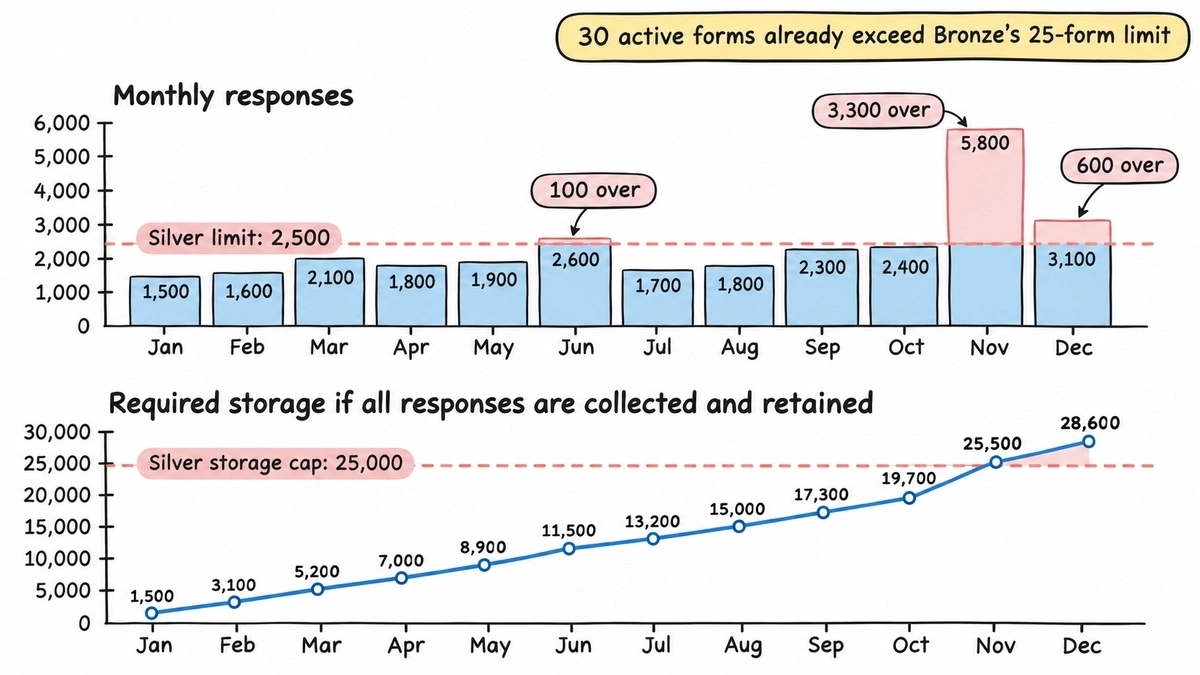
Thirty forms rules out Bronze before you count a single response, because Bronze stops at 25. So the agency starts on Silver.
Typical clients bring in 100 to 250 responses a month each. Then the calendar happens: one client runs an event in June, an ecommerce client runs a Black Friday giveaway in November, and a few clients push holiday promos in December.
| Month | Responses (all 10 clients) | Silver monthly cap (2,500) | Running total stored |
|---|---|---|---|
| January | 1,500 | OK | 1,500 |
| February | 1,600 | OK | 3,100 |
| March | 2,100 | OK | 5,200 |
| April | 1,800 | OK | 7,000 |
| May | 1,900 | OK | 8,900 |
| June | 2,600 | Over by 100 | 11,500 |
| July | 1,700 | OK | 13,200 |
| August | 1,800 | OK | 15,000 |
| September | 2,300 | OK | 17,300 |
| October | 2,400 | OK | 19,700 |
| November | 5,800 | Over by 3,300 | 25,500 |
| December | 3,100 | Over by 600 | 28,600 |
Three things go wrong on Silver.
First, in June the last 100 respondents of the month hit the over-quota page. That might be the final day of event registration.
Second, in November the account runs out of submissions around the middle of the month. The giveaway is still running, and so is every other client’s lead form. Your accounting client’s contact form goes dark because a different client’s campaign took off. That’s the real cost of a shared pool: one client’s success becomes another client’s outage.
Third, by November the account holds more than 25,000 stored responses. On Silver, Jotform starts deleting the oldest ones unless you export and purge first. Every month from then on, someone on your team has a data-housekeeping chore.
The tier it’s forced into
To get through the year without an outage, the agency needs Gold: 10,000 submissions a month and 100,000 stored. You could stay on Silver monthly and jump to Gold for three months, but you’d be upgrading reactively, after a client’s form has already failed.
| Option | Annual cost | Cost per client per month |
|---|---|---|
| Silver, annual (with outages in June, November and December) | $468 | $3.90 |
| Silver monthly for 9 months, Gold monthly for 3 | $828 | $6.90 |
| Gold, annual | $1,188 | $9.90 |
| Gold, monthly | $1,548 | $12.90 |
Gold annual is the honest answer for this agency: $1,188 a year, or $9.90 per client each month. It’s still a single-user plan, and custom domains for client-branded form links still need Enterprise.
If you want to run your own numbers, our form builder cost calculator does this math for different response volumes and tools.
Where Jotform is worth the money
Jotform does a lot that we don’t, and you should weigh that before switching anything.
- Payments. Jotform takes payments through many gateways, with a payment submission allowance on every plan. We don’t collect payments yet (it’s in progress).
- PDF editor. Jotform turns submissions into designed PDF documents. We don’t have this.
- Approvals. Jotform has approval flows that route a submission to the right person to approve or deny. We don’t have approval workflows.
- E-signatures. Jotform Sign handles signed documents, with a monthly allowance per plan. We don’t offer e-signatures.
- HIPAA. Jotform’s Gold and Enterprise plans include HIPAA features. We don’t market Fomr for HIPAA-regulated data.
If your clients need any of those, Jotform’s price buys you real features, and the Gold bill is fair for what you get.
The same agency on Fomr
If your client work is mostly lead forms, quote requests, briefs and surveys, response caps are the problem you’re paying to solve. That’s where we fit.
| Jotform Gold (annual) | Fomr Pro (annual) | |
|---|---|---|
| Price | $1,188/yr | $288/yr ($24/mo) |
| Monthly responses | 10,000 | Unlimited |
| Stored responses | 100,000 | Unlimited |
| Active forms | 100 | Unlimited |
| Team members | Single-user plan | Unlimited |
| Separate workspace per client | Folders; Jotform Teams tiers not listed | Unlimited workspaces |
| Branding removal | Yes | Yes |
| Custom domain | Enterprise only | One custom domain |
| Payments | Yes | Not yet (in progress) |
| PDF editor, approvals, e-signatures | Yes | No |
| HIPAA features | Yes | No |
Every Fomr plan, including the free one, has unlimited forms and unlimited responses. There’s no monthly counter to run out, so a Black Friday spike for one client can’t switch off another client’s form. Pro adds unlimited workspaces, branding removal, one custom domain, partial responses, respondent emails and redirect on completion. On Pro, the 10-client agency above pays $2.40 per client per month.
Give it a try
Send clients a digital marketing consultant estimate form that never hits a monthly quota
This is a real, working template from our gallery. Fill it out like a respondent would, then make it your own.

What Fomr doesn’t do for agencies yet
We’d rather you find these out here than after migrating:
- Roles and permissions are on our Business plan, which isn’t available to buy yet. Today everyone on your team sees every workspace, so you can’t give a client login to only their own forms. Full isolation means a separate organization per client, each with its own Pro subscription.
- Pro includes one custom domain. Multiple domains and custom email domains are Business-only.
- Owner notifications only go to members of your organization (up to 10 per form), so they can’t go straight to a client’s inbox.
- Native GA4 and Meta Pixel tracking are coming soon. For now you can capture UTMs in hidden values, and track conversions with the
fomr:submitevent our embed fires on your page. - No Zapier, webhooks or CRM integration yet. Responses can go to Google Sheets and email today.
For a fuller look at the trade-offs, see our Jotform alternative page and the roundup of Jotform alternatives. If Typeform is also on your shortlist, our breakdown of the Typeform response limit covers the same problem there.
What I’d do with this
Look at last year’s response counts per month, added across every client, and find your biggest month. Then pick the Jotform tier that survives that month, not your average one, and check your running total against the stored-submission cap.
If that tier is Gold and you aren’t using payments, PDFs, approvals or signatures, you’re paying for a submission allowance. Build one client’s form on Fomr without signing up, compare it side by side, and check our pricing for the rest of the details.