A client’s giveaway goes live on Monday morning. By Wednesday the form shows a “not accepting responses” screen, and the ads are still running. Nobody touched the form. The account just ran out of responses for the month.
That’s the Typeform response limit doing exactly what it was built to do. Every major form builder counts something: responses, submissions, stored entries, upload space or form views. They also behave very differently when the counter fills up. Some close the form, some keep collecting, and one quietly deletes your oldest data.
We checked every vendor’s own pricing page and help center on November 3, 2026. Here’s what each one caps and what happens when you hit it.
Typeform response limit vs other builders: the table
All figures are from each vendor’s pricing page or help docs, checked on November 3, 2026. Prices are monthly billing in USD.
| Tool | Free plan cap | Cheapest paid cap | Counted across | What happens at the cap |
|---|---|---|---|---|
| Typeform | 10 responses/month | 100/month (Basic, $39/mo) | Every form in the account | Forms go private until next month or until you upgrade |
| Jotform | 100 submissions/month, 500 stored | 1,000/month, 10,000 stored (Bronze, $39/mo) | Every form in the account | Forms disabled with a “Form over quota” message; over the storage cap, the oldest entry is deleted |
| Fillout | 1,000 responses/month | 2,000/month (Starter, $15/mo) | The account | Forms keep collecting; you’re asked to upgrade or wait for the reset on the 1st |
| Tally | No cap, fair use applies | No cap on Pro ($24/mo) | The account | Fair use review; Tally offers a custom plan above sustained heavy use |
| Paperform | 30 submissions/month | Unlimited, fair use (Pro, $59/mo) | The account | Forms or features “may stop working” until billing is updated |
| Google Forms | No published cap | No paid tier for Forms alone | Per form | Uploads stop when the owner’s Drive storage is full |
| Microsoft Forms | 200 per form (personal account) | 1,000 per form (paid personal) | Per form | Form stops taking new responses |
| Fomr | Unlimited | Unlimited (Pro, $24/mo) | Not counted | Nothing; file storage is the only cap (see below) |
Two columns in that table matter more than the numbers. “Counted across” tells you whether one busy form can starve the rest. “What happens at the cap” tells you whether you lose responses, lose access, or get a bill.
How the Typeform response limit works
Typeform’s response limits article is clear about the mechanics. The limit resets every month, applies to monthly and yearly plans alike, and unused responses don’t carry over. It’s pooled across all your forms, so a Plus account with three forms gets 1,000 responses in total, not 1,000 per form.
The current plans, from the pricing page cards:
- Free: 10 responses a month across all forms
- Basic: 100 responses a month, $39/month or $28/month billed yearly
- Plus: 1,000 responses a month, $79/month or $56/month billed yearly
- Business: 10,000 responses a month, $129/month or $91/month billed yearly
Typeform says it experiments with its pricing, and the comparison table on the same page showed lower figures than the cards on the day we checked. Treat any price you see as provisional and confirm it in your own account.
What respondents see at 100%
Typeform emails you at 90% and 100%. At 100%, your forms switch to private mode and respondents see a message that the form isn’t accepting new responses. The forms come back on their own at the start of the next month, or sooner if you upgrade.
Deleting responses won’t give any back. A deleted response still counts toward the month, which rules out the obvious workaround of clearing test entries.
Auto-upgrade keeps forms open, and keeps billing you
Typeform’s fix for this is auto-upgrade. Switch it on and your forms stay open past the limit while Typeform moves you up response tiers (Basic goes 100, 250, 500, 750, then Plus at 1,000), charging the difference for the rest of the billing period. The ceiling across all plans is 50,000 a month.
Here’s the part to read twice: an auto-upgraded plan stays in place for later billing periods by default. A single viral month on a yearly plan can set your renewal price for the next year unless you turn auto-upgrade off and downgrade by hand. It’s a reasonable feature. It’s also an easy way to pay Plus prices for a Basic workload.
Jotform limits: three counters, not one
Jotform’s account usage article lists more than one cap that can stop a form, and they work differently.
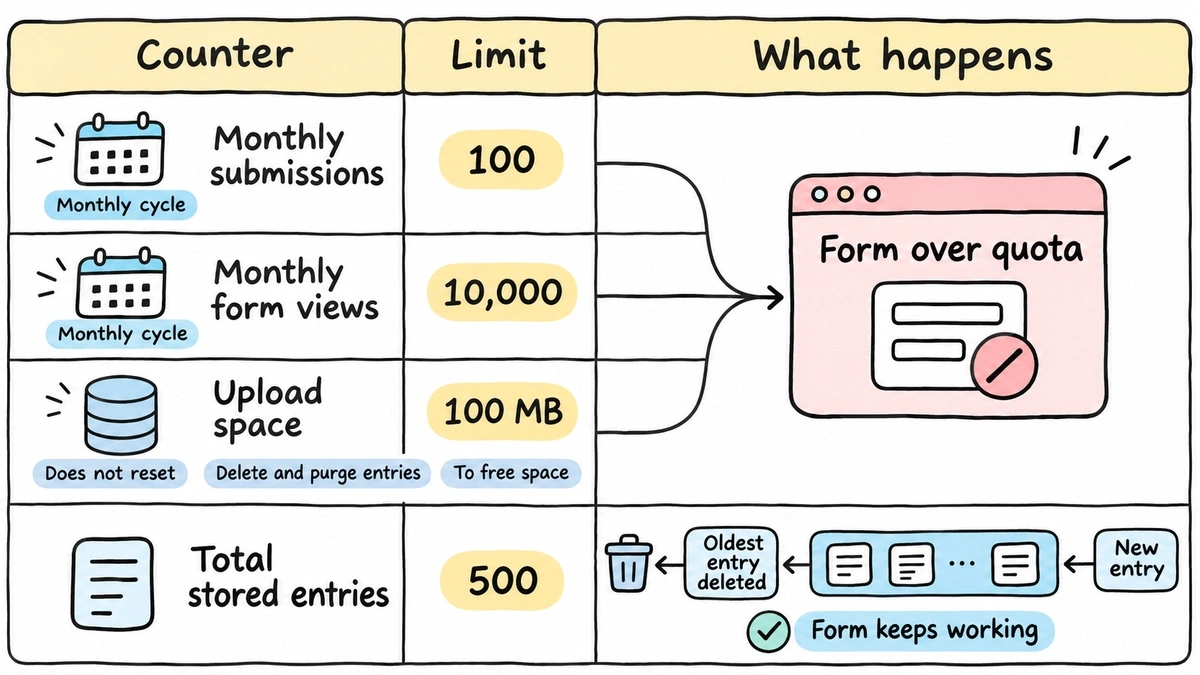
The Jotform submission limit most people mean is monthly submissions, which reset on your account’s own monthly cycle. Free (Starter) allows 100, Bronze 1,000, Silver 2,500, Gold 10,000. Hit one and Jotform disables your forms on a date in the warning email, and visitors see “This Form Has Exceeded Its Allocated Quota.” You can wait, upgrade, or earn extra submissions through Jotform’s Increase Limits tasks.
Monthly form views (10,000 on Free, 100,000 on Bronze) and upload space (100 MB on Free, 1 GB on Bronze) can trip the same “Form over quota” screen. Upload space doesn’t reset; you free it by deleting and purging entries.
Total submission storage is the one that surprises people. It’s the maximum number of entries you can keep across all forms: 500 on Free, 10,000 on Bronze, 25,000 on Silver, 100,000 on Gold. Jotform’s help page says that exceeding it “deletes the oldest form entry to make room for the new submission.” The form keeps working. Your history gets shorter.
Prices on November 3, 2026: Bronze $39/month ($34 billed yearly), Silver $49 ($39), Gold $129 ($99). Our Jotform pricing breakdown walks through what those tiers cost an agency in practice.
The builders that keep collecting
Not every tool closes the form. Some of the more generous caps come with fine print.
Fillout says it plainly in its pricing FAQ: “Your forms will still collect responses.” Past your monthly limit (1,000 on Free, 2,000 on Starter, 5,000 on Pro, unlimited on Business at $75/month), you’re asked to upgrade or wait for the count to reset on the 1st. Its fair use policy flags accounts above 30,000 submissions a month or 250,000 in total.
Tally puts no cap on submissions, even on the free plan, within its fair use policy. Tally’s example of heavy use is 50,000 submissions a month sustained for three or four months. If you go past that, Tally contacts you about a custom plan billed quarterly on top of your subscription. That’s about as honest as fair use gets, and Tally beats most of this list on raw volume for the money.
Paperform caps Free at 30 submissions a month and calls Pro ($59/month) and above unlimited, subject to fair use. Its pricing page says that if you go over your limits and don’t upgrade, your forms or features may stop working.
Google Forms publishes no response cap. The real limits are elsewhere: file uploads go to the owner’s Drive and use their storage, respondents must sign in with a Google account to upload, and the linked spreadsheet tops out at 20 million cells per Google’s Drive file limits.
Microsoft Forms caps per form, not per account. Per Microsoft’s limits page, a free personal account gets 200 responses per form and a paid personal account 1,000. Work and school accounts go up to 5,000,000. There’s also a ceiling of 400 forms per user.
Why agencies hit response caps first
A single business with one contact form rarely notices a monthly cap. An agency with eight clients does, because Typeform and Jotform both pool the limit across the whole account.
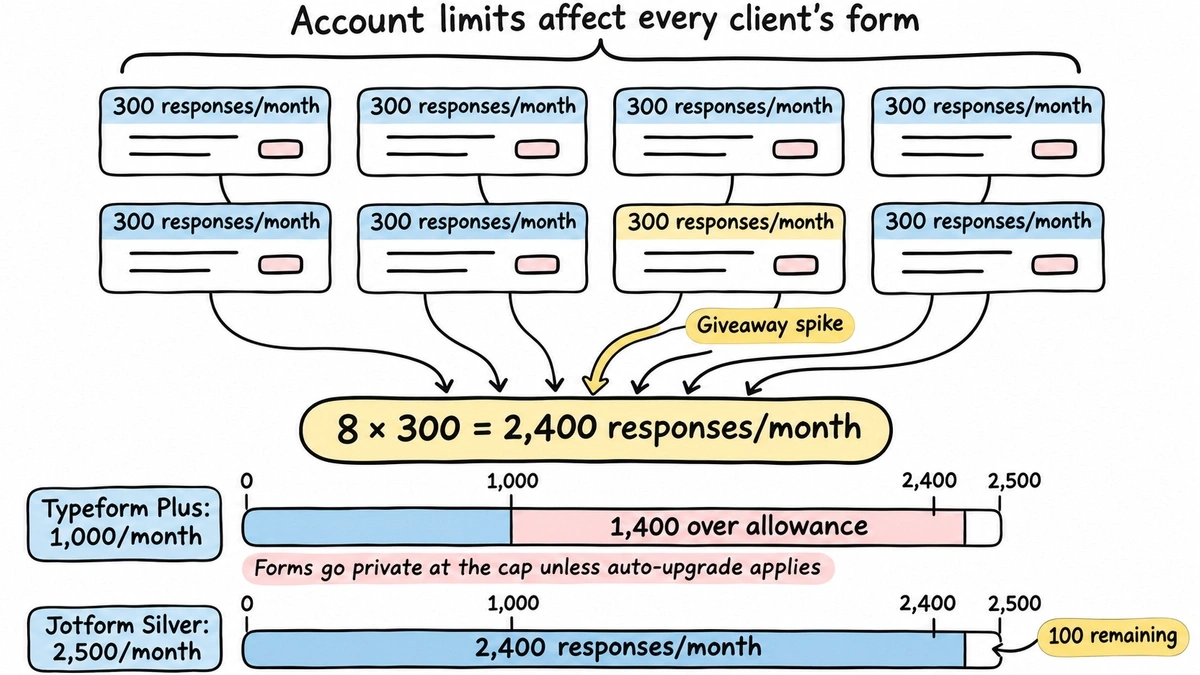
Run the numbers on a modest month. Eight clients, each with a lead form pulling 300 responses, is 2,400 responses. On Typeform Plus (1,000 a month) your forms would go private before the middle of the month unless auto-upgrade kicks in. On Jotform Silver (2,500 a month) you’d scrape by, with one client’s giveaway away from a “Form over quota” screen on every other client’s form.
Then there’s Jotform’s storage counter. At 2,400 submissions a month, Silver’s 25,000 stored entries fill up in about ten months. After that, every new lead deletes an old one unless someone exports and purges on schedule.
The pooling is the real issue. One client’s campaign takes off, and a different client’s form goes dark. You end up explaining a vendor’s billing model to someone who just wanted their leads.
What “form builder unlimited responses” actually means
“Unlimited” on a pricing page usually means one of three things:
- Unlimited, but a fair use policy defines heavy use (Tally, Fillout Business, Paperform Pro)
- No published cap, with the limit moved to storage or spreadsheet size (Google Forms)
- No response counter at all, with other resources capped (Fomr)
None of these is dishonest. Just read the fair use page before you put a high-volume campaign on any of them.
Where Fomr fits
We built Fomr with unlimited form submissions on every plan, including Free. There’s no monthly counter to reset, no form that goes private on day 20, and no auto-upgrade. Forms, responses and team members are unlimited on Free and Pro.
For agencies, Pro ($24/month) adds unlimited workspaces, so each client gets its own space, plus branding removal, one custom domain and partial responses. Hidden values capture UTM tags from the URL, and the embed fires a fomr:submit event you can hook into for conversion tracking.
In our own data (2,000+ published forms and 35,000+ completed responses since March 2025), monthly totals jump whenever a handful of high-volume forms take off. That spikiness is exactly what a monthly cap punishes.
Give it a try
Launch this halloween house decorating contest entry form with no entry cap
This is a real, working template from our gallery. Fill it out like a respondent would, then make it your own.

Unlimited responses is not unlimited storage
Here’s our honest limitation. Responses are unlimited, but file storage isn’t:
- Free: 10 MB per file, 100 MB of storage per organization
- Pro: 5 GB per file, 10 GB of storage per organization
Storage is shared by every workspace in the organization and includes your asset library. When it runs out, new file uploads stop being accepted, including files respondents try to attach, and we email your admins. A contest that asks for photos will hit this long before any response count would. The file upload docs cover how to set per-question size limits.
There are other gaps an agency should know about. We don’t have Zapier, webhooks, or native GA4 and Meta Pixel yet. Per-client roles are on the Business plan, which isn’t available to buy yet, so today everyone on your team sees every workspace. Owner notifications go only to organization members, so they can’t go straight to a client’s inbox.
Before you launch a high-volume campaign
Whichever tool you use, check these five things before the ads go live:
- Is the cap per form or pooled across the account?
- When does the counter reset, the 1st or your billing date?
- What do respondents see at the cap: a closed form, or nothing at all?
- Does deleting test responses give any back? (On Typeform, no.)
- Is there a separate cap on stored entries or upload space?
If you’re already planning a move, our Typeform alternatives for agencies roundup goes deeper on switching costs.
Run your next campaign without a counter
If response caps are the reason you’re shopping, test it with a real form. Open the guest editor and build one without signing up, or start from a template. When you need client workspaces and your own branding, compare plans and move to Pro.