You sign a client on Friday. By the following Wednesday you’re still waiting on their logo files, their ad account access and the name of whoever approves copy. The kickoff call turns into forty minutes of questions you could have asked in a form. That’s the week most people start looking for client intake form software.
The search gets confusing fast, because three different kinds of product show up under the same name: form builders, content collection tools, and client management suites that bundle intake with contracts and invoices. They solve different problems at very different prices.
This guide is for agencies and freelancers onboarding clients. It isn’t about patient intake; if that’s what you need, our patient intake form guide is the better read. All competitor prices and limits below were checked on each vendor’s own pricing page on November 14, 2026.
What agencies actually need from client intake form software
Before the list, here’s what breaks first when you onboard more than a couple of clients a month.
The form has to look like you, not like the tool. An intake form is the first thing a new client does after signing. A vendor badge in the footer and a generic link make a $5,000 retainer feel like a side project.
Clients only see the questions that apply. An SEO client doesn’t need the paid social section. That means conditional logic, and ideally on a plan you’d actually buy.
Files come in with the answers. Logos, brand guidelines, last quarter’s report. If the form can’t take uploads, you’re back to chasing email attachments.
Volume and form counts don’t bite. You’ll end up with an intake form per service, plus variations per client. Tools that cap active forms or monthly responses get expensive in a boring, predictable way.
The answers land where your team works. A spreadsheet, an inbox, a project tool.
Two things only some agencies need: a signature on the intake itself, and a deposit collected in the same step. Those two decide whether a plain form builder is enough for you, so keep them in mind as you read.
The 7 tools at a glance
Same columns for every tool. “Entry paid price” is the cheapest paid plan, month to month unless noted.
| Tool | What it is | Free plan | Entry paid price | The limit to watch | Vendor branding removed |
|---|---|---|---|---|---|
| Fomr | Form builder | Unlimited forms and responses | Pro, $24/month | No signatures or payments yet | Pro |
| Tally | Form builder | Unlimited forms and submissions (fair use) | Pro, $24/month | 10 MB per file on Free | Pro |
| Jotform | Form builder | 5 forms, 100 submissions/month | Bronze, $39/month | 25 forms and 1,000 submissions on Bronze, single user | Bronze |
| Typeform | Form builder | Yes, limited responses | Basic, $39/month | 100 responses/month on Basic | Plus, $79/month |
| Content Snare | Content collection | None listed | Basic, $42/month | 20 active requests on Basic | Plus, $85/month |
| Dubsado | Client management suite | 21-day trial | Starter, $335/year | 1 active lead capture form, no automated workflows on Starter | Not stated on pricing page |
| HoneyBook | Client management suite | None listed | Starter, $29/month billed yearly | 2 lead forms on Starter | Essentials, $49/month billed yearly |
1. Fomr: best for branded intake across many clients
We make Fomr, so weigh this entry accordingly. It’s first because of one specific situation: you run intake for several clients or services and don’t want the bill tied to how many forms you build or how many people fill them in.
Every Fomr plan, Free included, has unlimited forms, unlimited responses and unlimited team members. The Free plan also covers the parts an intake form leans on: Logic rules that show or hide questions and whole pages, multi-page layouts with a progress bar, answer piping, a File Upload question (10 MB per file, 100 MB of storage), and a Google Sheets workflow that adds each completed response as a row. The design side is where we put most of our effort, so fonts, colors, logo and background can match your brand on any plan.
Pro is $24/month. For intake, that buys you the things a client notices:
- The “Made with Fomr” badge is gone and forms can live on your own domain (one custom domain per organization)
- A confirmation email goes to the client after they submit
- A redirect sends them straight to your booking calendar when they finish
- Files up to 5 GB each within 10 GB of storage, which matters for brand asset bundles
- Partial responses, so you can see what a client entered before they stalled
- Unlimited workspaces, one per client or service line
Where we’re the wrong pick:
- No signature field and no payments. Payment collection is on our roadmap and not live. If the client must sign or pay inside the intake form, skip to Tally, Jotform or the suites below.
- No client login. Clients fill in a form; they don’t get a portal to come back to.
- We don’t chase. Fomr won’t email a client who stopped halfway. You’ll see the partial response on Pro and nudge them yourself.
- Integrations are thin. Google Sheets and email notifications today, plus an API. Zapier, Make, Slack, Notion and Airtable are marked coming soon.
- Notifications stay in your team. Owner emails go to up to 10 members of your organization.
Best for: agencies and freelancers who want intake forms that look like their own brand, for any number of clients, at a flat price. The form builder for agencies page has the short version of how that works.
Give it a try
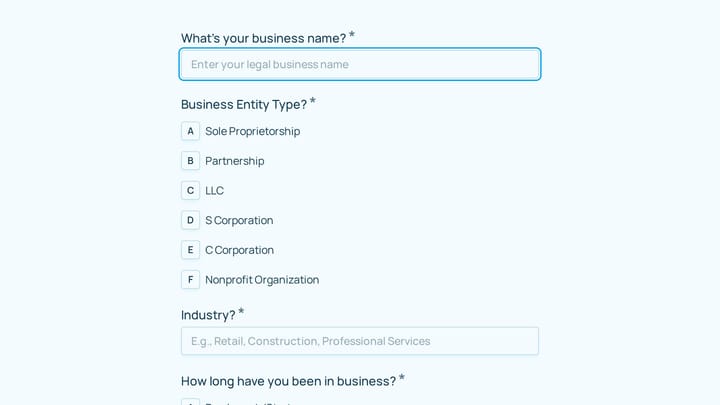
Rework this Amazon FBA consulting client intake form for your own service in a few minutes
This is a real, working template from our gallery. Fill it out like a respondent would, then make it your own.

2. Tally: best free pick if you need a signature
Tally is the budget pick, and on signatures and payments it beats us. Its pricing page lists unlimited forms and submissions on the free plan under fair-use guidelines, and the free feature list includes collecting signatures and collecting payments. For a freelancer who needs a signed scope and a deposit in one form, that’s hard to argue with.
Pro is $24/month and removes Tally branding, adds custom domains, removes the 10 MB per-file upload limit and gives you workspaces with team access. Business is $74/month.
The trade is visual. Tally builds forms like a document, which is quick, but getting a form to match a client-facing brand closely takes more effort than in a canvas editor. We go deeper on how Fomr and Tally differ.
Honest limitation: “fair use” isn’t a number, and the free plan carries Tally’s badge.
3. Jotform: best when intake means documents
If your intake ends in a signed PDF, an approval step or a payment, Jotform has the deepest toolkit here. Its pricing page includes signed documents on every plan: 10 a month on the free Starter plan, 100 on Bronze.
The price is paid in caps. Starter allows 5 forms and 100 submissions a month. Bronze is $39/month for 25 forms and 1,000 submissions, and it’s the first plan where Jotform branding is removable. Silver is $49/month for 50 forms, Gold $129/month for 100. Every plan below Enterprise is single-user, which is awkward the day an account manager needs to edit a form.
For an agency with one intake form per service and per client, 25 forms goes quickly. Our Jotform pricing breakdown and the Fomr vs Jotform page cover the details.
Honest limitation: you’ll count forms as well as submissions.
4. Typeform: best-looking conversational intake, at a price
Typeform’s one-question-at-a-time flow suits intake well. It feels like a conversation, and clients tend to like it.
The numbers are the problem. On the pricing page, Basic is $39/month for 100 responses and one user, and it keeps Typeform branding. Plus is $79/month for 1,000 responses and three users, and it’s the first plan that removes the branding. Business is $129/month. Intake volume is low, so the response cap rarely hurts here. What hurts is paying $79/month mainly to take a logo off.
If you’re weighing it, see Fomr vs Typeform and our list of the best Typeform alternatives for agencies.
Honest limitation: the plan most agencies would need for client-facing work costs more than three times Fomr Pro or Tally Pro.
5. Content Snare: best when the real problem is chasing
Some agencies don’t have a questions problem. They have a “the client still hasn’t sent the photos” problem. Content Snare is built for that: you send a request, clients open it from a link instead of a password, and the product lists automated reminders and approve-or-reject as features.
It’s priced for that job. Per its pricing page, Basic is $42/month ($35 billed yearly) for 20 active requests and 2 users. Plus is $85/month ($71 yearly) for 50 active requests and 5 users, and it’s where custom branding starts. Pro is $143/month ($119 yearly) for 100.
Honest limitation: it’s a specialist. If your intake is fifteen questions and a logo upload, this is a lot of money for reminders.
6. Dubsado: best client onboarding software for solo service businesses
Dubsado and HoneyBook aren’t really form tools. They’re client onboarding software: the intake form is one step in a pipeline that also invoices the client and gives them a portal.
Dubsado’s pricing page shows yearly prices: Starter at $335/year and Premier at $525/year, both with unlimited clients and projects, invoices and payment schedules, form templates and a client portal. Starter allows one active lead capture form and no automated workflows. Premier lifts both, and there’s a 21-day trial of Premier with no card.
Honest limitation: the automation that makes a suite worth it is on the higher plan, and you’re adopting a whole system, not a form.
7. HoneyBook: best all-in-one if you want contracts and invoices too
HoneyBook covers similar ground. On its pricing page, Starter is $29/month billed yearly with invoices and payments, proposals and contracts, a client portal and up to 2 lead forms. Essentials is $49/month billed yearly and adds automations, 2 team members, 10 lead forms and removal of the “Powered by HoneyBook” line. Premium is $109/month billed yearly with unlimited team members and lead forms.
Honest limitation: lead forms are capped on the two lower plans, and removing HoneyBook’s branding needs Essentials.
Form builder or client onboarding software?
Here’s how we’d decide.
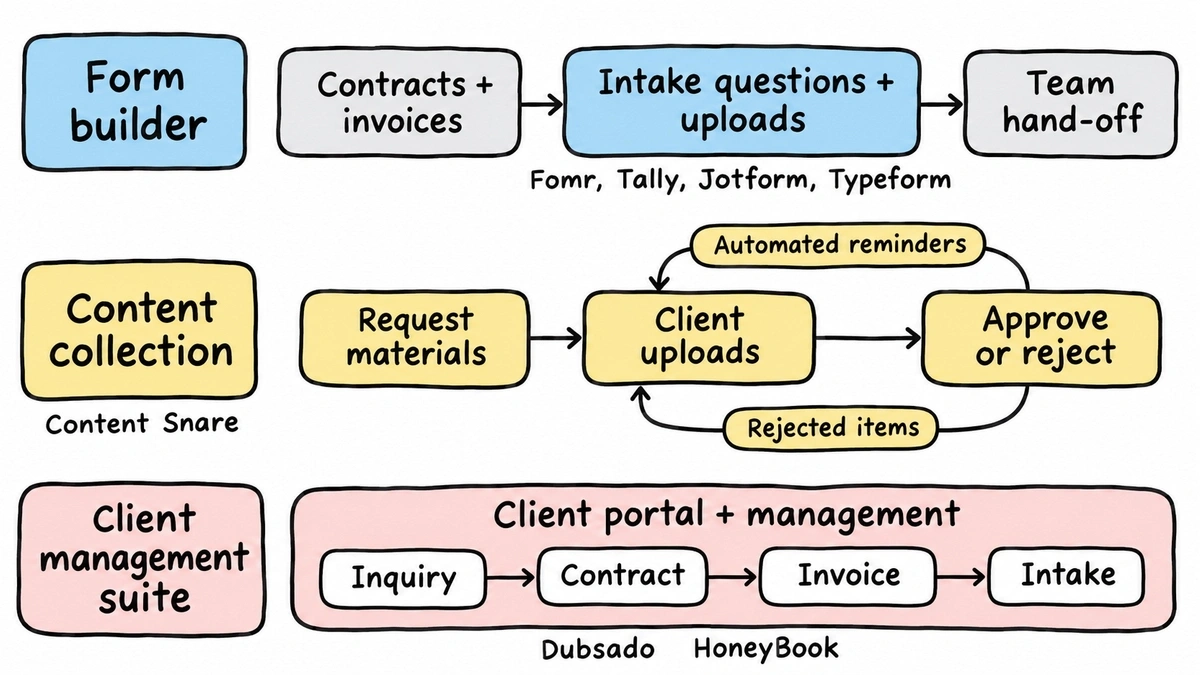
Pick a form builder when you already have tools for contracts and invoices and just need better answers before kickoff. Most agencies are here. They have a proposal tool and an accounting tool they’re not replacing, and a suite would duplicate both.
Pick content collection when clients routinely take weeks to send material and that delay costs you billable time.
Pick a suite when you’re a solo operator with no system at all, and you’d like one login for inquiry, contract, invoice and intake. For a team of six with existing tools, we think suites are overkill for intake alone.
What breaks when you switch
Switching intake tools is cheaper than switching lead-gen forms, because intake volume is small and the links live in your own emails. Still, plan for this:
- Rebuild the form and its logic. No tool here imports another’s form with conditions intact.
- Update every place the link lives. Welcome emails, proposal templates, your onboarding checklist, any automation that sends it.
- Export old responses. Download a CSV per form before you cancel. If clients uploaded files, download those too.
- Rewire the hand-off. Sheets syncs and notifications need reconnecting.
- Leaving a suite is the hard one. Contracts and invoices live there too, so only move intake out if the rest stays.
Which client intake form software should you pick?
- Branded intake for many clients or services, flat price: Fomr. Free to start, Pro at $24/month for your domain, no badge and client workspaces.
- Signature or deposit inside the form, lowest cost: Tally.
- Signed PDFs, approvals, document-heavy intake: Jotform, if 25 to 100 forms is enough.
- Conversational feel matters most and budget doesn’t: Typeform Plus.
- Clients are slow to send content: Content Snare.
- Solo, and you want contracts and invoices in the same place: Dubsado or HoneyBook.
If Fomr sounds like the fit, the fastest test is to build your real intake form. Open the guest editor without an account, or start from the template gallery. Our guide on how to create a client intake form covers which questions to ask and in what order, and form builder with file upload covers collecting assets.
Two more reads if you run forms for clients beyond intake: the six tests in choosing a form builder for agencies, and what each tool charges to hide its name in our white label form builder comparison.