A client opens the lead form you built for them and spots another company’s name in the footer. Then they notice the link in their ad points at that company’s domain. Then the confirmation email arrives from an address they’ve never heard of. Nobody complains out loud, but the form now looks rented, and that’s the moment agencies and freelancers start looking for a white label form builder.
The catch is that vendors use “white label” for very different things. Some mean a hidden badge. Some mean a custom domain. Very few mean the email sender, and that one tends to be on a different plan from the rest.
So we split it into four layers and checked what six form builders charge for each one. All competitor prices and plan limits were checked on each vendor’s own pricing and help pages on November 14, 2026.
What “white label” actually covers for forms
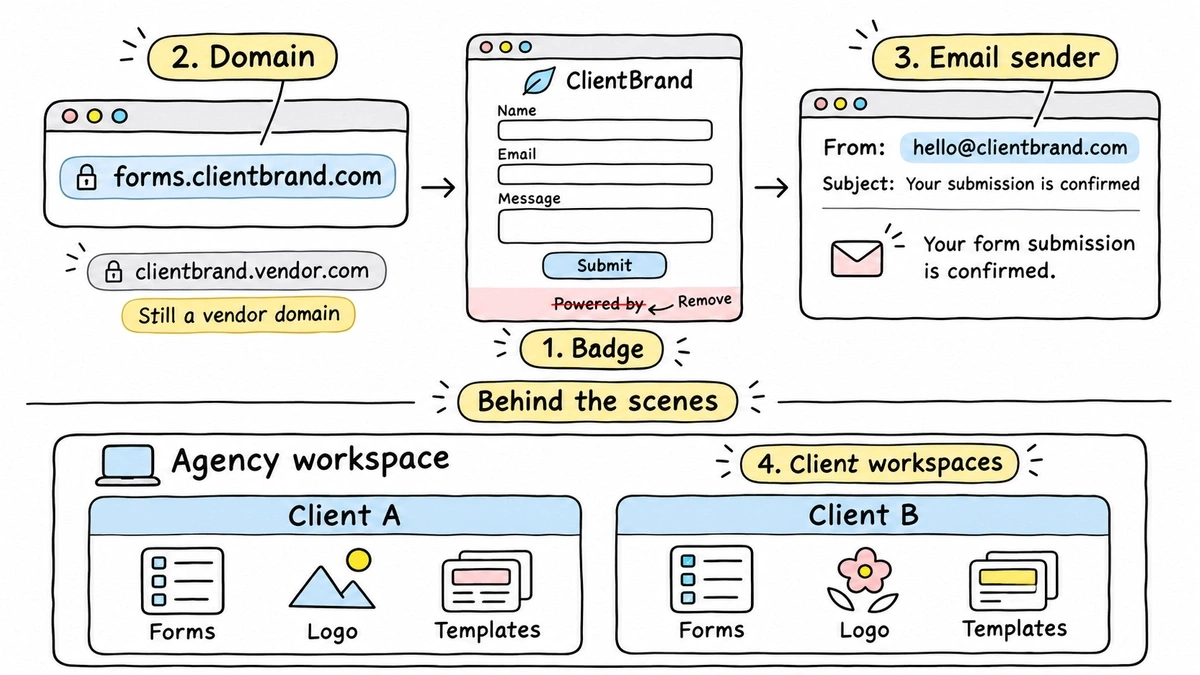
1. The badge
The “Made with” or “Powered by” line under the form. This is what most people mean, and every tool below removes it on some paid plan. It’s the cheapest layer almost everywhere.
2. The domain
A form at forms.clientbrand.com instead of the vendor’s address. This matters more than the badge for anything linked from ads or email, because the URL is visible before the form even loads. Watch the wording on pricing pages: a “custom subdomain” on the vendor’s domain (like clientbrand.vendor.com) still has the vendor’s name in it.
3. The email sender
Notifications and confirmation emails come from somewhere. If the client’s customer gets “Thanks for your request” from a form vendor’s address, the white label ends at the inbox. Sending from your own domain is the layer vendors gate hardest.
4. Client workspaces
This one isn’t visible to respondents, but it decides whether white labeling scales. Each client needs their own space for forms, logos and templates, so brand A’s assets don’t end up on brand B’s form. If you run forms for three or more clients, treat it as part of the package.
One more thing worth checking, though we didn’t score it: the link preview. When someone pastes the form link into Slack or WhatsApp, the title, image and favicon in the preview often still belong to the vendor.
What each white label form builder charges
Same four layers for every tool. Prices are month to month unless noted.
| Tool | Badge removed | Your own domain | Email from your domain | Client workspaces | Cheapest plan with no badge and your domain |
|---|---|---|---|---|---|
| Fomr | Pro, $24/month | Pro, one domain | Not yet | Unlimited on Pro, no per-client access | Pro, $24/month |
| Tally | Pro, $24/month | Pro, count not stated | Pro | Pro, with team access | Pro, $24/month |
| Fillout | Pro, from $40/month | Business, from $75/month | “White-label emails” on Pro | Every plan | Business, from $75/month |
| Typeform | Plus, $79/month | Subdomain on Plus, full domain Enterprise | Plan not stated on pricing page | Seats capped per plan | Enterprise for a full domain |
| Jotform | Bronze, $39/month | Listed from Gold, $129/month | Custom sender via your own SMTP | Single user below Enterprise | Gold, $129/month |
| Paperform | Pro, $59/month | +$20/month on Pro, one included on Business | Business, $149/month | 1 on Pro, 10 on Business | Pro plus add-on, $79/month |
Read the last column first. Two tools get you a clean badge-free form on your own domain for $24/month. The rest land between $75 and $129, or behind a sales call.
Tool by tool
Fomr: branding and domain at a flat price, email sender still missing
We build Fomr, so discount our enthusiasm as you see fit. On Pro at $24/month, the “Made with Fomr” badge comes off (removed by default on paid plans, with a per-form toggle if you want it back), and you can connect a custom domain like forms.youragency.com with automatic SSL. If you don’t own a domain, Pro also includes a Fomr subdomain such as youragency.on.fomr.io.
Pro also covers the link preview: page title, description, favicon and social image are yours to set. Add unlimited workspaces, one per client, with shared templates and assets coming from the Default Workspace. The design controls are on every plan, including Free: fonts, colors, logo and backgrounds.
And responses never change the price. Every plan has unlimited forms, responses and team members, so a client’s campaign spike doesn’t push your white label onto a bigger tier.
Now the gaps, because they matter for this topic specifically:
- Emails come from Fomr’s sender. Respondent confirmation emails (Pro) and owner notifications use our notification sender. Custom sender domains aren’t available. They’re planned for a Business plan that isn’t on sale yet. If the inbox is part of your white label promise, we don’t cover it today.
- One custom domain. Pro covers your agency’s domain or one client’s, not one per client. Multiple domains are also planned for Business.
- No per-client access. Everyone in your organization can open every workspace. You can’t give a client a login that shows only their forms.
Best for: agencies whose clients mostly see the form and its link, and who’d rather not pay per response for the privilege. More on that setup on our form builder for agencies page.
Give it a try
Put your client's logo on this eCommerce marketing consultant quote form and see how little of us is left
This is a real, working template from our gallery. Fill it out like a respondent would, then make it your own.
Tally: the most complete white label at $24
On white label alone, Tally is ahead of us right now. Its pricing page puts badge removal, custom domains, email notifications from your custom domain, and workspaces with team access all on Pro at $24/month. That’s every layer in our table on one plan. The page doesn’t say how many domains you can connect.
Where it’s weaker is the form itself. Tally’s document-style editor is fast, but matching a client’s visual identity closely takes more work than in a canvas editor. If the forms need to look like the client’s site and not just carry their logo, compare both: Fomr vs Tally.
Fillout: badge on Pro, domain on Business
Fillout’s pricing page has a detail that’s easy to miss. Starter (from $15/month) still shows “light branding”. Pro (from $40/month) removes all of it and includes white-label emails, with 5,000 responses a month. Custom domains wait for Business (from $75/month), which also makes responses unlimited.
The good part for agencies: workspaces and unlimited seats are on every plan. See Fomr vs Fillout for the rest.
Typeform: how to remove Typeform branding, and what it costs
To remove Typeform branding you need the Plus plan. On the pricing page, Basic at $39/month ($28 billed yearly) keeps the branding. Plus is $79/month ($56 billed yearly), includes 1,000 responses and three users, and lists both “Remove Typeform branding” and a custom subdomain. A full custom domain is marked Enterprise only.
So the cheapest way to remove Typeform branding is $56/month on a yearly commitment, and your links will still sit on a Typeform subdomain. The pricing page mentions a custom email domain without tying it to a plan, so ask before you buy.
If that’s too much for a missing logo, we listed cheaper routes in best Typeform alternatives for agencies, and there’s a direct Fomr vs Typeform comparison.
Jotform: how to remove Jotform branding, and where it stops
Jotform branding is removable from Bronze, the first paid plan, at $39/month ($408 billed yearly). On the free Starter plan it stays. That makes Jotform the cheapest of the big names for badge removal alone.
The other layers cost more. The pricing page lists custom domains in the Gold plan’s feature list ($129/month, $1,188 billed yearly) and under Enterprise, where Jotform’s white labeling features live. Email is better than most: Jotform’s help center describes setting up a custom sender address through your own SMTP server, though it doesn’t say which plans allow it. Every plan below Enterprise is single-user, so there are no client workspaces with teammates in them.
Bronze also caps you at 25 forms and 1,000 submissions a month. We covered the tiers in Jotform pricing, the options in best Jotform alternatives, and the head-to-head on Fomr vs Jotform.
Paperform: every layer exists, each one priced separately
Paperform’s pricing page is the most itemized. Pro is $59/month ($49 billed yearly) and removes the badge. A custom domain on Pro is a $20/month add-on. Business at $149/month ($124 billed yearly) includes one domain, charges $20/month for each extra, supports sending from your own email domains, and raises workspaces from 1 to 10.
It’s the only tool here with a clear price for extra domains, which is useful if each client needs their own. Ten clients on ten domains is Business plus nine add-ons. Details in Fomr vs Paperform.
What about a white label survey?
Same four layers, with one difference: surveys usually go out by email, so the sender layer matters more than it does for an embedded lead form. A survey invitation from an unfamiliar address gets ignored.
A form builder can run a white label survey as long as it has the question types. Fomr has rating, NPS and matrix questions on every plan, for example. Dedicated survey tools gate it higher. SurveyMonkey’s pricing page lists white label branding on Team Premier, a per-user plan with a three-user minimum, and a custom subdomain on Enterprise. The page showed us local-currency prices, so we’re not quoting a dollar figure. We compare the two in Fomr vs SurveyMonkey.
In Fomr’s case, the survey itself can be fully branded on Pro, but any confirmation email still comes from our sender. If you send invitations from your own email tool and link to the survey on your domain, respondents never see us.
What breaks when you turn white label on
Whether you’re upgrading or switching tools, a few things need redoing.
- The link you share changes. Once a form is on your domain, update ads, emails and QR codes so people see that address. The upside: once forms live on your domain, the next tool switch doesn’t break links again.
- Embeds on client sites. If you switch tools, every embedded form needs new code on the client’s site.
- Email deliverability. Sending from your own domain means adding DNS records to it. Send yourself a test before a campaign goes out.
- Downgrades undo it. Expect the badge to come back if you drop to a plan without it. In Fomr, forms on a custom domain are also unpublished on downgrade until you remove the domain and publish again.
- Old responses stay put. Export CSVs before cancelling anything.
Which white label form builder to pick
- You need every layer, including email from your domain, for the least money: Tally Pro.
- Badge and domain matter, clients run high-volume campaigns, and design has to match their brand: Fomr Pro at $24/month, knowing emails still come from our sender.
- You only need the badge gone and you’re already on Jotform: Bronze does it.
- Each client needs their own domain and you want a published price for it: Paperform Business.
- Your clients insist on Typeform’s format: Plus, and accept the subdomain.
If Fomr fits, you can check the look before paying anything. Build a client form in the guest editor or start from a template, style it with the client’s fonts and colors, then upgrade to Pro to drop the badge and connect a domain. Our custom domains guide walks through the DNS part.
White labeling is one of six things we’d test before trusting a tool with client work. The rest are in choosing a form builder for agencies. And if onboarding is where your client forms start, see our comparison of client intake form software.