
Add a Logic rule that redirects from your form’s ending. When someone submits and reaches that ending, Fomr sends them straight to your address instead of showing the ending page.
-
Open your form in the editor and click Logic in the editor dock.
-
Click Add rule. Under When, choose Reached ending, is, and Default ending.
-
Under Then, choose Redirect to URL and enter a full address that starts with
http://orhttps://, such as your homepage, a booking page, or a thank-you page on your site. -
Publish your form.
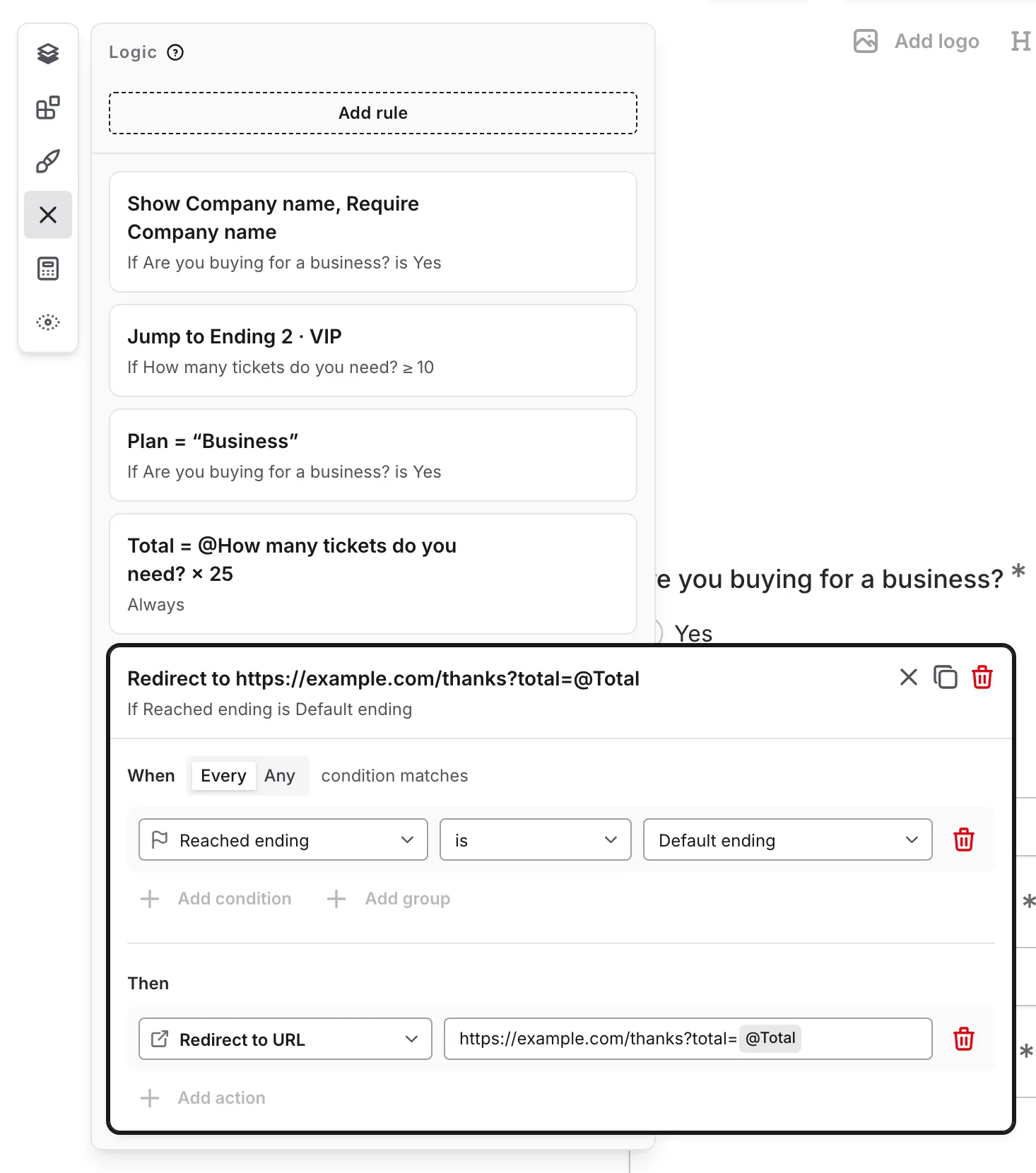
To pass details along, type @ in the address to insert an answer, a Hidden value, or a Calculated value, such as https://example.com/thanks?email=@Email. Fomr encodes inserted values automatically. In Preview, you see “Redirect to” and the address instead of being redirected, so test the redirect from the published form.
If your form has several endings, add a rule for each ending that should send respondents elsewhere. You can also combine the Reached ending condition with other conditions, such as sending Enterprise customers to your sales booking page.
If you set a redirect on the Thank You page before redirects moved to Logic, it was converted to an equivalent rule automatically.
