
Every Platform API request is authenticated with a Personal Access Token sent in an Authorization header. The API accepts no cookies, no query-string tokens, and no credentials in the request body.
Personal Access Tokens
Section titled “Personal Access Tokens”A Personal Access Token belongs to one member of one organization. It acts as that member and carries whatever the member’s role allows at the moment of each call. Change the member’s role and the token’s access changes immediately. Remove the member from the organization and their tokens are revoked.
- Tokens are for Admins. Creating and using tokens needs the Personal Access Token permission, which the Admin role includes and the Member role does not.
- The token is shown once. After creation only the Token Hint remains, such as
fomrt_…k7Qz: enough to recognize a token, never enough to use it. If you lose the value, create a new token. - Choose how long a token lasts. The default is 90 days. A dated expiry can be at most 365 days away and at least one hour away. You can also choose No expiration: the token then works until it is revoked.
- Each member can hold up to 10 active tokens. Expired and revoked tokens do not count.
Manage tokens in Settings > API
Section titled “Manage tokens in Settings > API”Open Settings > API to create, rotate, and revoke tokens for the organization you are currently using.
API usage
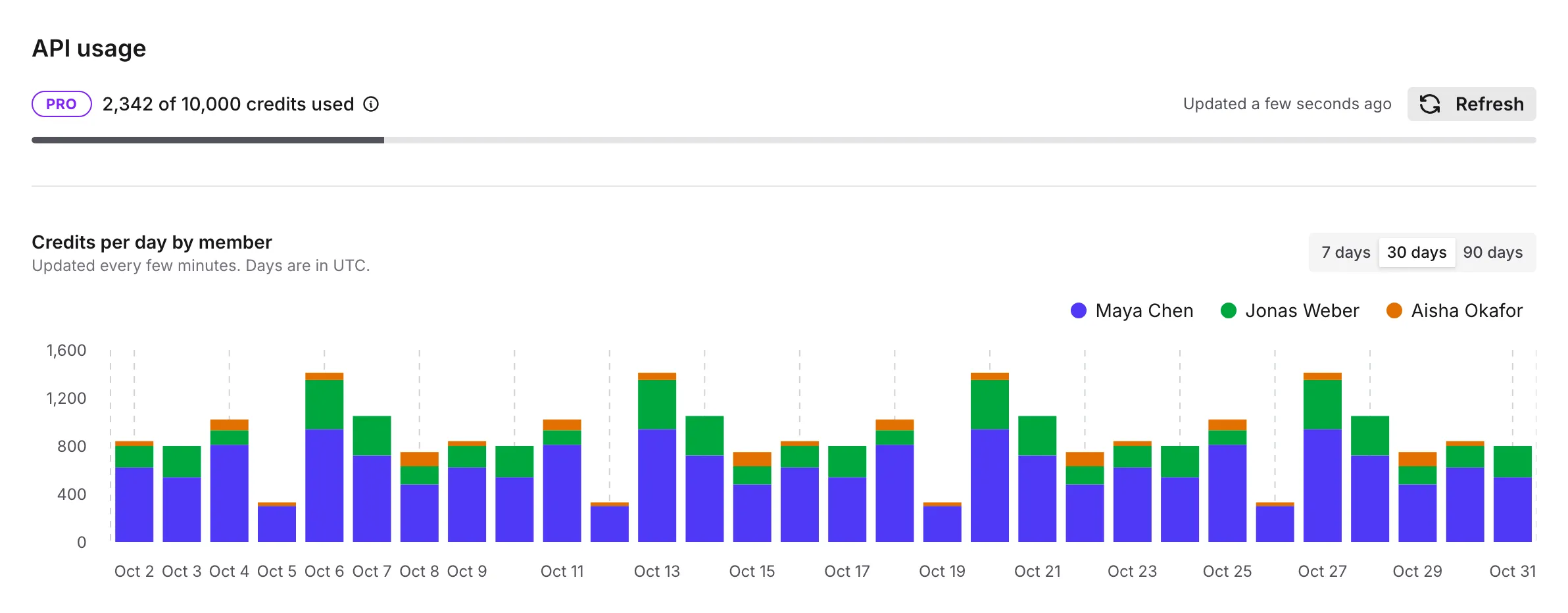
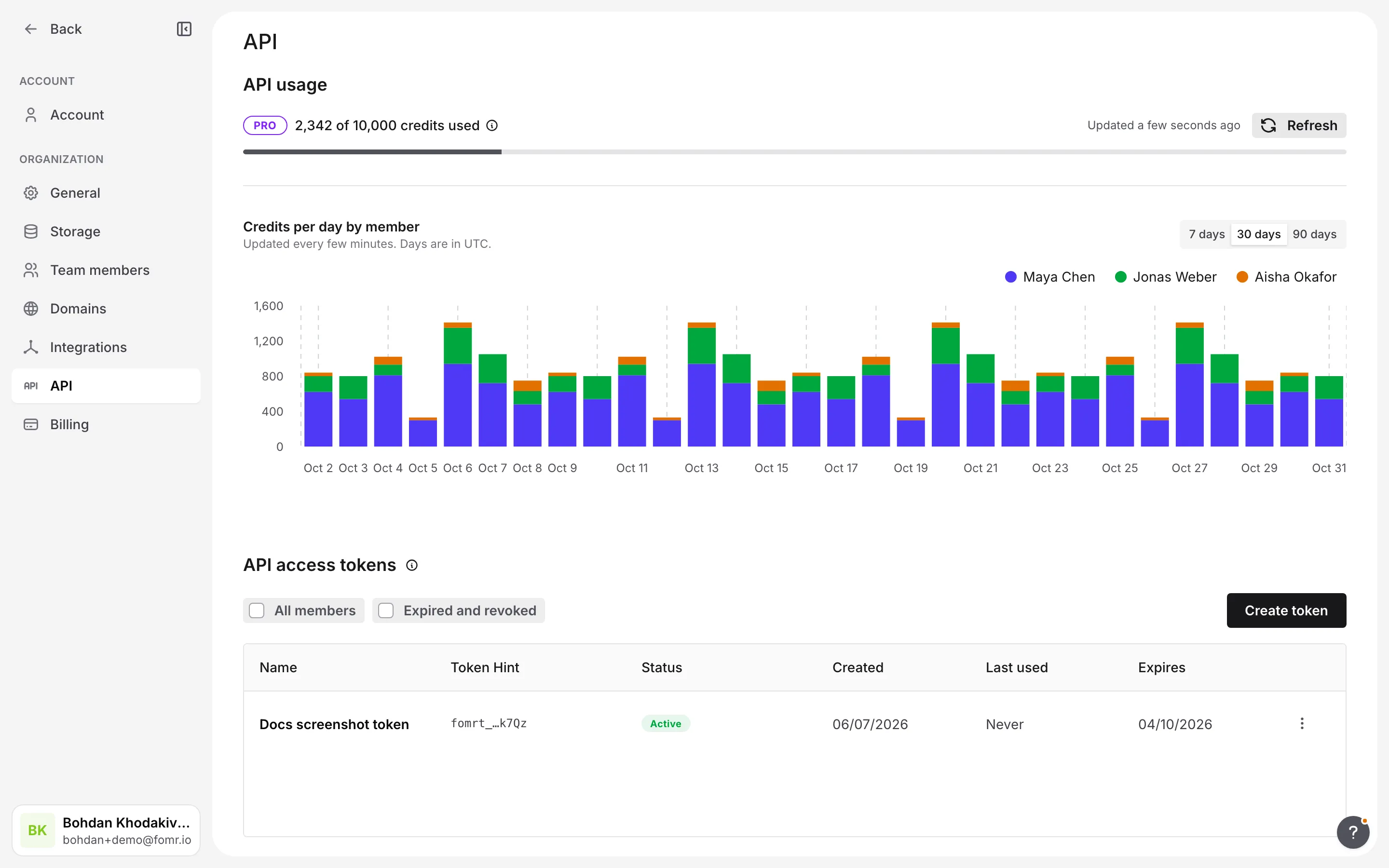
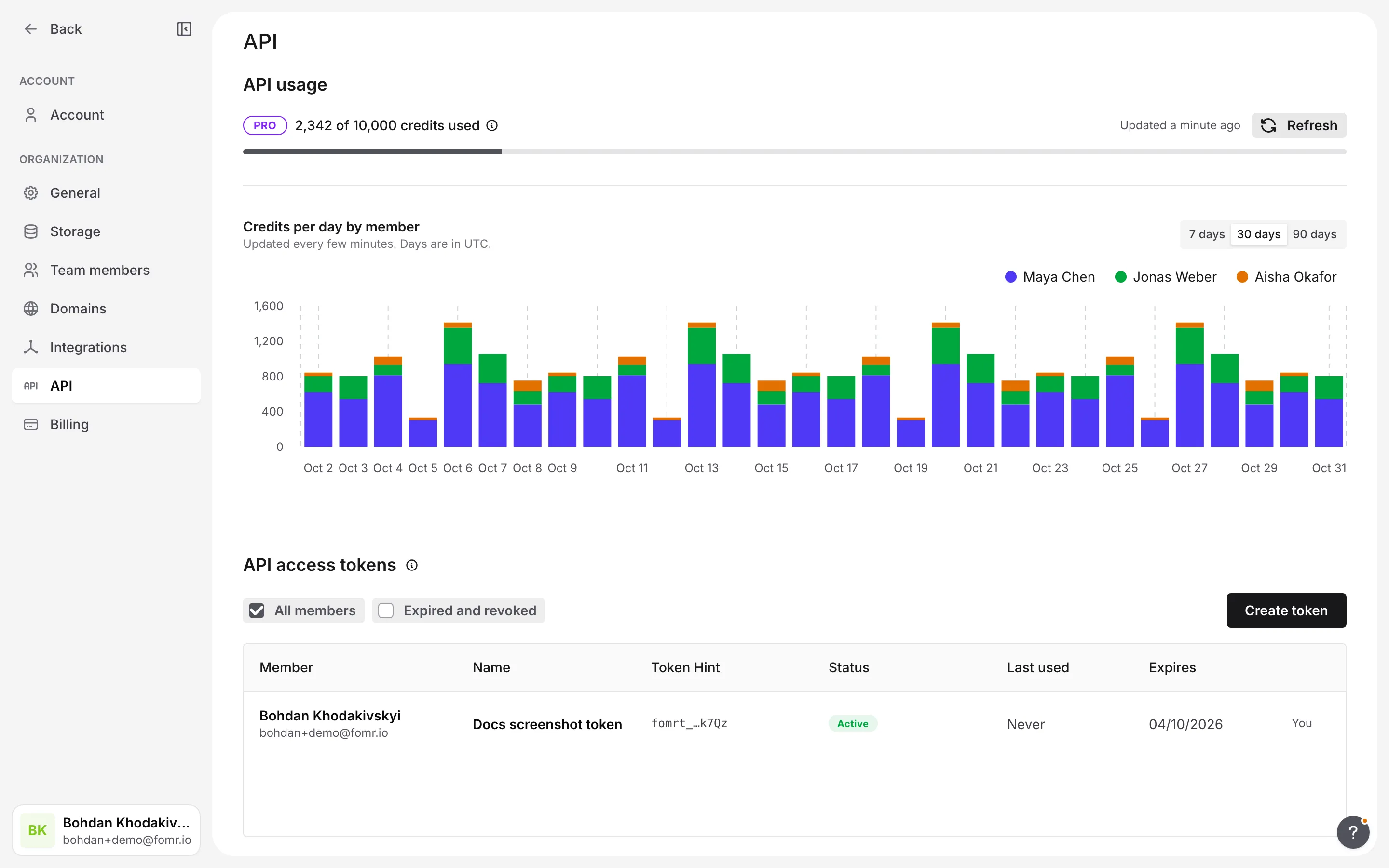
Section titled “API usage”API usage shows the organization’s live budget: credits used against the plan allowance. Its info icon shows when the pool refills and what each call costs: one credit per API request, and ten for creating a form with AI. Below it, a bar chart shows credits spent per day over the last 7, 30, or 90 days. Admins see every member’s share; other members see their own. The chart is refreshed every few minutes, so the last few calls may not appear yet. Every token in the organization spends from this one budget. Select Refresh to update it; during an API Cooldown the page checks again every 30 seconds. Creating and revoking tokens keeps working during a cooldown. See Rate limits and plans for how the budget works.
The sidebar’s usage card shows the same API usage next to storage, colored by how close the organization is to its allowance.
API access tokens
Section titled “API access tokens”API access tokens lists each of your tokens’ name, Token Hint, status, creation date, last use, and expiry. Turn on the Expired and revoked filter to review token history.
Create a token
Section titled “Create a token”-
Open Settings > API in the app
-
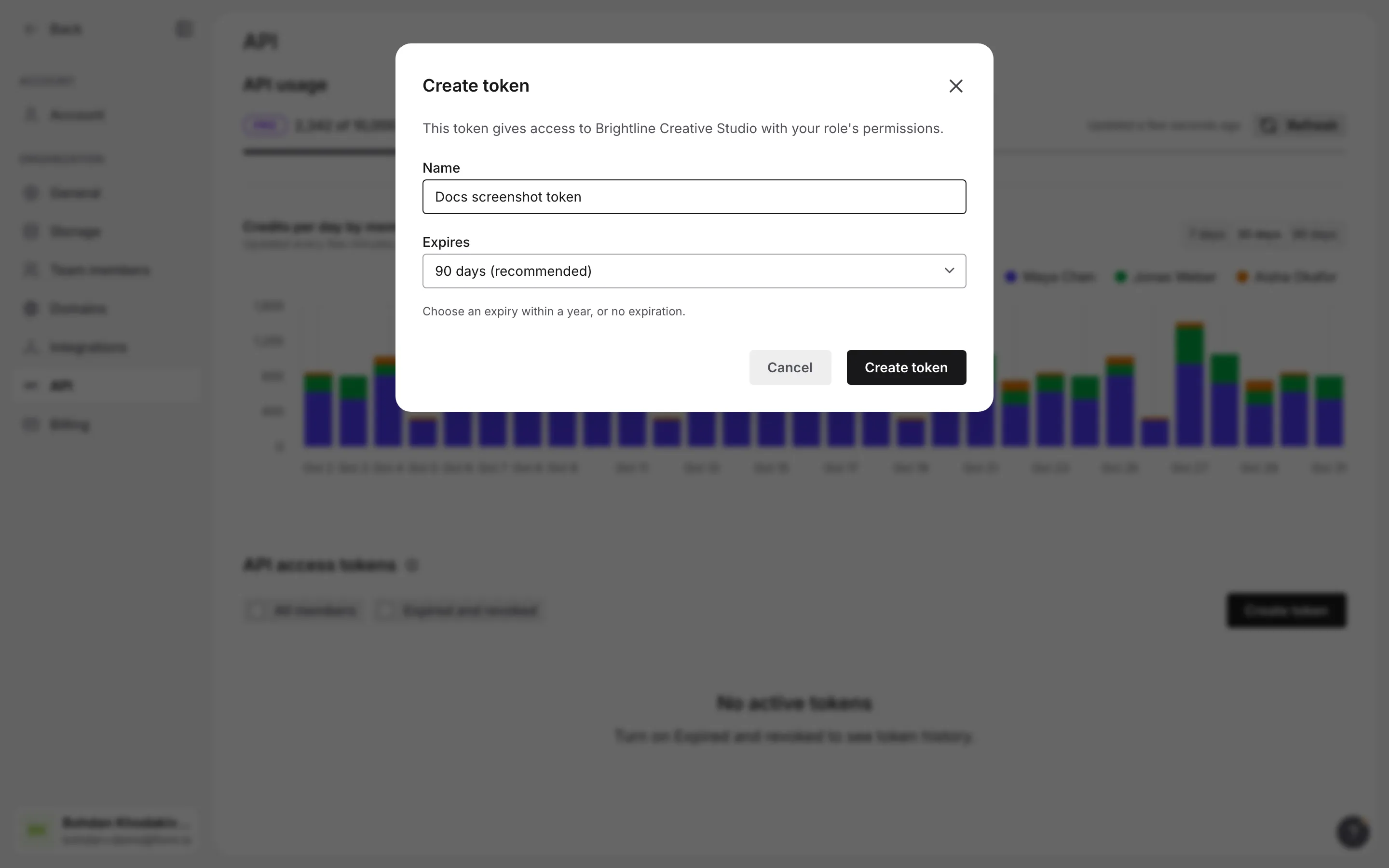
Select Create token. Keep the suggested name or replace it with one that says where the token will be used (“CI deploy”, “staging import”), then choose an expiry
-
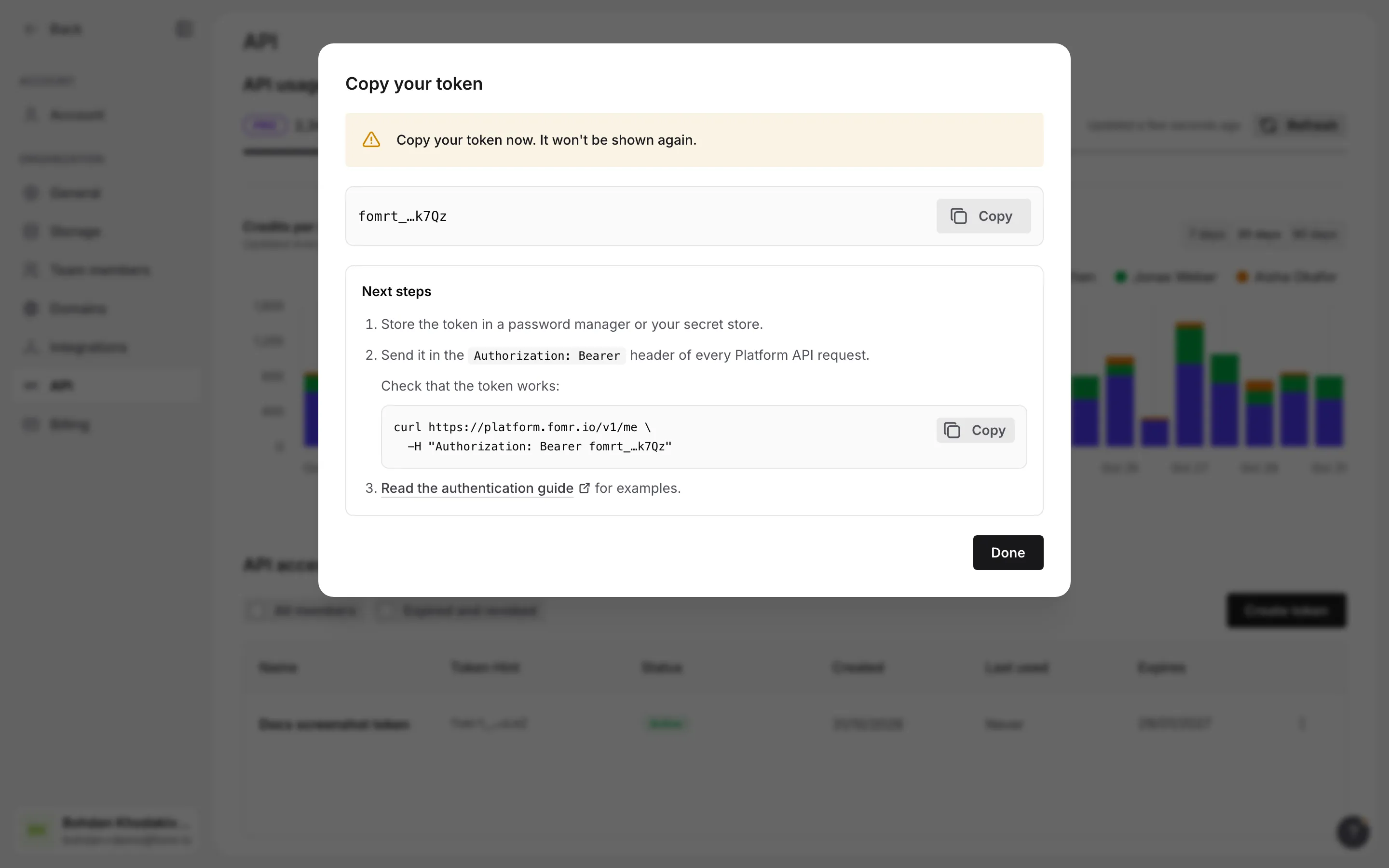
Copy the token from the One-Time Reveal into your secret store or environment, then select Done
The One-Time Reveal is the only time Fomr shows the full value. Store it, for example as FOMR_TOKEN. The Token Hint cannot authenticate a request. The reveal also includes a ready-to-copy curl command that calls GET /v1/me, so you can check the new token works.
Review organization tokens
Section titled “Review organization tokens”Admins can turn on the All members filter in API access tokens (Token Oversight). It lists every member’s tokens by Token Hint, with status, last use, and expiry, and marks blocked members and members who have been Removed. An admin can revoke any member’s active token but can never see its value.
Rotate or revoke a token
Section titled “Rotate or revoke a token”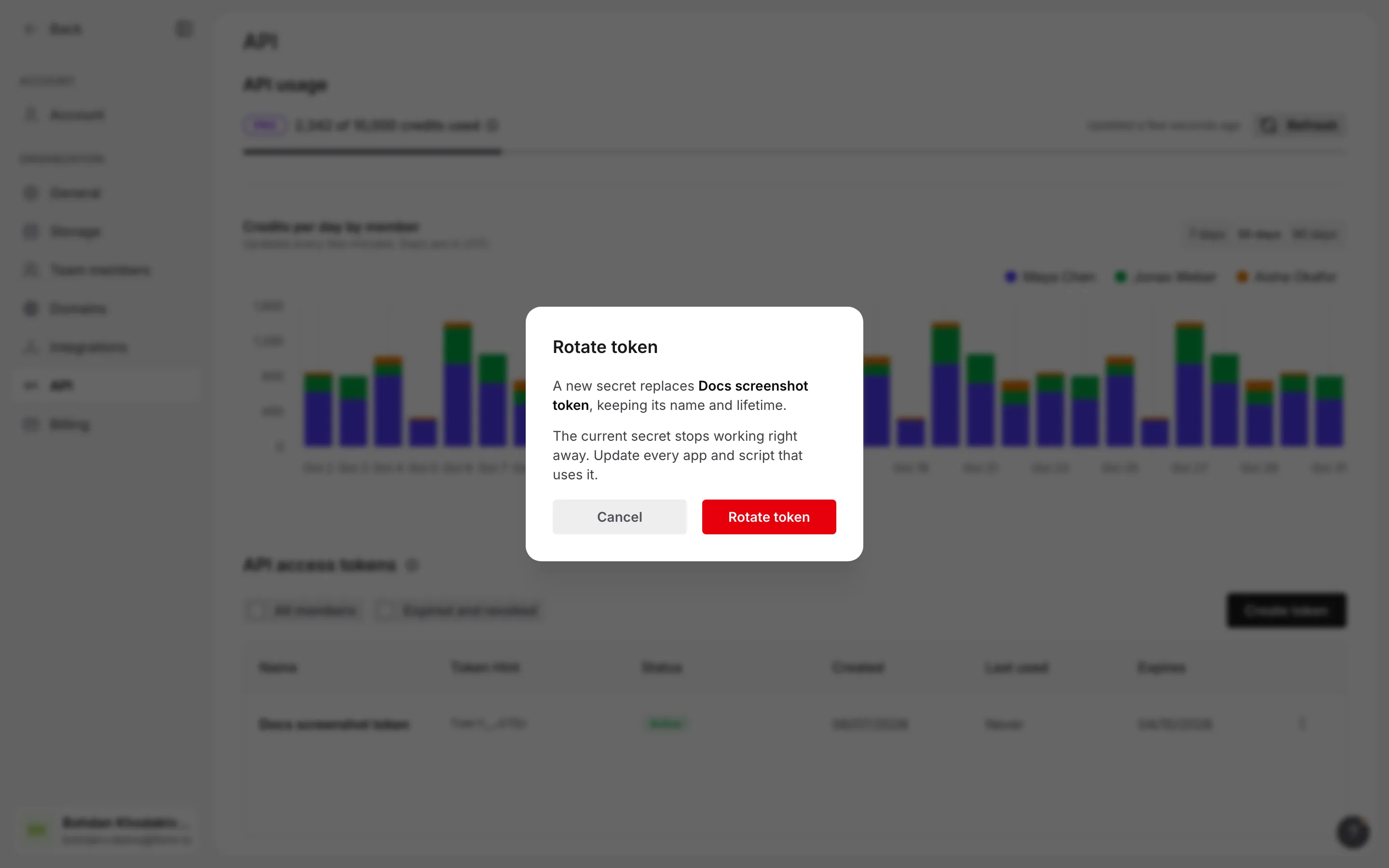
Select Rotate in a token’s actions menu and confirm to replace its secret in one step. The old secret stops working immediately, and a new token with the same name and lifetime, counted from now, is shown once in the One-Time Reveal. Only the token’s owner can rotate it. Use this when a token might have leaked.
To rotate without downtime instead, create a replacement, deploy it, confirm the caller works, then select Revoke on the old token. Revocation is immediate and permanent.
The Authorization header
Section titled “The Authorization header”Send the token as a Bearer credential:
Authorization: Bearer $FOMR_TOKENUse the Bearer scheme, one space, and the full token (fomrt_ followed by 43 letters and digits), with nothing after it. Anything else gets 401 UNAUTHORIZED. Being signed in to the app in your browser does not authenticate an API call.
Making a request
Section titled “Making a request”Put the token in an environment variable rather than typing it into a command, which would leave it in your shell history:
read -rs FOMR_TOKENexport FOMR_TOKENRun that, paste the token, and press Enter. Then call the API:
curl https://platform.fomr.io/v1/me \ -H "Authorization: Bearer $FOMR_TOKEN"Who the token is
Section titled “Who the token is”GET /v1/me (operation getMe) is the call to make first. It confirms the token works and returns the organization, the member’s role and current permissions, and how the call was authenticated.
{ "organization": { "public_id": "AcmeEvents", "name": "Acme Events", "plan": "pro" }, "member": { "role": "Admin", "permissions": { "forms": "write", "templates": "write", "assets": "write", "workflows": "write", "form_publish": true, "integration_management": true, "team_members": "write", "domains": "write", "billing": true, "organization_settings": true, "personal_access_tokens": true, "workspace_management": true } }, "credential": { "kind": "personal_access_token", "token": { "public_id": "tok1234567", "name": "CI deploy", "expires_at": "2026-12-02T00:00:00.000Z" } }, "token": { "public_id": "tok1234567", "name": "CI deploy", "expires_at": "2026-12-02T00:00:00.000Z" }}permissions reflects the member’s role at the moment of the call, so use it to check whether a token may perform an action before you try.
credentialsays how the caller authenticated. Itskindispersonal_access_token. Branch onkindso your client keeps working if new kinds are added.tokenrepeats the details of the calling Personal Access Token.
Revoking the calling token
Section titled “Revoking the calling token”DELETE /v1/me/token (operation revokeCurrentToken) revokes the token that made the request. It takes no body and returns the revoked token’s public_id, name, and revoked_at. Use it when a job finishes, a machine is decommissioned, or a client signs out and should leave no working credential behind.
curl -X DELETE https://platform.fomr.io/v1/me/token \ -H "Authorization: Bearer $FOMR_TOKEN"{ "public_id": "tok1234567", "name": "CI deploy", "revoked_at": "2026-10-01T09:00:00.000Z"}Revocation is immediate and permanent: the next request with the same token fails with 401 PERSONAL_ACCESS_TOKEN_REVOKED. The call goes through the same checks as any other, so a token that already fails every call (expired, or its member blocked or without the permission) cannot revoke itself; an admin can revoke it in Settings > API instead.
When authentication fails
Section titled “When authentication fails”Every failure is a Platform Error with a code to branch on. These codes concern the credential itself; the full catalog is on Errors. Retrying unchanged never helps: fix the credential or the membership first.
| Status | Code | What it means |
|---|---|---|
| 401 | UNAUTHORIZED | The header is missing or malformed, or the token is unknown. These cases are deliberately indistinguishable. Every 401 carries WWW-Authenticate: Bearer realm="platform.fomr.io". |
| 401 | PERSONAL_ACCESS_TOKEN_EXPIRED | The token passed its expiry. Create a new one. |
| 401 | PERSONAL_ACCESS_TOKEN_REVOKED | The token was revoked, or the member, organization, or account behind it was removed or suspended. |
| 403 | ORGANIZATION_MEMBER_BLOCKED | The member is blocked in the organization. Blocking revokes their tokens, so after an admin unblocks them they create new ones. |
| 403 | PERSONAL_ACCESS_TOKEN_NOT_PERMITTED | The member’s role does not include the Personal Access Token permission, for example because an admin changed them from Admin to Member. Restoring the Admin role restores access. |
Every 403 body also carries required_permission: the permission the member lacks, or null when no single permission applies.
{ "code": "PERSONAL_ACCESS_TOKEN_EXPIRED", "message": "This token has expired.", "request_id": "0f3c2a9e-6b1d-4e57-9a1c-2d8e4f6b7c90"}{ "code": "PERSONAL_ACCESS_TOKEN_NOT_PERMITTED", "message": "This member is not allowed to use the API.", "request_id": "0f3c2a9e-6b1d-4e57-9a1c-2d8e4f6b7c90", "required_permission": "personal_access_tokens"}Keeping tokens safe
Section titled “Keeping tokens safe”A Personal Access Token is a password that acts as a member of your organization. Treat it like one.
- Keep it in an environment variable or a secret manager. Never in source control, a config file you commit, a log line, an error report, or a URL.
- Give each place its own token. One per script, job, or machine, named for where it runs, so you can revoke one without breaking the others.
- Set the shortest expiry that fits the job. A token for a one-off import can last 7 days instead of the default 90. Keep No expiration for long-running integrations you monitor, and rotate those tokens on a schedule.
- Revoke immediately if a token leaks, then rotate.
